Unity MCP setup
Updated 2026-09-05
Connect your client to the local Unity MCP server, confirm the intended editor instance, and test a small saved scene change before expanding tool permissions.
Understand the editor bridge
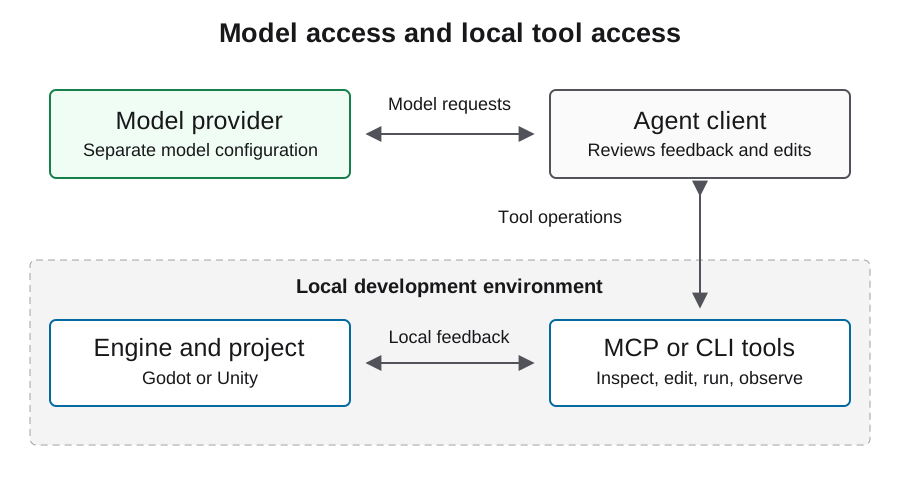
CoplayDev/unity-mcp connects an MCP client to a server and an editor-side package. The model service is a separate dependency. The project documents tools for working with scenes, scripts, assets, and tests, but a listed capability is not evidence that it works in your project.
Record which process owns each part of the connection. This matters when diagnosing a client that can reach the server but cannot operate on the editor. Keep account credentials, editor licensing, package compatibility, and model availability as separate setup checks. A model change will not repair an editor-instance mismatch.
Review the installation path and pinning policy
The project installation guide documents adding its package through Unity Package Manager and using the setup interface to configure the server and client. Review its stated Unity, Python, and uv prerequisites for the chosen revision before installing anything.
For reproducibility, preserve the resolved package revision, editor version, server version, and dependency records after setup. A moving branch URL is a discovery path, not an immutable experiment identity. Review downloads and package changes before applying them to an existing game, and retain the previous working project state so a connection experiment remains reversible.
https://github.com/CoplayDev/unity-mcp.git?path=/MCPForUnity#mainMatch the local HTTP endpoint to the client
The maintained installation guide documents the local HTTP example below. It assumes the server is already running at that address. Confirm the actual configured transport and address in the editor setup interface before using it. The MCP URL is not an LLM API base URL.
Use your client's documented configuration format. Some clients use different root keys or transport declarations, so this generic mcpServers example is not a universal file to paste into every agent. Keep the server local unless a separately reviewed remote setup is required, and do not add model credentials to an unrelated editor connection.
{
  "mcpServers": {
    "unityMCP": {
      "url": "http://localhost:8080/mcp"
    }
  }
}
Prove which editor instance receives work
Open the intended project and inspect connection state through the package interface. Then use the client's discovered read operations to obtain project and scene context. Match that information to the local project before approving an edit. Multiple open projects make this gate especially important.
Record actual resources and tool schemas from the installed version. Do not invent a tool call from a name remembered from another release. A useful first result identifies the expected scene and its existing objects without changing them. If returned state is stale or ambiguous, stop and resolve routing rather than trying a visible mutation to discover the target.
Use a reversible edit as the first miniflow
Choose an owned disposable scene, record its initial state, and request one simple change with a visible consequence. Inspect the saved scene and file diff, wait for the editor to become ready, and exercise the scene. Preserve observed behavior and any console errors.
Then reopen the scene to confirm that the intended change persisted. This distinguishes an in-memory editor effect from a saved project change. Keep the flow small enough to diagnose failure at one boundary: routing, mutation, compilation, execution, or persistence. Restore the disposable scene after review and use the recorded working configuration for your next task.
| Observation | What it establishes | What remains |
|---|---|---|
| Client discovers tools | Server is reachable | Correct editor targeting |
| Expected scene is returned | Read targets intended context | Write and runtime behavior |
| Saved diff matches request | Resource mutation persisted | Playable result |
| Scene behaves as requested | Narrow runtime outcome | Full game and export acceptance |
Troubleshoot the transport before the game
When the client cannot connect, verify the configured URL and whether the local server is running. When the server starts but the editor is absent, inspect the package connection and editor logs. When the intended editor is connected but a tool is missing, inspect the installed version's exposed tool groups.
Only after that boundary works should you diagnose compilation or gameplay. Keep separate log excerpts for client startup, server routing, editor readiness, and the failed scene action. This allows a report to explain where execution stopped rather than attributing every failure to the model or repeatedly reinstalling components without evidence.
Protect the project from broad automation
An editor connection may modify scenes, scripts, and assets. Restrict the initial experiment to a known directory and require review for operations that delete resources, alter dependencies, or touch unrelated scenes. Preserve a recoverable working state before the first change.
Do not expose a local development service publicly just to resolve a client configuration issue. Treat third-party asset content and tool results as untrusted inputs, and keep credentials out of shared logs. A successful connection is not permission to upload builds or modify store records. Publishing remains a separate workflow with a separate authorization boundary.
Handoff a reproducible connection record
Record the editor, project, package and server revisions, client version, transport, observed tool surface, and completed miniflow. Keep the exact scene diff and runtime result. State whether compilation, PlayMode behavior, tests, and target export were examined or remain pending.
This configuration follows the maintained project documentation; verify it against your installed package and client. For game production, proceed to the Unity workflow guide and test the complete loop. Keep known limitations in the handoff so another developer can distinguish a connection issue from a project problem and reproduce the same working setup.
FAQ
Is localhost:8080/mcp the model endpoint?
No. It is the documented local MCP server example. Model requests use the agent client's separate provider configuration.
Does the connected indicator prove the integration?
It is an initial observation. Verify project identity and a controlled read before proceeding to a reversible write and runtime check.
Can I use the same JSON with every client?
No. Clients differ in schema and transport support. Follow the selected client's documented configuration.
Should the first test build a complete game?
Start with one reversible scene change. It gives clearer evidence about routing, persistence, and runtime behavior before a larger task.
What should I record after setup?
Record the client, transport, editor and server versions, resolved package revision, project identity, and results of the read and reversible scene test.