การตั้งค่า Unity MCP
Updated 2026-09-05
เชื่อม client กับ Unity MCP server ภายในเครื่อง ยืนยัน editor instance ที่ตั้งใจ และทดสอบ scene change เล็กๆ ที่บันทึกได้ก่อนขยายสิทธิ์เครื่องมือ
เข้าใจ editor bridge
CoplayDev/unity-mcp เชื่อม MCP client กับ server และ package ฝั่ง editor model service เป็น dependency แยก โปรเจกต์มีเอกสาร tools สำหรับ scene, script, asset และ test แต่ความสามารถที่ระบุไว้ไม่ได้เป็นหลักฐานว่าทำงานในโปรเจกต์ของคุณ
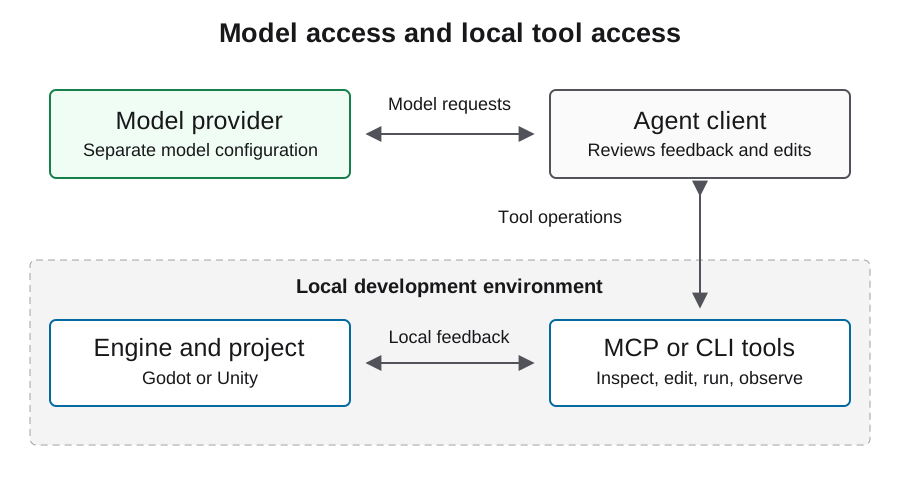
บันทึกว่า process ใดเป็นเจ้าของแต่ละส่วนของ connection สิ่งนี้สำคัญเมื่อตรวจ client ที่ไปถึง server แต่ควบคุม editor ไม่ได้ แยก account credentials, editor licensing, package compatibility และ model availability เป็น setup checks คนละข้อ การเปลี่ยนโมเดลไม่ซ่อม editor-instance mismatch
รีวิว installation path และ pinning policy
คู่มือติดตั้งโปรเจกต์ระบุการเพิ่ม package ผ่าน Unity Package Manager และใช้ setup interface กำหนด server กับ client ตรวจ prerequisite ของ Unity, Python และ uv ตาม revision ที่เลือกก่อนติดตั้ง
เพื่อให้ทำซ้ำได้ เก็บ resolved package revision, editor version, server version และ dependency records หลัง setup branch URL ที่เปลี่ยนได้เป็น discovery path ไม่ใช่ immutable experiment identity รีวิว download และ package changes ก่อนใช้กับเกมเดิม และเก็บ working state ก่อนหน้าเพื่อให้ connection experiment ย้อนกลับได้
https://github.com/CoplayDev/unity-mcp.git?path=/MCPForUnity#mainจับคู่ local HTTP endpoint กับ client
installation guide ที่ดูแลอยู่มี local HTTP example ด้านล่าง โดยสมมติว่า server ทำงานที่ address นั้นแล้ว ยืนยัน transport และ address ที่ตั้งค่าจริงใน editor setup interface ก่อนใช้ MCP URL ไม่ใช่ LLM API base URL
ใช้ configuration format ตามเอกสารของ client บาง client ใช้ root keys หรือ transport declarations ต่างกัน ดังนั้น mcpServers example ทั่วไปนี้ไม่ใช่ไฟล์ที่วางได้ทุก agent ให้ server เป็น local เว้นแต่มี remote setup ที่รีวิวแยก และอย่าใส่ model credentials ใน editor connection ที่ไม่เกี่ยวข้อง
{
  "mcpServers": {
    "unityMCP": {
      "url": "http://localhost:8080/mcp"
    }
  }
}
พิสูจน์ว่า editor instance ใดรับงาน
เปิดโปรเจกต์ที่ตั้งใจและตรวจ connection state ผ่าน package interface จากนั้นใช้ read operations ที่ client ค้นพบเพื่อรับ project และ scene context จับคู่ข้อมูลกับ local project ก่อนอนุมัติ edit เมื่อเปิดหลายโปรเจกต์ gate นี้สำคัญมาก
บันทึก resources และ tool schemas จริงจาก version ที่ติดตั้ง อย่าสร้าง tool call จากชื่อที่จำได้จาก release อื่น ผลลัพธ์แรกที่ดีจะระบุ scene ที่คาดหวังและ object เดิมโดยไม่เปลี่ยน หาก state ที่ส่งกลับเก่าหรือกำกวม ให้หยุดแก้ routing แทนการลอง mutation เพื่อค้นหา target
ใช้ reversible edit เป็น miniflow แรก
เลือก disposable scene ที่เป็นของคุณ บันทึก initial state และขอ change ง่ายๆ หนึ่งอย่างที่เห็นผล ตรวจ saved scene และ file diff รอ editor พร้อม แล้วทดลอง scene เก็บ behavior ที่สังเกตและ console errors
เปิด scene ใหม่เพื่อยืนยันว่า change อยู่รอด สิ่งนี้แยก in-memory editor effect จาก saved project change ทำ flow ให้เล็กพอวินิจฉัย failure ที่ boundary เดียว: routing, mutation, compilation, execution หรือ persistence หลัง review ให้คืน disposable scene และใช้ working configuration ที่บันทึกไว้กับ task ถัดไป
| Observation | สิ่งที่ยืนยันได้ | สิ่งที่ยังเหลือ |
|---|---|---|
| Client ค้นพบ tools | เข้าถึง server ได้ | editor target ถูกต้อง |
| ส่ง scene ที่คาดหวังกลับ | read target context ที่ตั้งใจ | write และ runtime behavior |
| saved diff ตรงกับคำขอ | resource mutation อยู่รอด | ผลลัพธ์ที่เล่นได้ |
| scene ทำงานตามคำขอ | runtime outcome แบบแคบ | game และ export acceptance ทั้งหมด |
แก้ transport ก่อนแก้เกม
เมื่อ client ต่อไม่ได้ ให้ตรวจ URL ที่ตั้งและ local server ทำงานหรือไม่ เมื่อ server start แต่ไม่พบ editor ให้ตรวจ package connection และ editor logs เมื่อ editor ที่ตั้งใจเชื่อมแล้วแต่ tool หาย ให้ตรวจ tool groups ที่ version ติดตั้งเปิดเผย
เมื่อ boundary นี้ทำงานแล้วจึงวินิจฉัย compilation หรือ gameplay เก็บ log excerpts แยกสำหรับ client startup, server routing, editor readiness และ scene action ที่ fail เพื่ออธิบายว่าหยุดที่ใด แทนการโทษโมเดลทุกอย่างหรือ reinstall โดยไม่มีหลักฐาน
ปกป้องโปรเจกต์จาก automation ที่กว้างเกินไป
editor connection อาจแก้ scene, script และ asset จำกัด experiment แรกไว้ที่ directory ที่รู้จัก และให้ review operation ที่ลบ resource เปลี่ยน dependency หรือแตะ scene ที่ไม่เกี่ยวข้อง เก็บ working state ที่กู้คืนได้ก่อน change แรก
อย่าเปิด local development service ต่อสาธารณะเพียงเพื่อแก้ client configuration ถือ third-party asset content และ tool result เป็น untrusted inputs และเอา credentials ออกจาก shared logs connection ที่สำเร็จไม่ใช่ permission ให้อัปโหลด build หรือแก้ store record การเผยแพร่เป็น workflow และ authorization boundary แยก
ส่งต่อ connection record ที่ทำซ้ำได้
บันทึก editor, project, package และ server revisions, client version, transport, tool surface ที่สังเกตได้ และ miniflow ที่จบ เก็บ scene diff ที่แน่นอนและ runtime result ระบุว่า compilation, PlayMode behavior, tests และ target export ถูกตรวจแล้วหรือยังหรือยัง pending
configuration นี้ทำตามเอกสารโปรเจกต์ที่ดูแลอยู่ ตรวจสอบกับ package และ client ที่ติดตั้ง สำหรับ production เกมให้ไปยัง Unity workflow guide และทดสอบ loop เต็ม เก็บ limitation ที่รู้ไว้ใน handoff เพื่อให้ developer อื่นแยก connection issue จาก project problem และทำ setup เดิมซ้ำได้
คำถามที่พบบ่อย
localhost:8080/mcp คือ model endpoint หรือไม่?
ไม่ นี่คือตัวอย่าง local MCP server ตามเอกสาร model requests ใช้ provider configuration แยกของ agent client
connected indicator พิสูจน์ integration หรือไม่?
เป็น observation แรก ตรวจ project identity และ controlled read ก่อนทำ reversible write และ runtime check
ใช้ JSON เดียวกันกับทุก client ได้หรือไม่?
ไม่ได้ Client ต่างกันที่ schema และ transport support ทำตาม configuration ที่เอกสารของ client ที่เลือก
test แรกควรสร้างเกมสมบูรณ์หรือไม่?
เริ่มจาก reversible scene change หนึ่งอย่าง จะได้หลักฐานชัดกว่าเรื่อง routing, persistence และ runtime ก่อนงานใหญ่
หลัง setup ควรบันทึกอะไร?
บันทึก client, transport, editor และ server versions, resolved package revision, project identity และผล read กับ reversible scene test