การพัฒนาเกม AI ด้วย Unity
Updated 2026-09-05
ใช้โปรเจกต์ Unity ที่มีอยู่ เปลี่ยน gameplay ที่รีวิวได้หนึ่งอย่าง และนำผ่าน compilation, tests, play และ target build
เริ่มจาก contract ของโปรเจกต์ที่มีอยู่
ระบุ Unity editor, project path, target platform, packages และ rendering setup ที่เลือกก่อนให้เอเจนต์เขียน เก็บ project version และ dependency locks ในบันทึกการทดลอง ยืนยันว่า operator มี editor access และ target modules ที่ต้องใช้ model access ไม่สามารถให้ prerequisite เหล่านี้
กำหนด scene ที่เล่นได้ขนาดเล็กด้วย conventions ของโปรเจกต์ หากทีมมี character controller หรือ input abstraction อยู่แล้ว ให้เอเจนต์ตรวจสอบก่อนเสนอการแทนที่ วิธีนี้ทำให้การเปลี่ยนที่สร้างขึ้นรีวิวได้ และป้องกันต้นแบบที่ดูแยกขาดจากการข้ามระบบที่เกมส่วนอื่นพึ่งพา
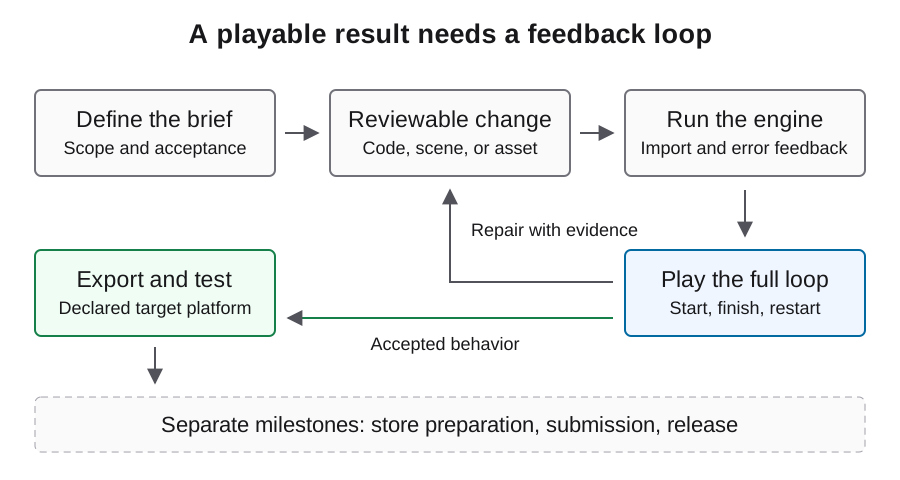
ถือ editor automation เป็นการเชื่อมต่อแยก
โปรเจกต์ Unity MCP ของ CoplayDev เปิด operation ของ editor ให้ client ที่เข้ากันได้ คู่มือติดตั้งอธิบาย editor package และ server connection บริการโมเดลของเอเจนต์เป็น dependency แยก การเปลี่ยน model credentials ไม่แก้ editor instance ที่ใช้ไม่ได้
เริ่มด้วยการตรวจโปรเจกต์แบบ read-only และยืนยันว่า instance ที่เปิดอยู่ตัวใดจะรับคำขอ จำกัด approval ของ mutation ไว้ที่ disposable scene หรือฟีเจอร์ที่เป็นของคุณโดยชัดเจน การที่ tool คืน success หมายถึง operation เสร็จใน boundary ของมันเอง scene ที่ได้อาจยังมี reference ผิดหรือ fail ตอน play คู่มือ MCP เฉพาะทางอธิบาย connection checks และการบันทึก version
ขอการเปลี่ยนแปลงที่มีขอบเขตและผลลัพธ์ที่เห็นได้
ขอ controller adjustment, menu transition หนึ่งอย่าง หรือ persistence feature เล็กๆ แทนการเขียน scene ใหม่ทั้งหมดหลังทุก failure ระบุว่าผู้เล่นควรทำอะไร state ใดควรเปลี่ยน และจะสังเกตผลอย่างไร เก็บ working state เดิมก่อนรับ generated modifications
ใช้ brief ตัวอย่างด้านล่างกำหนดการเปลี่ยนแบบจำกัดและเกณฑ์ review สำหรับ scene และ prefab ให้ตรวจ object references และ saved state รวมกับ script diffs เพราะ source file เดียวอาจไม่มี configuration ที่กำหนด gameplay ขอให้เอเจนต์ระบุ object ที่ได้รับผลก่อนแก้
Inspect the selected project and its existing input and controller code.
Add one restart transition to the owned gameplay scene.
Keep package versions and rendering settings unchanged.
Report changed scripts, scene references, and the verification performed.
Stop before package downloads, purchases, external uploads, or publishing.
รอ compilation ก่อนตีความผลการเล่น
แยก code compilation, editor readiness และ gameplay ใน observation log หาก compilation fail ให้เก็บ error แรกที่เกี่ยวข้องและบริบท source ที่เปลี่ยน อย่าขอปรับ movement ระหว่าง editor ยังโหลด script ที่ต้องการไม่ได้ เพราะจะทำให้เกิด edits เพิ่มบน baseline ที่ใช้ไม่ได้
หลัง compile ให้ตรวจ components และ references ที่คาดหวังก่อนเข้า play ทำ player action เดิมซ้ำหลัง correction console ที่ไม่มี error เป็นหลักฐานที่ดี แต่เกมยังต้องไปถึง state ที่ตั้งใจ การเปลี่ยนซ้ำที่ไม่เปลี่ยนอาการควรนำไปสู่ reproduction ที่เล็กลง ไม่ใช่ replacement ที่ใหญ่ขึ้น
ใช้ test framework ของโปรเจกต์อย่างมีเจตนา
Unity Test Framework มีเอกสารสำหรับการเลือก test จาก command line และ output ผล ตัวอย่างสมมติว่า framework ตั้งค่าไว้แล้วและ test result directory มีอยู่ UNITY_BIN และ PROJECT เป็น shell variables ตัวอย่างที่ชี้ไปยัง editor และโปรเจกต์ที่มีอยู่ จับคู่เอกสารกับ package ที่ติดตั้ง
รัน EditMode checks สำหรับ logic ที่แยกได้เหมาะสม และ PlayMode checks สำหรับ behavior ที่ต้อง execute หมวดหมู่เหล่านี้ไม่แทนที่ hands-on review ของ controls และ presentation เก็บจำนวน tests, failures และ result files กับ revision ที่ทดสอบ run ที่ค้นพบ no tests ไม่สามารถยืนยันว่าเกมผ่าน
UNITY_BIN="/absolute/path/to/Unity"
PROJECT="/absolute/path/to/project"
"$UNITY_BIN" -batchmode -projectPath "$PROJECT" \
  -runTests -testPlatform EditMode \
  -testResults "/absolute/existing-results-dir/editmode.xml" \
  -logFile "/absolute/existing-results-dir/editmode.log"
รีวิว build inputs ก่อนสร้าง player
build ควรใช้ scene selection และ target configuration ที่รีวิวแล้ว อย่าคิดว่า scene ที่เปิดอยู่ใน editor คือ scene ที่รวมตอน start เก็บ build identity และ logs เพื่อผูก failure ภายหลังกับ artifact ที่แน่นอน
Unity CLI รองรับการเรียก static editor method ที่มีอยู่ผ่าน -executeMethod flag นี้ไม่ได้สร้าง build implementation โปรเจกต์ต้องมี method จริงพร้อม build behavior และ failure handling ที่ชัดเจน ให้ใช้ build entry point ของทีมแทน sample method ที่ดูเหมือนรันได้แต่ไม่มีอยู่ในโปรเจกต์
ตรวจ gameplay นอก editor
ทดสอบ player ที่ส่งมอบบน operating system ที่ประกาศพร้อม controls ที่คาดหวังและ clean starting state เข้าจากหน้าจอแรก จบรอบ restart เปลี่ยน settings และ relaunch เปรียบเทียบ persistence กับ transitions ตาม brief ไม่ใช่เพียงดูว่าหน้าต่างเปิด
บันทึก screenshot จริงและ sequence สั้นๆ ที่ใช้ input จาก artifact นั้น หาก editor run ผ่านแต่ build fail ให้ตรวจ scene inclusion, resource dependencies และ platform-specific behavior ก่อนขอให้เอเจนต์เขียน core gameplay ใหม่ boundary ที่เปลี่ยนเป็นเบาะแสที่มีประโยชน์ต่อสาเหตุ
ติดตามงานมนุษย์และ dependency ที่ยังไม่แก้
เก็บ inspector changes แบบ manual, asset edits, instructions ที่เพิ่ม และ environment repairs ใน intervention record สิ่งเหล่านี้เป็น production effort แม้ไม่สร้าง model usage แยก text coding calls จาก image generation, engine work และ target-device testing เมื่อรีวิว cost
walkthrough ที่อิงเอกสารนี้ควรตรวจสอบกับ editor และ package versions ที่เลือก เก็บ complete workflow ที่เล็กที่สุดใน handoff: connection, change, compilation, play และ export เมื่อ developer อื่นทำซ้ำได้ ให้นำ baseline นั้นไปใช้กับฟีเจอร์ถัดไปและตรวจใหม่ทุกครั้งที่ dependency หรือ build target เปลี่ยน
คำถามที่พบบ่อย
Unity MCP เลือกโมเดลของฉันหรือไม่?
ไม่ มันให้การเชื่อมต่อกับ editor tool ไคลเอนต์เอเจนต์ของคุณกำหนดการเข้าถึงและการยืนยันตัวตนของโมเดลแยกต่างหาก
command-line tests แทน gameplay review ได้หรือไม่?
มันครอบคลุม tests ที่ค้นพบและ execute จริง Controls ของผู้เล่น ความชัดเจนทางภาพ และพฤติกรรมบน target platform ยังต้องตรวจ runtime ที่เหมาะสม
ทำไมไม่ใส่ universal build command?
build ขึ้นกับ scene ของโปรเจกต์ target settings และ build entry points ที่มีอยู่ การสร้าง executeMethod ที่ไม่มีอยู่ไม่ได้ทำให้ตัวอย่างรันได้
ใช้ Unity setup เดิมกับ editor version อื่นได้หรือไม่?
ตรวจ package compatibility ใหม่และเก็บ working state ก่อนหน้า การอัปเกรดเปลี่ยน environment ของการทดลองและต้องมีการตรวจของตัวเอง
ควรตรวจอะไรเมื่อ editor play ทำงานแต่ build fail?
เปรียบเทียบ startup scene selection, packaged resources, target configuration และ platform logs ทำ player action เดิมซ้ำใน artifact ที่ export จริง