Unity AI game development
Updated 2026-09-05
Use your existing Unity project, make one reviewable gameplay change, and carry it through compilation, tests, play, and a target build.
Begin with the existing project contract
Identify the selected Unity editor, project path, target platform, packages, and rendering setup before giving an agent write access. Keep the project version and dependency locks with the experiment record. Confirm the operator has the required editor access and target modules; model access cannot supply those prerequisites.
Define one small playable scene using the project's established conventions. If the team already has a character controller or input abstraction, ask the agent to inspect it before proposing a replacement. This makes generated changes reviewable and prevents an apparently isolated prototype from bypassing systems the rest of the game depends on.
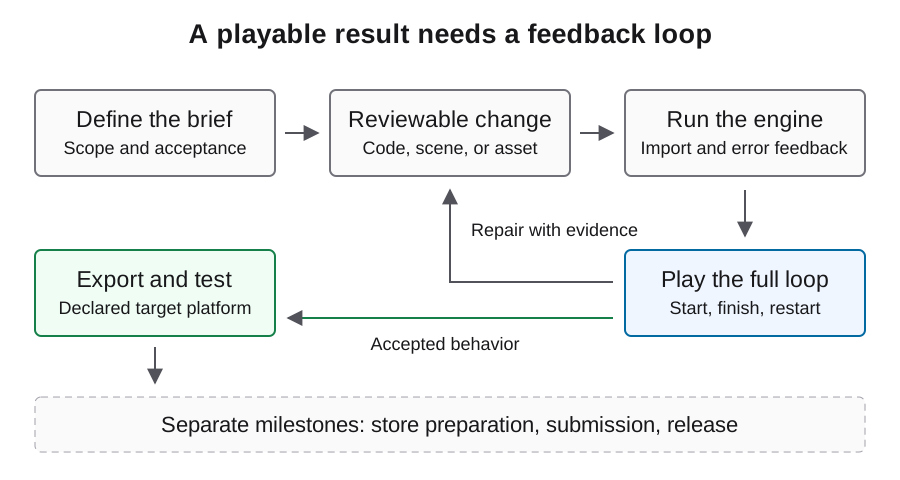
Treat editor automation as a separate connection
CoplayDev's Unity MCP project exposes editor operations to compatible clients. Its installation guide describes an editor package and a server connection. The agent's model service is separate: changing model credentials will not fix an unavailable editor instance.
Start with read-only project inspection and confirm which open instance receives the request. Keep mutation approvals scoped to a disposable scene or explicitly owned feature. A tool returning successfully means the operation completed at its own boundary; the resulting scene may still have incorrect references or fail during play. The dedicated MCP guide covers connection checks and version recording.
Request bounded changes with visible outcomes
Ask for a controller adjustment, one menu transition, or a small persistence feature rather than a whole scene rewrite after every failure. State what the player should do, what state should change, and how the result will be observed. Preserve the prior working state before accepting generated modifications.
Use the illustrative brief below to define a bounded change and its review criteria. For scenes and prefabs, inspect object references and saved state as well as script diffs; a source file alone may not contain the configuration that determines gameplay. Ask the agent to identify the affected objects before editing them.
Inspect the selected project and its existing input and controller code.
Add one restart transition to the owned gameplay scene.
Keep package versions and rendering settings unchanged.
Report changed scripts, scene references, and the verification performed.
Stop before package downloads, purchases, external uploads, or publishing.
Wait for compilation before interpreting play results
Separate code compilation, editor readiness, and gameplay in the observation log. If compilation fails, capture the earliest relevant error and the changed source context. Do not ask for movement tuning while the editor cannot load the intended scripts; that produces additional edits against an invalid baseline.
After compilation, check the expected components and references before entering play. Reproduce the same player action after a correction. An error-free console is useful evidence, but the game must still reach the intended state. Repeated changes that do not alter the symptom should trigger a smaller reproduction rather than a larger replacement.
Use the project test framework deliberately
Unity Test Framework documents command-line test selection and results output. The example assumes that framework is already configured and the test result directory exists. UNITY_BIN and PROJECT are illustrative shell variables pointing at the existing editor and project. Match the reference documentation to your installed package.
Run EditMode checks for appropriate isolated logic and PlayMode checks for behavior that needs execution. These categories do not replace hands-on review of controls and presentation. Keep test counts, failures, and result files with the revision under test. A run that discovers no tests cannot establish that the game passes.
UNITY_BIN="/absolute/path/to/Unity"
PROJECT="/absolute/path/to/project"
"$UNITY_BIN" -batchmode -projectPath "$PROJECT" \
  -runTests -testPlatform EditMode \
  -testResults "/absolute/existing-results-dir/editmode.xml" \
  -logFile "/absolute/existing-results-dir/editmode.log"
Review build inputs before producing a player
A build should use the project's reviewed scene selection and target configuration. Do not assume the scene currently open in the editor is the one included at startup. Preserve build identity and logs so later failures can be associated with the exact artifact.
Unity's CLI supports calling an existing static editor method through -executeMethod. That flag does not create a build implementation: the project needs a real method with explicit build behavior and failure handling. Prefer the team's existing build entry point to invented sample methods that appear runnable but do not exist in the project.
Validate gameplay outside the editor
Test the delivered player on the declared operating system with the expected controls and a clean starting state. Enter from the first screen, complete a round, restart, change settings, and relaunch. Compare persistence and transitions against the acceptance brief rather than only checking whether a window opens.
Record authentic screenshots and a short input-driven sequence from that artifact. If the editor run passed but the build fails, inspect scene inclusion, resource dependencies, and platform-specific behavior before asking the agent to rewrite core gameplay. The boundary that changed is a useful clue to the cause.
Track human work and unresolved dependencies
Keep manual inspector changes, asset edits, added instructions, and environment repairs in the intervention record. They are part of production effort even when they generate no model usage. Distinguish text coding calls from image generation, engine work, and target-device testing when reviewing cost.
This documentation-backed walkthrough should be validated against your chosen editor and package versions. Keep the smallest complete workflow in the handoff: connection, change, compilation, play, and export. Once another developer can repeat it, use that baseline for the next feature and revisit the check whenever a dependency or build target changes.
FAQ
Does Unity MCP select my model?
No. It provides an editor tool connection. Your agent client separately determines model access and authentication.
Can command-line tests replace gameplay review?
They cover the tests actually discovered and executed. Player controls, visual clarity, and target-platform behavior still require appropriate runtime checks.
Why not include a universal build command?
Builds depend on project scenes, target settings, and available build entry points. An invented executeMethod target would not make a runnable example.
Can I reuse a Unity setup for a different editor version?
Recheck package compatibility and preserve the previous working state. An upgrade changes the experiment environment and needs its own verification.
What should I check when editor play works but the build fails?
Compare startup scene selection, packaged resources, target configuration, and platform logs. Reproduce the same player action in the exact exported artifact.