Godot vs Unity for AI-assisted games
Updated 2026-09-05
Evaluate Godot for an original small 2D project and Unity when existing code, assets, or team skills make it the natural home. Compare the complete production loop.
The recommendation depends on your starting point
For an original small 2D project, evaluate Godot and a narrow desktop target first. Its CLI gives you an explicit way to run the edit-and-observe workflow. Choose it when that workflow matches your skills and requirements, then validate the target export before investing in a larger prototype.
If you already maintain a Unity project, first evaluate agent assistance inside that project. Migrating scenes, assets, and team habits merely to try a model introduces a second experiment. Keep the engine stable while testing whether the agent can produce and verify a small useful change.
Compare automation boundaries, not marketing labels
Both routes need an engine environment and an agent with suitable permissions. A model that can write code is only one component. Compare how the operator identifies the project, observes errors, reviews changes, and obtains a target build.
The table captures decision questions rather than a feature score. A CLI is useful when its output localizes the failure; editor automation is useful when the relevant state lives in scenes or inspector settings. Neither eliminates the need to review the game itself. Use the linked official documentation to verify your selected version.
| Decision | Godot route | Unity route |
|---|---|---|
| Project access | Explicit project directory | Selected editor project and instance |
| Automation entry | Documented CLI; optional Godot MCP | Editor CLI; optional Unity MCP |
| Build prerequisites | Preset and export templates | Project build setup and target modules |
| Acceptance evidence | Playable loop plus target export check | Playable loop plus target player check |
| Best baseline | Original small project with known scope | Existing project conventions when available |
Evaluate the feedback the agent receives
Write down one representative failure, such as an unresponsive restart button, and identify the information needed to diagnose it. The agent may need scene references, the input event, state variables, and a runtime error. Ask whether your chosen tools can provide that context reliably.
Do not count a large tool inventory as evidence of better debugging. A narrow tool that returns the correct project state can be more useful than many actions against an ambiguous editor instance. Record failed reads, stale observations, and manual context gathering as part of the experiment effort.
Design a fair same-task trial
Use the same original game brief, acceptance criteria, target device, asset baseline, time policy, and model access conditions. Preserve engine-specific implementation freedom without allowing one version to omit required behavior. Decide in advance how setup time and prior engine knowledge will be reported.
The proposed trial record below contains unknown values deliberately. Fill it only from an executed run. When a workflow needs human repair, keep that assistance visible. A comparison that silently supplies one engine with a finished controller and makes the other build one from scratch measures different starting assets, not engine fit.
{
  "brief_hash": null,
  "engine_version": null,
  "agent_model_identity": null,
  "target_platform": null,
  "acceptance_passed": null,
  "human_interventions": null,
  "actual_api_cost": null,
  "artifact_hash": null
}
Test export risk early
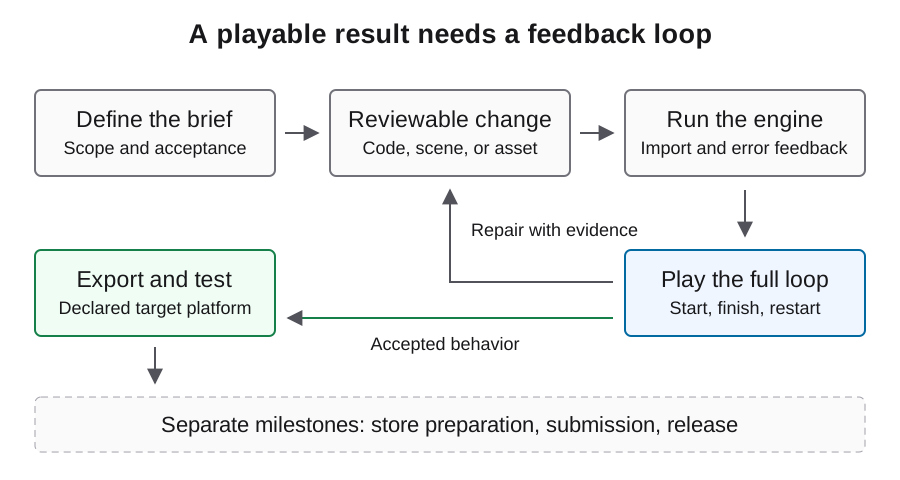
Before expanding a prototype, establish that the selected environment can produce the intended target artifact. An export prerequisite discovered at the end can invalidate a schedule even if the editor demo is playable. Treat this as a separate readiness check rather than a model-quality score.
Then launch the artifact on the real target. Keep editor success, artifact creation, and target acceptance in separate columns. For web delivery, include browser loading, input, and runtime errors. For desktop delivery, verify startup and persistence outside the development environment. The same output filename does not imply the same supported runtime behavior.
Account for assets and team maintenance
Inspect the rights, import behavior, and editing requirements of existing assets before comparing engines. A project with established animations, materials, and review tools has a different migration cost from an empty prototype. Generated art also needs technical cleanup and provenance regardless of engine.
Consider who will maintain the result after the initial experiment. Reviewable scripts, predictable scene organization, and a reproducible build may matter more than the first generated screenshot. Ask a maintainer to reproduce one defect from the handoff package; the effort required is evidence about workflow quality that a feature matrix cannot provide.
Measure task cost without pretending setup is free
Keep API billing, engine setup, local build time, and human review separate. If you aggregate them for a project budget, state the labor assumptions and currencies. Preserve failed requests and abandoned repairs. An expensive-looking call can reduce later work, but only the completed acceptance path can test that hypothesis.
Do not extrapolate a task budget from prompt length or compare subscription activity with a fabricated per-run API bill. Model rates belong to the actual provider and dated billing record. The cost guide supplies a measurement structure without hardcoded prices or an assumed engine winner.
Make a reversible engine decision
Select the route whose smallest trial can be reproduced with your current environment and team. Define the evidence that would make you reconsider: missing target support, inaccessible project state, repeated opaque failures, or unacceptable maintenance work. Keep those thresholds tied to the project rather than general claims about AI game makers.
This comparison is a source-backed selection framework, not a measured same-task ranking. Review the relevant workflow and MCP page, then run a contained trial before committing to a migration or large asset investment. Keep results tied to your brief and environment so a later engine decision can use evidence from your actual production needs.
FAQ
Should model choice determine the engine?
Begin with project requirements and team knowledge. Then test whether the chosen model and tools can complete a representative change in that environment.
Should I migrate a Unity project to Godot for AI?
Not on this evidence alone. First evaluate a bounded agent change in the existing project; migration adds unrelated risk and effort.
Does MCP make the engines equivalent?
No. MCP standardizes a connection, not the tools, engine semantics, project structure, or quality of observations.
Can I compare only the exported file?
You also need target-platform play, acceptance coverage, environment prerequisites, and intervention records. File creation is only one milestone.
What is a useful first Godot trial?
Use one original 2D room with a complete round and restart, then export to a declared desktop target. Keep scope and acceptance comparable to any Unity trial.