Godot AI game development
Updated 2026-09-05
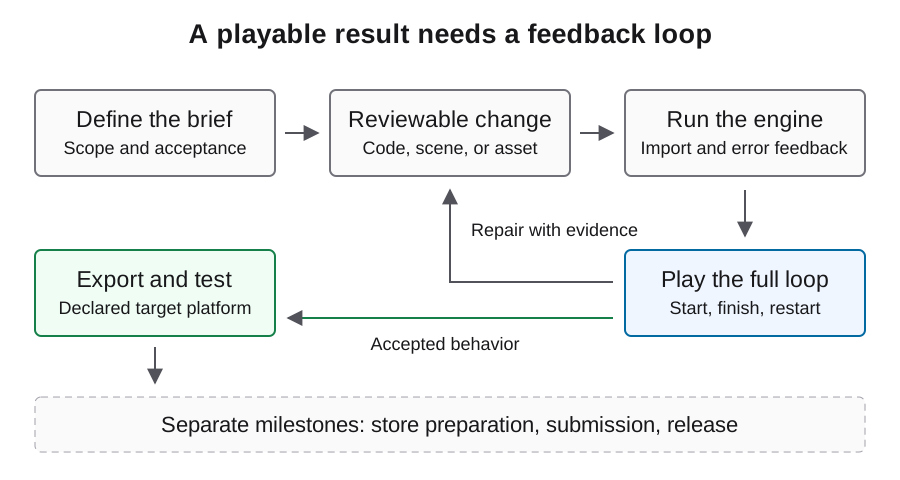
Use Godot CLI feedback to move from project edits to a playable loop and a tested export. Inspect imports, scene behavior, and packaging as separate steps.
Define the project boundary before edits
Start from an owned project directory and a written list of permitted changes. Inventory existing scenes, scripts, assets, and plugins so the agent can extend the current structure instead of creating a second implementation. Keep the initial project state recoverable and record which engine binary opens it.
Choose a modest playable slice with explicit transitions. For example, a title screen leading to one room and back through win or loss gives you a repeatable test. Decide who reviews visual composition and controls, because neither a successful parser nor a model's completion message proves the experience feels coherent.
Identify the executable and supported arguments
Godot's stable CLI documentation supplies the commands below. GODOT_BIN and PROJECT are shell variables chosen for this example, not Godot settings; replace their placeholder paths with your existing executable and project. The project path must contain project.godot.
Capture the version and help output before scripting additional flags. This avoids assuming a command available in current online documentation exists in your installed build. Record the binary identity with later test results and keep it stable while investigating a failure. These illustrative commands use the documented CLI forms.
GODOT_BIN="/absolute/path/to/godot"
PROJECT="/absolute/path/to/project"
"$GODOT_BIN" --version
"$GODOT_BIN" --help
"$GODOT_BIN" --headless --path "$PROJECT" --import
Separate import, parsing, and actual play
A headless import checks an asset-processing boundary. A parser check examines a script. A normal launch reaches the game and can reveal scene wiring and runtime problems. Keep those outcomes separate in the review record rather than summarizing all three as tests passed.
The illustrative script path below must already exist in your project. A parser check is intentionally narrow: it cannot establish working collisions, responsive input, or correct persistence. After an edit, replay the behavior it changes and the transition immediately before and after it. This is often more informative than creating numerous isolated checks for generated helper functions.
"$GODOT_BIN" --headless --path "$PROJECT" \
  --script res://scripts/player.gd --check-only
"$GODOT_BIN" --path "$PROJECT" --debug
Choose CLI tools or MCP deliberately
A shell-capable agent can operate a reviewed CLI sequence. Godot MCP is an additional project-maintained tool interface, with setup covered on its dedicated page. In either case, the operator should know which project is targeted before approving a write or process launch.
Keep the agent's model-provider settings separate from engine tooling. A working local connection cannot prove a particular model is available, or that the agent supports every feature of a compatible gateway. Establish the smallest permitted read first, then a reversible scene change, and only then a complete gameplay cycle in an authorized experiment.
Give failures enough scene context
When an interaction fails, capture the relevant scene tree, script, input action, and first meaningful runtime error. Explain the expected transition and the observed state. A report that the player cannot move should say whether the game has focus, whether input is detected, and whether the player's position changes.
Require a small proposed correction with an explanation tied to that evidence. After applying it, repeat the same action and inspect for regressions in restart and scene transitions. Avoid accepting a repair solely because the error disappeared; disabling the affected feature can remove an error while leaving the original requirement unmet.
Prepare export prerequisites explicitly
An export requires a matching preset and installed export templates. Review export_presets.cfg and resource inclusion before building. Keep export credentials private. The preset name in the example is illustrative and must match your project; the output directory must already exist.
Treat a missing template or preset as an environment problem, not evidence that the generated game logic is wrong. Preserve export logs and the artifact hash so target-platform findings refer to a specific build. A successful export is an important checkpoint but does not establish that the delivered player starts or completes a round.
"$GODOT_BIN" --headless --path "$PROJECT" \
  --export-release "Windows Desktop" "/absolute/existing-build-dir/game.exe"
Run a delivery miniflow on the target
Launch the exported game in the operating system you intend to support. Test start, input, a complete round, restart, settings, and persistence after relaunch. For each result, retain the artifact identity, device context, and observed outcome. An export created on macOS does not itself verify Windows behavior.
For a web target, also inspect browser loading and runtime errors and exercise the canvas using real input. Verify content is visible and moves when appropriate. Test the intended hosting configuration rather than assuming a local editor run covers browser resource loading and platform restrictions.
A source project and native capture to inspect
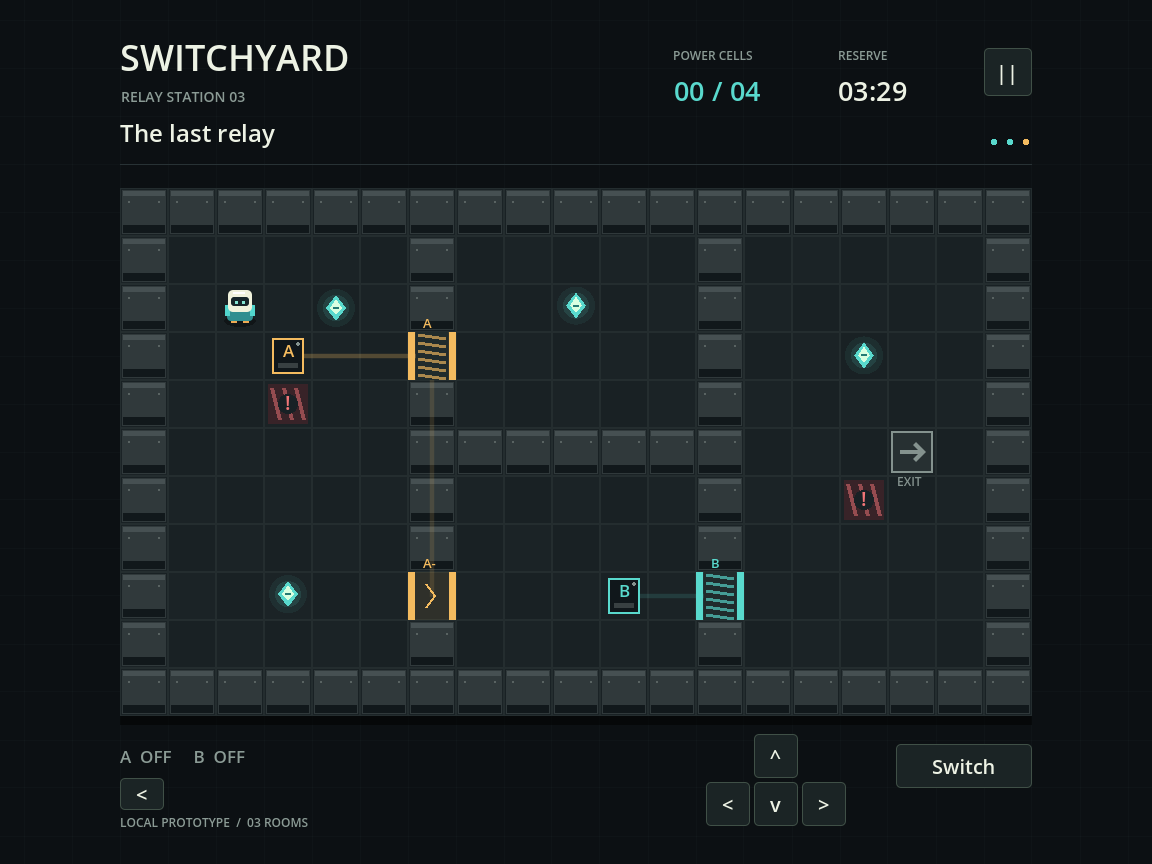
The local Switchyard example provides a three-room Godot puzzle, automated gameplay checks, save-reopen checks, raw logs, a source ZIP and a Godot PCK. Its native captures show the actual running project at two viewport sizes. Repeating the documented commands is a stronger check than judging the project from a screenshot alone.
The project used Godot 4.5.1 in a Codex run whose exact generation model was not verified. It therefore demonstrates a local engine workflow, not an Astra benchmark. Browser export was blocked by missing export templates, and the PCK is not a standalone Windows executable. Those boundaries are recorded with the source so the next developer knows what remains to be tested.
Close the loop with a reviewable handoff
The handoff should name the playable scope, source identity, engine and template versions, build instructions, accepted results, and unresolved defects. Include authentic captures from the tested artifact and the provenance of shipped assets. Preserve repair attempts and manual interventions rather than presenting only a final generated code dump.
When the basic loop is accepted, add assets and localization through their own import and gameplay checks before considering platform submission. This walkthrough is based on engine documentation; apply it to your installed version and retain actual results. Keep a short unresolved-issues list with reproduction steps so the next development session begins from the same known state.
FAQ
Is a headless import a gameplay test?
No. It exercises resource import. Input, visuals, state transitions, and persistence require their own observed checks.
Can I use an export template as the editor executable?
Use a Godot editor binary for the documented export command. Export templates are a separate prerequisite, not a replacement for the editor.
Why does the export preset fail to resolve?
Check that its name matches export_presets.cfg exactly, including spaces, and that you selected the intended project directory.
Where should the agent run commands?
Use the explicit owned project path and the selected engine executable. Avoid depending on whichever directory or binary happens to be active in another terminal.
What is the smallest useful acceptance flow?
Launch from the title, exercise the main action, finish a round, restart, then relaunch to check persistence. Expand it when the game adds new behavior.