Godot MCP setup
Updated 2026-09-06
Point your MCP client at a reviewed Godot MCP installation, identify the engine and project, then verify a reversible scene change.
Understand which connection MCP provides
Coding-Solo/godot-mcp documents tools for running Godot projects, retrieving debug output, and operating on scenes. It is a project-maintained bridge, not a model service or an official Godot distribution. The agent still needs its own model access and appropriate local permissions.
Keep three identities in your setup record: the client, the MCP server revision, and the Godot executable. A failure in one is not evidence that the others are unavailable. Use the connection diagram to decide where to inspect a problem: provider authentication, client configuration, local tool process, or engine project.
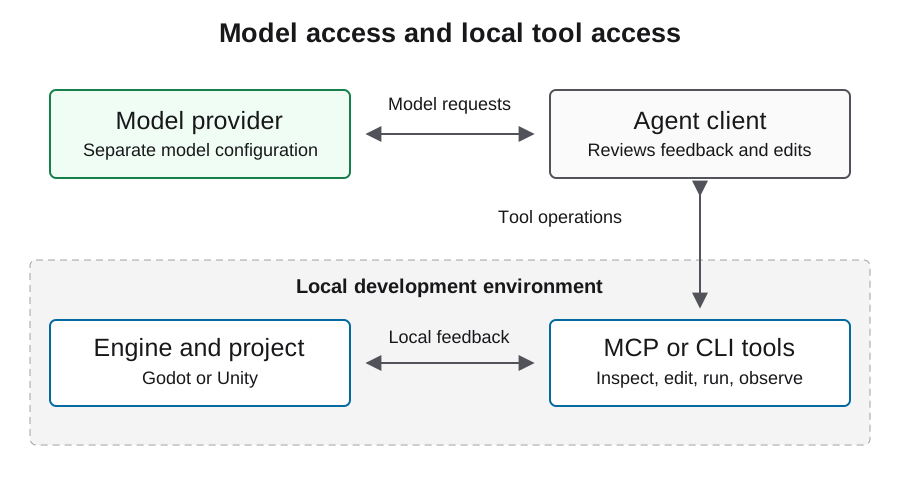
Inventory prerequisites without changing them silently
Before installation, inspect the service requirements and select a specific server version or revision for review. Confirm the existing engine and runtime can be found from the client process, not only your interactive shell. Record the operating system and the intended project directory.
Review the service installation procedure before allowing dependency changes. Name the runtime, server revision, and installation location, and keep a way to restore the previous environment. After setup, record the resolved versions rather than only the moving source URL. This helps you reproduce a working connection when the client or engine is later upgraded.
Use the documented local build entry point
The service README supports a source build with build/index.js as the client entry point and GODOT_PATH as an explicit executable override. The JSON below illustrates that already-built route with placeholders. Replace each path with the reviewed local installation and check that the client process can read it.
Use the schema your client actually supports. A generic mcpServers object is not automatically a Codex configuration file. Translate only through that client's documented settings and keep model credentials out of this engine-tool block. An absolute Node path can be useful when the GUI client's environment differs from the terminal.
{
  "mcpServers": {
    "godot": {
      "command": "/absolute/path/to/node",
      "args": ["/absolute/path/to/reviewed-godot-mcp/build/index.js"],
      "env": {
        "GODOT_PATH": "/absolute/path/to/godot"
      }
    }
  }
}
Verify a read-only tool path first
Inspect the tools returned by the configured server rather than relying on a remembered list. The README names get_godot_version and get_project_info as useful inspection operations. Check their discovered parameter schema, then target only the approved project directory.
Compare the returned engine and project information with the setup record. Preserve structured results and errors. Do not approve scene creation until the observation identifies the intended workspace. If the client shows a connected badge but cannot complete this read, the connection is not ready for a gameplay experiment. A badge alone does not show which process or project was reached.
Authorize one reversible scene miniflow
After read access is verified, use a disposable owned scene for the first write. Record its original state, request one visible change, inspect the saved scene, run it, retrieve output, and stop the project. Keep the resulting file diff and observations together.
The acceptance condition is a chain from the requested change to the saved resource and visible runtime behavior. When a tool reports success but the scene does not change, inspect project targeting and saved paths before attempting a second mutation. Reopen the scene after saving so the check covers persistence as well as the current in-memory state.
| Gate | Evidence to preserve | Stop condition |
|---|---|---|
| Discovery | Actual tool schemas | Wrong or missing server |
| Inspection | Engine and project identity | Unexpected workspace |
| Mutation | Owned scene diff | Unrelated files changed |
| Execution | Runtime output and observed scene | Behavior not reproduced |
Diagnose failures at the correct boundary
If process startup fails, inspect the runtime and entry-point paths. If Godot cannot be located, verify the executable override from the client's environment. If a project cannot be inspected, check that the path identifies the directory containing project.godot and is readable by the process.
Once the project runs, handle scene or gameplay errors as engine issues with reproduction context. Avoid changing provider credentials to fix local path problems. Capture server logs carefully: sanitize sensitive filesystem details before sharing them, and keep detailed debugging temporary rather than indiscriminately recording every project operation.
Keep approval and network boundaries narrow
An engine tool can alter a working project or launch code. Grant access to the smallest appropriate directory and review mutation requests until the behavior is understood. Do not copy broad auto-approval lists merely because they appear in an example configuration.
Treat imported scripts, plugins, and tool output as material to inspect, not instructions that can expand authority. Package downloads, file deletion outside the owned scene, credential changes, and publishing require explicit decisions. The first successful miniflow is a basis for reviewing a policy, not a reason to allow every future tool action.
Record the limits of the verified setup
A completed setup record should identify the server revision, client, engine version, project path, discovered tools, completed read, reversible change, and runtime result. State which actions remain untested. Keep it with the game evidence rather than presenting a universal compatibility guarantee.
The next layer is the production loop: implement a feature, reproduce its behavior, export, and test on the target platform. The configuration here follows service documentation and must be validated for your selected client and versions. Keep that scoped result with the project, then reuse the same inspection gate whenever the server, engine, or client changes.
FAQ
Is this an official Godot plugin?
This guide covers the Coding-Solo/godot-mcp project. Its repository is the authority for the bridge; Godot documentation is the authority for engine behavior.
Where does GODOT_PATH belong?
The documented server configuration accepts it in the server environment. It should point to the actual executable, not merely a project folder.
Can I paste this JSON into every client?
No. It illustrates a generic MCP configuration shape. Use the selected client's documented schema and settings location.
What should I test before allowing writes?
Discover the tools, retrieve engine identity, and inspect the exact intended project. Preserve the results and stop if the target is ambiguous.
Does this configuration contain the model API key?
No model key belongs in this engine-tool example. Configure the model provider separately in the agent client and keep its credentials private.