Godot MCP setup
Updated 2026-09-06
اپنے MCP client کو reviewed Godot MCP installation کی طرف point کریں، engine اور project identify کریں، پھر reversible scene change verify کریں۔
سمجھیں MCP کون سا connection فراہم کرتا ہے
Coding-Solo/godot-mcp Godot projects چلانے، debug output لینے اور scenes operate کرنے کے tools document کرتا ہے۔ یہ project-maintained bridge ہے، model service یا official Godot distribution نہیں۔ Agent کو اپنا model access اور مناسب local permissions الگ درکار ہیں۔
Setup record میں تین identities رکھیں: client، MCP server revision اور Godot executable۔ ایک کی failure دوسرے کے unavailable ہونے کا evidence نہیں۔ Connection diagram سے طے کریں کہ مسئلہ کہاں inspect کرنا ہے: provider authentication، client configuration، local tool process یا engine project۔
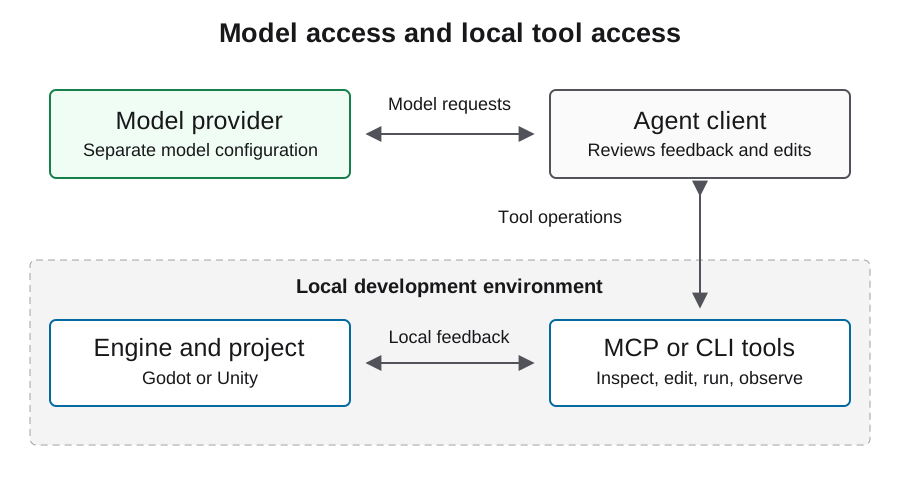
Prerequisites inventory کریں، خاموشی سے نہ بدلیں
Installation سے پہلے service requirements inspect کریں اور review کے لیے specific server version یا revision منتخب کریں۔ Confirm کریں کہ client process سے existing engine اور runtime مل سکتے ہیں، صرف interactive shell سے نہیں۔ Operating system اور intended project directory record کریں۔
Dependency changes allow کرنے سے پہلے service installation procedure review کریں۔ Runtime، server revision اور installation location لکھیں، اور previous environment restore کرنے کا طریقہ رکھیں۔ Setup کے بعد moving source URL نہیں بلکہ resolved versions record کریں۔ اس سے client یا engine upgrade کے بعد working connection reproduce ہو سکے گی۔
Documented local build entry point استعمال کریں
Service README source build کے لیے build/index.js کو client entry point اور GODOT_PATH کو explicit executable override کے طور پر support کرتا ہے۔ نیچے کا JSON already-built route کو placeholders کے ساتھ دکھاتا ہے۔ ہر path کو reviewed local installation سے بدلیں اور check کریں کہ client process اسے پڑھ سکتا ہے۔
وہ schema استعمال کریں جسے آپ کا client واقعی support کرتا ہے۔ Generic mcpServers object خود بخود Codex configuration file نہیں بنتا۔ صرف client کی documented settings کے ذریعے translate کریں اور model credentials کو engine-tool block سے باہر رکھیں۔ GUI client کا environment terminal سے مختلف ہو تو absolute Node path مفید ہو سکتا ہے۔
{
  "mcpServers": {
    "godot": {
      "command": "/absolute/path/to/node",
      "args": ["/absolute/path/to/reviewed-godot-mcp/build/index.js"],
      "env": {
        "GODOT_PATH": "/absolute/path/to/godot"
      }
    }
  }
}
پہلے read-only tool path verify کریں
Remembered list پر بھروسا کرنے کے بجائے configured server سے واپس آنے والے tools inspect کریں۔ README get_godot_version اور get_project_info کو useful inspection operations بتاتا ہے۔ Discovered parameter schema چیک کریں اور صرف approved project directory target کریں۔
Returned engine اور project information کو setup record سے compare کریں۔ Structured results اور errors محفوظ کریں۔ Observation intended workspace identify نہ کرے تو scene creation approve نہ کریں۔ Client connected badge دکھائے مگر read مکمل نہ کر سکے تو gameplay experiment کے لیے connection تیار نہیں؛ badge یہ نہیں بتاتا کہ کون سا process یا project ملا۔
ایک reversible scene miniflow authorize کریں
Read access verify ہونے کے بعد پہلی write کے لیے disposable owned scene استعمال کریں۔ Original state record کریں، ایک visible change مانگیں، saved scene inspect کریں، اسے run کریں، output لیں اور project stop کریں۔ Resulting file diff اور observations ساتھ رکھیں۔
Acceptance condition requested change سے saved resource اور visible runtime behavior تک chain ہے۔ Tool success report کرے مگر scene نہ بدلے تو دوسری mutation سے پہلے project targeting اور saved paths inspect کریں۔ Save کے بعد scene reopen کریں تاکہ check current in-memory state کے ساتھ persistence بھی cover کرے۔
| Gate | Evidence محفوظ کریں | Stop condition |
|---|---|---|
| Discovery | Actual tool schemas | Wrong یا missing server |
| Inspection | Engine اور project identity | Unexpected workspace |
| Mutation | Owned scene diff | Unrelated files changed |
| Execution | Runtime output اور observed scene | Behavior reproduce نہیں ہوئی |
Failures کو درست boundary پر diagnose کریں
Process startup fail ہو تو runtime اور entry-point paths inspect کریں۔ Godot نہ ملے تو client environment سے executable override verify کریں۔ Project inspect نہ ہو تو چیک کریں کہ path project.godot والے directory کی شناخت کرتا ہے اور process اسے پڑھ سکتا ہے۔
Project run ہونے کے بعد scene یا gameplay errors کو reproduction context والے engine issues سمجھیں۔ Local path problem کے لیے provider credentials نہ بدلیں۔ Server logs احتیاط سے capture کریں؛ share کرنے سے پہلے sensitive filesystem details sanitize کریں اور ہر project operation indiscriminately record کرنے کے بجائے detailed debugging temporary رکھیں۔
Approval اور network boundaries narrow رکھیں
Engine tool working project بدل یا code launch کر سکتا ہے۔ Smallest appropriate directory تک access دیں اور behavior سمجھ آنے تک mutation requests review کریں۔ Example configuration میں broad auto-approval lists نظر آئیں تو انہیں copy نہ کریں۔
Imported scripts، plugins اور tool output کو inspect کرنے والا material سمجھیں، authority بڑھانے والی instructions نہیں۔ Package downloads، owned scene سے باہر deletion، credential changes اور publishing کے لیے explicit decisions درکار ہیں۔ پہلی successful miniflow policy review کی بنیاد ہے، ہر future tool action allow کرنے کی وجہ نہیں۔
Verified setup کی limits record کریں
Completed setup record میں server revision، client، engine version، project path، discovered tools، completed read، reversible change اور runtime result لکھیں۔ جو actions untested رہیں انہیں بھی state کریں۔ اسے game evidence کے ساتھ رکھیں، universal compatibility guarantee کے طور پر پیش نہ کریں۔
اگلا layer production loop ہے: feature implement کریں، behavior reproduce کریں، export کریں اور target platform پر test کریں۔ یہاں configuration service documentation follow کرتی ہے اور selected client اور versions پر validate ہونی چاہیے۔ Scoped result project کے ساتھ رکھیں اور server، engine یا client بدلنے پر یہی inspection gate دوبارہ استعمال کریں۔
عمومی سوالات
کیا یہ official Godot plugin ہے؟
یہ guide Coding-Solo/godot-mcp project cover کرتی ہے۔ Bridge کے لیے اس کی repository authority ہے؛ engine behavior کے لیے Godot documentation authority ہے۔
GODOT_PATH کہاں رکھنا ہے؟
Documented server configuration اسے server environment میں قبول کرتی ہے۔ اسے actual executable کی طرف point کرنا چاہیے، صرف project folder کی طرف نہیں۔
کیا یہ JSON ہر client میں paste کر سکتا ہوں؟
نہیں۔ یہ generic MCP configuration shape کی مثال ہے۔ منتخب client کا documented schema اور settings location استعمال کریں۔
Writes allow کرنے سے پہلے کیا test کروں؟
Tools discover کریں، engine identity لیں اور exact intended project inspect کریں۔ Results محفوظ کریں اور target ambiguous ہو تو رک جائیں۔
کیا اس configuration میں model API key ہے؟
نہیں۔ اس engine-tool example میں model key نہیں ہونی چاہیے۔ Model provider کو agent client میں الگ configure کریں اور credentials private رکھیں۔