Debug AI-generated games
Updated 2026-09-05
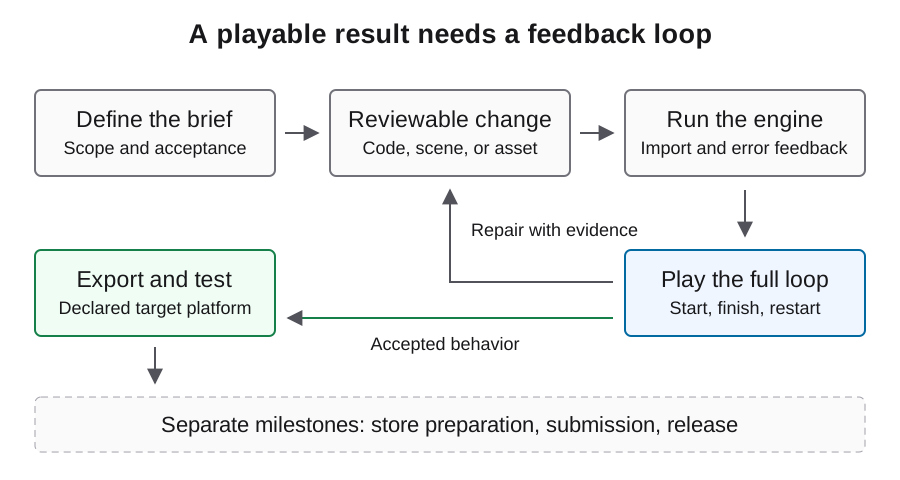
Find the first boundary that fails, give the agent a reproducible symptom, and retest the same player action. Start with the engine and build you actually run.
Classify the failure before asking for a fix
Identify the earliest failing step: project discovery, import, parsing or compilation, scene startup, player input, gameplay state, export, or target launch. Later symptoms may be consequences of that first failure. Keep the engine version, project revision, target, and exact reproduction together.
For example, a scene that never starts cannot tell you whether its restart button works. A browser that cannot fetch the game package cannot test the controller. Route the error to the right boundary before changing code; this keeps a repair loop from accumulating unrelated patches while the original prerequisite remains broken.
| Symptom | Inspect first | Retest outcome |
|---|---|---|
| Project will not open | Path, version, dependencies | Expected project loads |
| Blank scene | Startup errors, scene, camera, visibility | Expected content appears |
| Input has no effect | Focus, action mapping, state, handlers | Action changes game state |
| Export fails | Preset or target prerequisites | Artifact is created |
| Build fails only on target | Packaged resources and platform logs | Target completes the same loop |
Capture the first meaningful engine error
In Godot, use the debugger panel and the relevant runtime output. In Unity, inspect compilation and runtime errors separately and wait for the editor to be ready before interpreting play results. Preserve the stack or location that identifies the failing script and the operation that triggered it.
Send the agent a focused excerpt plus the relevant scene or object context. Avoid a giant undifferentiated log that obscures the first error, but keep the full record locally for later inspection. Redact credentials and personal data. A useful report says what the player did, what should happen, and what the engine actually reported.
Reduce the reproduction without changing the requirement
Start from a recoverable project state and isolate the smallest scene or action that still exhibits the defect. Keep the real controller, collision rule, or save boundary involved in the problem. Removing the failing system entirely may produce a clean run while losing the behavior you needed to fix.
The brief below is an original diagnostic template. Fill it with observed details rather than asking the model to assume a cause. Require one proposed explanation and a narrowly scoped change. When the test is complete, rejoin the full player journey so the local repair does not hide a broken scene transition.
Project revision: <record actual revision>
Engine and target: <record actual environment>
Steps: launch -> start round -> perform the failing action
Expected state: <specific result>
Observed state: <specific result>
First engine error: <relevant error and location>
Inspect the referenced scene and script before editing.
Propose one cause, make a scoped fix, then repeat these steps.
Preserve the required behavior and report any remaining failure.
Investigate a blank screen in layers
First determine whether the engine started and the intended scene loaded. Then inspect camera selection, viewport dimensions, object visibility, positions, and any overlay that covers the scene. Use engine state and a real capture together: an image alone may not reveal whether the scene is paused, off-camera, or empty.
Apply input and observe whether state changes even when nothing appears. If position changes but the image does not, focus on rendering or scene references. If neither changes, investigate startup and input before adjusting artwork. Keep each hypothesis tied to an observation so the agent does not rewrite both systems unnecessarily.
Trace input through the gameplay transition
Follow the action from focus and mapping to its handler, then to the state it is supposed to change. Check pause state and UI interception before blaming movement math. A restart failure might be a missing handler, a stale scene reference, or a state that was never reset.
After repair, test the action from more than one relevant state: first launch, after a win, and after a loss when applicable. Check for duplicated handlers or stale objects that appear only after repeated rounds. A small complete miniflow can localize these lifecycle defects more effectively than repeatedly testing the button in isolation.
Separate browser loading from game logic
For a Godot web export, inspect the browser network and console panels before editing gameplay code. Confirm the exported HTML, JavaScript, WebAssembly, and game package load from the intended location. Compare the hosting settings with the official web export documentation, including the requirements of the chosen thread configuration.
Keep exported companion filenames consistent and test the artifact rather than a mixture of old and new files. If the wrong project appears, inspect service-worker caching in the test browser. Then exercise input and verify moving content. A nonblank canvas is an initial rendering check, not proof that the game loop works.
Check export-specific failures on the target
When the editor works but the distributed build fails, compare startup scene selection, included resources, configuration, and target logs. Preserve the exact artifact hash so a later re-export does not invalidate the reproduction record. Test with a clean starting state before relying on existing saves or editor caches.
Do not change the core mechanic to solve a missing packaged file. Fix the packaging boundary and replay the same acceptance path in the target build. For desktop artifacts, use the actual operating system; for browser artifacts, use the intended browser and hosting setup. Cross-exporting alone does not establish target behavior.
Close a repair with a before-and-after result
Retain the failing reproduction, the scoped diff, and the repeated action that now produces the expected state. Add a regression check at the boundary that caused the defect, then replay the surrounding game loop. Record any manual corrections and the requests consumed by unsuccessful repairs.
The examples here are diagnostic procedures, not a published failure-and-fix case. Use them to create a concrete report from your project. When the same symptom persists after repeated proposals, stop the automatic loop and gather the missing observation instead of escalating to a broad rewrite with no new evidence.
FAQ
The agent says the game is fixed, but the screen is blank. What next?
Reproduce the symptom and inspect startup errors, the active scene, camera, and input response. The completion message is not a runtime observation.
Should I regenerate the whole project?
First isolate the earliest failing boundary and preserve the working state. A focused reproduction is usually easier to review than a replacement that changes many systems.
Why does the browser show an older game?
Check the artifact identity, served files, and service-worker cache in the test browser. Verify that the current export is actually being loaded.
Do passing script checks prove playability?
They cover the checks executed. Scene wiring, input, rendering, state transitions, and persistence require runtime evidence.
What should a useful bug report include?
Project and engine identity, target, steps, expected and observed states, first relevant error, and the smallest scene or files needed to reproduce it.