ดีบักเกมที่สร้างด้วย AI
Updated 2026-09-05
หาขอบเขตแรกที่ fail ให้เอเจนต์มีอาการที่ทำซ้ำได้ และทดสอบ player action เดิม เริ่มจากเอนจินและ build ที่คุณรันจริง
จำแนก failure ก่อนขอ fix
ระบุขั้นตอนแรกที่ fail: project discovery, import, parsing หรือ compilation, scene startup, player input, gameplay state, export หรือ target launch อาการภายหลังอาจเกิดจาก failure แรก เก็บ engine version, project revision, target และ reproduction ที่แน่นอนร่วมกัน
ตัวอย่างเช่น scene ที่ไม่ start ไม่สามารถบอกว่า restart button ทำงานหรือไม่ browser ที่ fetch game package ไม่ได้ก็ทดสอบ controller ไม่ได้ ส่ง error ไปยัง boundary ที่ถูกก่อนเปลี่ยนโค้ด เพื่อไม่ให้ repair loop สะสม patches ที่ไม่เกี่ยวขณะ prerequisite เดิมยังเสีย
| อาการ | ตรวจสิ่งใดก่อน | ผลการ retest |
|---|---|---|
| เปิดโปรเจกต์ไม่ได้ | Path, version, dependencies ที่ต้องตรวจ | โหลดโปรเจกต์ที่คาดหวังได้ |
| Scene ว่าง | Startup errors, scene, camera, visibility ที่ต้องตรวจ | คอนเทนต์ที่คาดหวังปรากฏ |
| Input ไม่ส่งผล | Focus, action mapping, state, handlers ที่ต้องตรวจ | Action เปลี่ยน game state |
| Export fail | Preset หรือ target prerequisites | สร้าง artifact ได้ |
| Build fail เฉพาะบน target | Packaged resources และ platform logs | Target จบ loop เดิมได้ |
เก็บ engine error แรกที่มีความหมาย
ใน Godot ใช้ debugger panel และ runtime output ที่เกี่ยวข้อง ใน Unity ตรวจ compilation และ runtime errors แยกกัน และรอ editor พร้อมก่อนตีความผล play เก็บ stack หรือตำแหน่งที่ระบุ script ที่ fail และ operation ที่เรียกมัน
ส่ง excerpt ที่โฟกัสพร้อม scene หรือ object context ที่เกี่ยวข้องให้เอเจนต์ หลีกเลี่ยง giant log ที่ไม่แยกซึ่งบัง error แรก แต่เก็บ record เต็มไว้ในเครื่องเพื่อการตรวจภายหลัง redact credentials และ personal data รายงานที่ดีบอกว่า player ทำอะไร ควรเกิดอะไร และเอนจินรายงานอะไรจริง
ลด reproduction โดยไม่เปลี่ยน requirement
เริ่มจาก project state ที่กู้คืนได้และแยก scene หรือ action ที่เล็กที่สุดซึ่งยังแสดง defect เก็บ controller, collision rule หรือ save boundary จริงที่เกี่ยวกับปัญหา การลบระบบที่ fail ทั้งหมดอาจทำให้ run สะอาด แต่สูญเสีย behavior ที่ต้องแก้
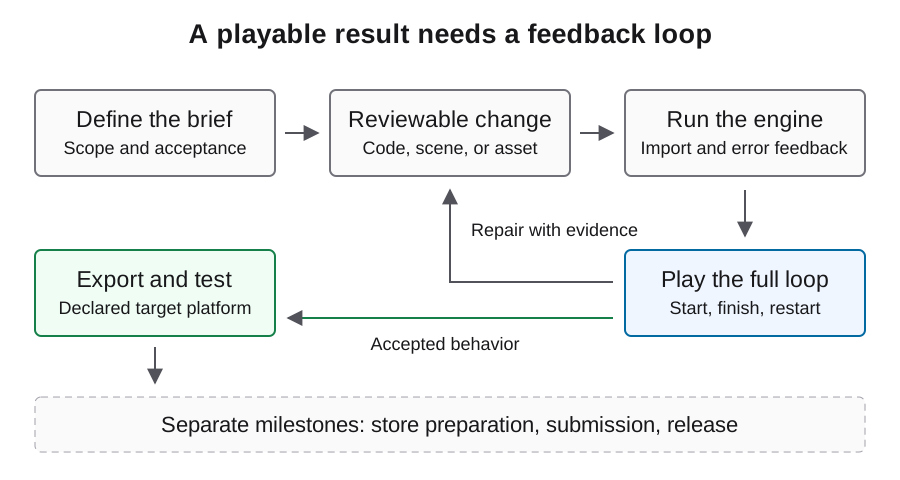
brief ด้านล่างเป็น diagnostic template ต้นฉบับ เติม observed details แทนการให้โมเดลสมมติสาเหตุ ขอ explanation หนึ่งแบบและ change ที่มีขอบเขตแคบ เมื่อ test เสร็จให้กลับไปยัง player journey เต็ม เพื่อไม่ให้ local repair ซ่อน scene transition ที่เสีย
Project revision: <record actual revision>
Engine and target: <record actual environment>
Steps: launch -> start round -> perform the failing action
Expected state: <specific result>
Observed state: <specific result>
First engine error: <relevant error and location>
Inspect the referenced scene and script before editing.
Propose one cause, make a scoped fix, then repeat these steps.
Preserve the required behavior and report any remaining failure.
ตรวจหน้าจอว่างเป็นชั้นๆ
ก่อนอื่นดูว่า engine start และ scene ที่ตั้งใจโหลดหรือไม่ จากนั้นตรวจ camera selection, viewport dimensions, object visibility, positions และ overlay ที่บัง scene ใช้ engine state พร้อม real capture เพราะภาพเดียวอาจไม่บอกว่า scene pause อยู่นอกกล้องหรือว่าง
ลอง input และดูว่า state เปลี่ยนแม้ไม่มีอะไรปรากฏหรือไม่ หาก position เปลี่ยนแต่ภาพไม่เปลี่ยน ให้เน้น rendering หรือ scene references หากไม่เปลี่ยนทั้งคู่ ให้ตรวจ startup และ input ก่อนปรับ artwork ผูก hypothesis แต่ละอย่างกับ observation เพื่อไม่ให้เอเจนต์เขียนทั้งสองระบบใหม่โดยไม่จำเป็น
ติดตาม input ผ่าน gameplay transition
ตาม action จาก focus และ mapping ไปยัง handler แล้วไปยัง state ที่ควรเปลี่ยน ตรวจ pause state และ UI interception ก่อนโทษ movement math restart ที่ fail อาจเกิดจาก handler หาย scene reference เก่า หรือ state ที่ไม่เคย reset
หลัง repair ทดสอบ action จากมากกว่าหนึ่ง state ที่เกี่ยวข้อง: first launch, หลัง win และหลัง loss เมื่อใช้ได้ ตรวจ duplicated handlers หรือ stale objects ที่ปรากฏเฉพาะหลังเล่นหลายรอบ complete miniflow ขนาดเล็กช่วยระบุ lifecycle defects ได้ดีกว่าทดสอบปุ่มเดิมซ้ำแบบโดดเดี่ยว
แยก browser loading จาก game logic
สำหรับ Godot web export ตรวจ browser network และ console panels ก่อนแก้ gameplay code ยืนยันว่า exported HTML, JavaScript, WebAssembly และ game package โหลดจากตำแหน่งที่ตั้งใจ เปรียบเทียบ hosting settings กับ web export documentation อย่างเป็นทางการ รวมข้อกำหนดของ thread configuration ที่เลือก
คงชื่อไฟล์ companion ที่ export ให้ตรงกันและทดสอบ artifact ไม่ใช่ไฟล์เก่ากับใหม่ปนกัน หากโปรเจกต์ผิดปรากฏ ให้ตรวจ service-worker caching ใน test browser จากนั้นทดลอง input และยืนยัน content ที่เคลื่อนที่ canvas ที่ไม่ว่างเป็นเพียง rendering check แรก ไม่ใช่หลักฐานว่า game loop ทำงาน
ตรวจ failure เฉพาะ export บน target
เมื่อ editor ทำงานแต่ distributed build fail ให้เปรียบเทียบ startup scene selection, included resources, configuration และ target logs เก็บ artifact hash ที่แน่นอนเพื่อไม่ให้ re-export ภายหลังทำลาย reproduction record ทดสอบด้วย clean starting state ก่อนพึ่ง existing saves หรือ editor caches
อย่าเปลี่ยน core mechanic เพื่อแก้ packaged file ที่หาย แก้ packaging boundary และเล่น acceptance path เดิมใน target build สำหรับ desktop artifact ใช้ operating system จริง สำหรับ browser artifact ใช้ browser และ hosting setup ที่ตั้งใจ การ export ข้ามแพลตฟอร์มเพียงอย่างเดียวไม่ได้ยืนยัน target behavior
ปิด repair ด้วยผลลัพธ์ก่อนและหลัง
เก็บ failing reproduction, scoped diff และ action เดิมที่ตอนนี้ให้ expected state เพิ่ม regression check ที่ boundary ซึ่งก่อ defect แล้วเล่น game loop รอบข้างอีกครั้ง บันทึก manual corrections และ requests ที่ repair ไม่สำเร็จใช้ไป
ตัวอย่างในหน้านี้เป็น diagnostic procedures ไม่ใช่ published failure-and-fix case ใช้สร้าง report จากโปรเจกต์ของคุณ เมื่ออาการเดิมยังอยู่หลัง proposals ซ้ำ ให้หยุด automatic loop และเก็บ observation ที่หาย แทนการขยายเป็น rewrite ใหญ่โดยไม่มีหลักฐานใหม่
คำถามที่พบบ่อย
เอเจนต์บอกว่าเกมแก้แล้วแต่หน้าจอว่าง ควรทำอะไรต่อ?
ทำอาการซ้ำและตรวจ startup errors, active scene, camera และ input response completion message ไม่ใช่ runtime observation
ควรสร้างโปรเจกต์ใหม่ทั้งหมดหรือไม่?
แยก boundary แรกที่ fail และเก็บ working state ก่อน reproduction ที่โฟกัสมักรีวิวง่ายกว่า replacement ที่เปลี่ยนหลายระบบ
ทำไม browser แสดงเกมเก่า?
ตรวจ artifact identity, served files และ service-worker cache ใน test browser ยืนยันว่า current export ถูกโหลดจริง
script checks ที่ผ่านพิสูจน์ playability หรือไม่?
ครอบคลุม checks ที่ execute เท่านั้น Scene wiring, input, rendering, state transitions และ persistence ต้องมี runtime evidence
bug report ที่มีประโยชน์ควรมีอะไร?
Project และ engine identity, target, steps, expected และ observed states, error แรกที่เกี่ยวข้อง และ scene หรือ files ที่เล็กที่สุดสำหรับ reproduction