AI game assets workflow
Updated 2026-09-05
Define the asset your game needs, retain its origin and permissions, then inspect the imported result at gameplay scale before putting it in a release.
Write an asset contract before generating art
Define the asset's job in the game: player sprite, obstacle, background tile, button, sound cue, or promotional material. Specify dimensions, transparency, frame layout, viewpoint, palette constraints, and the scale at which it will be inspected. Treat these as production inputs rather than hoping a visually appealing image will fit later.
For a sprite sheet, define frame count, cell dimensions, origin, and expected animation states. For a UI asset, identify the surrounding text and interaction state. Use an owned placeholder until the contract is stable so art iteration does not obscure whether gameplay works.
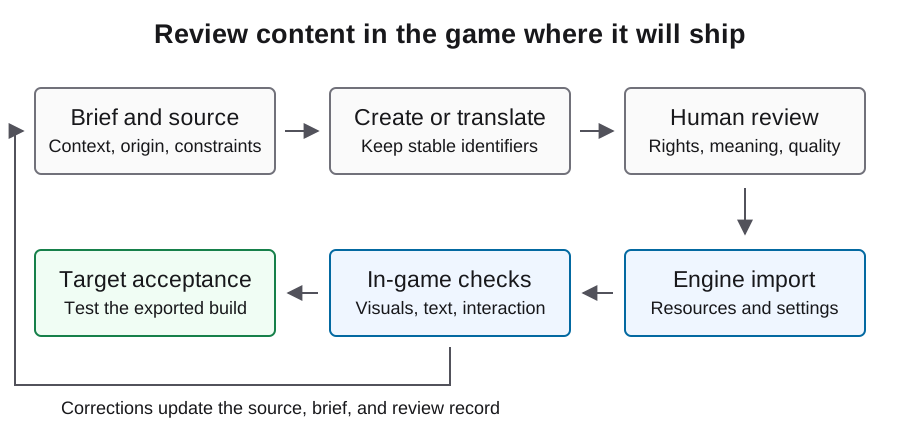
Select a source with a reviewable permission basis
Possible sources include original commissioned work, self-authored assets, a licensed pack, or generated material produced under reviewed service terms. Compare them by permissions, editability, consistency, and review effort, not by an unsupported claim that one source is always cheaper.
Keep the original source link and the applicable license or agreement with the asset record. Record attribution and redistribution requirements. Generated material also needs review of its inputs and output; model access does not establish clearance for copied characters, marks, or other protected material. Escalate unclear rights before distribution rather than converting uncertainty into an approved status.
| Source route | Evidence to retain | Technical review |
|---|---|---|
| Original work | Author and ownership record | Export settings and edit source |
| Licensed pack | License, source, attribution duties | Scale and import compatibility |
| Generated material | Tool identity, input rights, terms review | Consistency, cleanup, frame usability |
Keep coding and image production attributable
Astra can be the subject of a coding experiment while a separate image tool produces art. Record those roles independently. A text instruction asking for a sprite does not prove which service generated the pixels, and a successful code session does not provide an image-service bill.
For each generated output, retain the actual image tool identity, request record where available, generation settings, selected output, and manual edits. Put failed or discarded attempts in the usage ledger. Track image work separately from text coding even when one agent orchestrates both, so the case can explain where cost and human effort actually went.
Use a manifest with honest unknowns
Use the illustrative record below for an asset pipeline, keeping unknown fields null until reviewed. Approval requires an actual source, permission decision, file identity, and technical review. Keep the asset identifier stable when replacing an output so the new file can inherit context without inheriting an unearned approval.
Keep raw material and final imported output linked by the same asset identifier. When a person removes a background, repairs an animation frame, or changes contrast, record the transformation. This makes later replacement, attribution review, and debugging possible without relying on memory of a chat session.
{
  "asset_id": "player_idle",
  "source_url": null,
  "permission_record": null,
  "creator_or_tool": null,
  "source_hash": null,
  "final_file_hash": null,
  "transformations": [],
  "image_cost_record": null,
  "review_status": "pending",
  "import_result": null
}
Inspect the engine import, not just the source file
Godot's image-import documentation describes compression and mipmap choices that affect imported textures. Select settings according to the asset's actual display conditions; pixel art, scaled backgrounds, and 3D textures do not share one universal preset. Preserve the settings used for the accepted output.
Inspect transparent edges, unintended backgrounds, frame spacing, and visual scale inside the game. Compare the collision representation with the visible object. A technically valid PNG can still be unusable if frames shift the character's apparent position or the sprite disappears against the level. Reject these problems before propagating the asset across many scenes.
Review animation, sound, and UI in context
Play the relevant action repeatedly and inspect transitions between animation states. Check whether visual timing matches collision and feedback. A frame-by-frame contact sheet can help inspection, but it does not replace observing the running animation and the player input that triggers it.
For audio, review level consistency, looping, timing, and permission records independently from image checks. For UI artwork, verify focus, disabled states, and text contrast at the intended resolutions. Record failures by asset and behavior so the agent receives actionable feedback instead of a broad request to make the game look better.
Check the exported artifact and disclosure inventory
Verify that the accepted resources are present in the exported build and behave as reviewed. Preserve a screenshot or recording from the real artifact when making an implementation claim. Do not substitute a concept image or generated mockup for gameplay evidence.
Maintain a shipping inventory that distinguishes artwork, sound, narrative, localization, and runtime output. Use the Steam preparation guide and current Content Survey to decide what must be described for the actual game. A completed internal asset record helps that review, but it does not itself establish platform approval or resolve an uncertain rights question.
Budget for accepted assets, including rework
Measure asset production against accepted in-game results, not simply the number of files generated. Keep rejected generations, manual cleanup, import corrections, and target-build rechecks in the record. Use actual provider billing categories and dates rather than embedding a price in the guide.
When repeated generations fail the same technical requirement, revisit the asset contract or use an original placeholder while solving gameplay. More prompts cannot compensate for an undefined frame layout. These procedures and manifest fields are illustrative; evaluate the actual files and applicable terms before treating an asset as accepted or estimating the next production batch.
FAQ
Does Astra coding usage include all game art costs?
No. Attribute image and audio services separately, even when an agent invokes them during the same task. Use actual request and billing records.
Can I use any image that looks suitable?
Review its permission basis and technical fit. Appearance alone establishes neither distribution rights nor usable animation and import behavior.
Is a transparent PNG a finished sprite?
It still needs checks for scale, origin, frames, edges, collision fit, and visibility inside the intended game.
What belongs in an asset manifest?
Origin, permission record, creator or tool identity, hashes, transformations, review state, and import evidence. Missing information should remain explicitly unknown.
When should an asset be marked accepted?
After its permission record is resolved, the imported file matches the technical brief, and the relevant behavior has been checked in the target build.