AI गेम assets workflow
Updated 2026-09-05
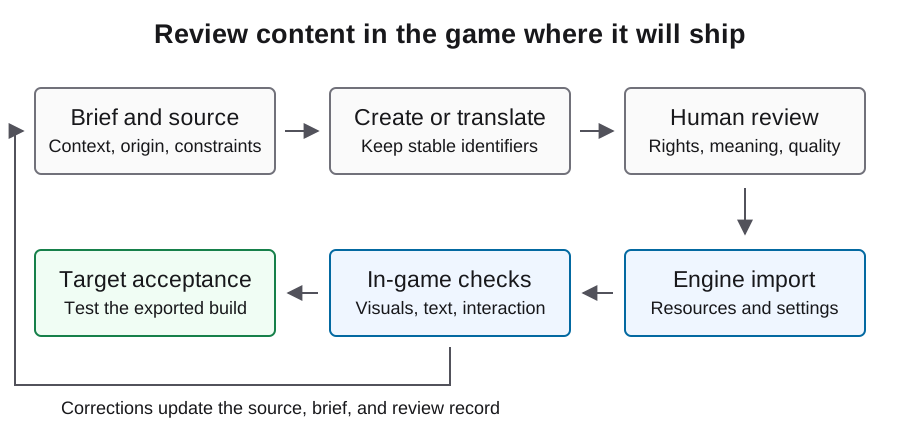
Game को जिस asset की आवश्यकता है उसे परिभाषित करें, उसका origin और permissions सुरक्षित रखें और release में रखने से पहले imported result को gameplay scale पर inspect करें।
Art generate करने से पहले asset contract लिखें
Game में asset का काम परिभाषित करें: player sprite, obstacle, background tile, button, sound cue या promotional material। Dimensions, transparency, frame layout, viewpoint, palette constraints और वह scale लिखें जिस पर इसे inspect किया जाएगा। इन्हें production inputs मानें, बाद में visually appealing image के fit होने की उम्मीद पर निर्भर न रहें।
Sprite sheet के लिए frame count, cell dimensions, origin और expected animation states तय करें। UI asset के लिए आसपास का text और interaction state पहचानें। Contract stable होने तक owned placeholder रखें, ताकि art iteration gameplay के काम करने या न करने को छिपा न दे।
Review योग्य permission basis वाला source चुनें
Possible sources में original commissioned work, self-authored assets, licensed pack या reviewed service terms के तहत बना generated material शामिल हो सकता है। Permissions, editability, consistency और review effort के आधार पर तुलना करें; बिना support के यह दावा न करें कि कोई एक source हमेशा सस्ता है।
Original source link और लागू license या agreement को asset record के साथ रखें। Attribution और redistribution requirements record करें। Generated material के inputs और output की भी review चाहिए; model access copied characters, marks या अन्य protected material की clearance सिद्ध नहीं करता। Rights अस्पष्ट हों तो distribution से पहले escalate करें, uncertainty को approved status में न बदलें।
| Source route | सुरक्षित रखने योग्य evidence | Technical review |
|---|---|---|
| Original work | Author और ownership record | Export settings और edit source |
| Licensed pack | License, source और attribution duties | Scale और import compatibility |
| Generated material | Tool identity, input rights और terms review | Consistency, cleanup और frame usability |
Coding और image production को attributable रखें
Astra coding experiment का subject हो सकता है, जबकि अलग image tool art तैयार कर सकता है। इन roles को स्वतंत्र रूप से record करें। Sprite माँगने वाला text instruction यह सिद्ध नहीं करता कि pixels किस service ने बनाए, और सफल code session image-service bill उपलब्ध नहीं कराता।
हर generated output के लिए actual image tool identity, जहाँ उपलब्ध हो वहाँ request record, generation settings, selected output और manual edits रखें। Failed या discarded attempts usage ledger में रखें। एक agent दोनों काम coordinate करे तब भी image work को text coding से अलग track करें, ताकि case में वास्तविक cost और human effort स्पष्ट हो।
ईमानदार unknowns वाली manifest रखें
Asset pipeline के लिए नीचे दिए illustrative record का उपयोग करें और review होने तक unknown fields को null रखें। Approval के लिए actual source, permission decision, file identity और technical review चाहिए। Output बदलते समय asset identifier stable रखें, ताकि नया file context inherit कर सके, लेकिन ऐसी approval inherit न करे जो earned नहीं है।
Raw material और final imported output को उसी asset identifier से link करें। कोई व्यक्ति background हटाए, animation frame repair करे या contrast बदले तो transformation record करें। इससे replacement, attribution review और debugging बाद में chat session की memory पर निर्भर नहीं रहेंगे।
{
  "asset_id": "player_idle",
  "source_url": null,
  "permission_record": null,
  "creator_or_tool": null,
  "source_hash": null,
  "final_file_hash": null,
  "transformations": [],
  "image_cost_record": null,
  "review_status": "pending",
  "import_result": null
}
केवल source file नहीं, engine import inspect करें
Godot की image-import documentation compression और mipmap choices बताती है, जो imported textures को प्रभावित करती हैं। Asset की वास्तविक display conditions के अनुसार settings चुनें; pixel art, scaled backgrounds और 3D textures के लिए एक universal preset नहीं होता। Accepted output में उपयोग की गई settings सुरक्षित रखें।
Transparent edges, unintended backgrounds, frame spacing और game के भीतर visual scale inspect करें। Collision representation की visible object से तुलना करें। Technically valid PNG भी unusable हो सकती है, यदि frames character की apparent position बदल दें या level के सामने sprite गायब हो जाए। Asset को कई scenes में फैलाने से पहले इन समस्याओं को reject करें।
Animation, sound और UI को context में review करें
Relevant action बार-बार चलाएँ और animation states के बीच transitions inspect करें। जाँचें कि visual timing collision और feedback से मेल खाती है। Frame-by-frame contact sheet inspection में सहायक हो सकती है, पर running animation और उसे trigger करने वाले player input को देखना उसका replacement नहीं है।
Audio के लिए level consistency, looping, timing और permission records को image checks से स्वतंत्र review करें। UI artwork के लिए intended resolutions पर focus, disabled states और text contrast verify करें। Failures को asset और behavior के अनुसार record करें, ताकि agent को actionable feedback मिले, केवल game को बेहतर दिखाने का अस्पष्ट request नहीं।
Exported artifact और disclosure inventory check करें
Verify करें कि accepted resources exported build में मौजूद हैं और review में स्वीकार किए गए तरीके से behave करते हैं। Implementation claim करते समय real artifact का screenshot या recording सुरक्षित रखें। Concept image या generated mockup को gameplay evidence का substitute न बनाएँ।
Shipping inventory में artwork, sound, narrative, localization और runtime output अलग दिखाएँ। Actual game के लिए क्या describe करना है, यह तय करने में Steam preparation guide और current Content Survey उपयोग करें। Complete internal asset record review में मदद करता है, लेकिन अपने आप platform approval या uncertain rights का समाधान सिद्ध नहीं करता।
Rework सहित accepted assets का budget रखें
Asset production को केवल generated files की संख्या से नहीं, accepted in-game results के विरुद्ध measure करें। Rejected generations, manual cleanup, import corrections और target-build rechecks record करें। Guide में price embed करने के बजाय actual provider billing categories और dates उपयोग करें।
Repeated generations एक ही technical requirement fail करें तो asset contract फिर देखें या gameplay solve करते समय original placeholder उपयोग करें। Undefined frame layout की भरपाई अधिक prompts नहीं कर सकते। ये procedures और manifest fields illustrative हैं; asset को accepted मानने या अगली production batch estimate करने से पहले actual files और लागू terms evaluate करें।
अक्सर पूछे जाने वाले प्रश्न
क्या Astra coding usage में game art की सभी costs शामिल हैं?
नहीं। Image और audio services को अलग attribute करें, भले agent उन्हें उसी task में invoke करे। Actual request और billing records उपयोग करें।
क्या suitable दिखने वाली कोई भी image उपयोग कर सकता हूँ?
उसका permission basis और technical fit review करें। केवल appearance distribution rights, usable animation या import behavior में से किसी को सिद्ध नहीं करती।
क्या transparent PNG finished sprite है?
नहीं, अभी scale, origin, frames, edges, collision fit और intended game के भीतर visibility की checks बाकी हैं।
Asset manifest में क्या होना चाहिए?
Origin, permission record, creator या tool identity, hashes, transformations, review state और import evidence। Missing information को स्पष्ट रूप से unknown रखें।
Asset को accepted कब mark करना चाहिए?
Permission record resolve होने, imported file का technical brief से match करने और target build में relevant behavior check होने के बाद।