AI game localization
Updated 2026-09-05
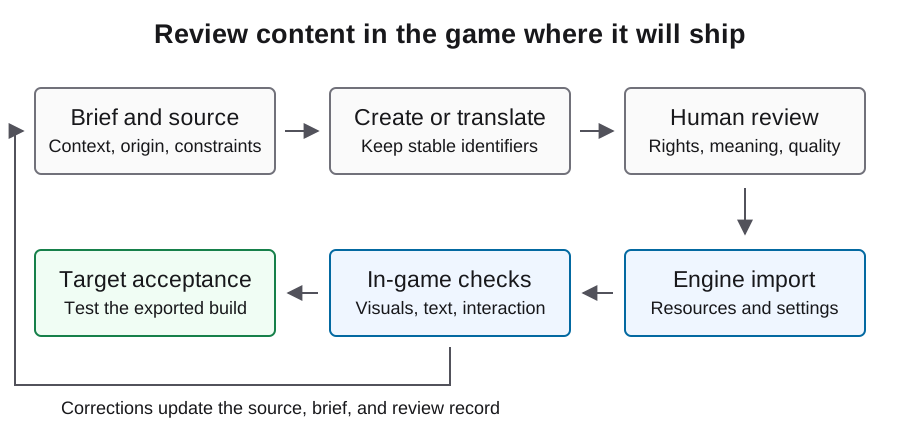
Translate a complete player journey, not a disconnected string list. Start with stable identifiers, preserve gameplay meaning, and review the result inside the exported game.
Extract the strings players actually encounter
Begin with one complete journey: title, settings, tutorial, gameplay feedback, win or loss, and restart. Include error messages and save prompts, not only dialogue. Give every message a stable key so revisions can be applied without guessing which identical English phrase a translator meant.
Store context beside the text: screen, speaker, action, tone, and space constraint. The word charge could refer to a price, an attack, or stored energy. A short context field prevents that ambiguity from spreading across a batch. Keep identifiers separate from prose and avoid renaming keys merely because the English wording changes.
Prepare a clean Godot source table
Godot documents CSV translation input with unique keys and language columns. A column beginning with an underscore can carry comments. The example is an original English source fixture; add target-locale columns after translation review. Use a CSV-aware editor or parser so quotes, commas, and line breaks remain valid.
Keep a terminology list for controls, items, and recurring mechanics. Tell the translator which terms are names and which may be adapted. Freeze the source revision before a batch, then track later changes by key. This lets you review changed messages instead of paying to regenerate every accepted line.
keys,en,_context
MENU_START,Start game,Title screen action
MENU_RESTART,Restart round,Shown after win or loss
SCORE_TOTAL,Score: {score},HUD; preserve the named placeholder
SAVE_FAILED,Progress could not be saved.,Error after a failed save
Protect placeholders and gameplay facts
Separate text that can change from values the game inserts at runtime. Godot supports translated strings with named formatting arguments, which let translators reorder a sentence while retaining its variables. The example assumes the translation resource is configured and score_label is an existing Label reference.
Validate the placeholder set, required keys, numbers embedded in instructions, and any markup used by your project. Ask a human reviewer to check meaning independently. A structurally valid translation can still reverse a control instruction or change the objective. Keep structural checks and language approval as separate outcomes so each failure reaches the right reviewer.
score_label.text = tr("SCORE_TOTAL").format({"score": score})Translate by context and review difficult messages
Batch related screens or conversations together so the model can preserve terminology and voice. Provide the source context, approved glossary, protected tokens, and intended audience with each batch. Request structured output keyed to the original identifiers, then reject missing or unexpected entries before merging.
Route ambiguous mechanics, humor, character voice, and culturally sensitive text to a competent language reviewer. Short button labels often require more judgment than long descriptive text because the available space is small. Preserve reviewer corrections as terminology or context updates where appropriate, so the next batch does not repeat the same misunderstanding.
Import and register the translations
After import, verify the intended translation resources under Godot's Project Settings, Localization, Translations. Do not infer successful registration merely from the presence of a CSV file. Use the documentation for your engine version and check the actual resource list.
Switch languages in the running project and visit the screens that use the new keys. If a key is displayed verbatim, inspect key spelling, resource registration, and selected locale. If text disappears, inspect the font and its required glyph coverage. Keep font permissions and fallback choices with the asset records, because a correct translation is useless when the build cannot render it.
Stress the layout before translating everything
Use Godot's pseudolocalization tooling to expose layout assumptions early. Then test actual reviewed target-language strings in the same screens. Long labels, multiple lines, right-to-left ordering, punctuation, and mixed numbers can reveal problems that a source-language screenshot does not show.
Review controls at the smallest supported window size and with the intended input method. Check that labels remain readable without covering neighboring controls and that the player can still reach essential actions. Test dialogue progression and subtitle timing as part of play, not only in a spreadsheet. Preserve screenshots from the actual build for issues that require visual judgment.
Keep store copy and language support consistent
Translate store descriptions from an approved feature inventory. Track interface text, subtitles, and audio support separately, and make the store representation match what the build actually provides. Do not let an attractive localized description promise a mode, platform, or accessibility feature that has not shipped.
Steam provides its own localization workflow and language settings. Reconcile these with the game's release package before submission. Include AI-assisted player-facing translations in the product's contribution inventory for the current Content Survey review. Store publishing is a separate action from preparing a localization file, so keep review and publication responsibilities explicit.
Accept a localized journey, then maintain the delta
For each target locale, run the chosen player journey through a complete round and relaunch with the language preference preserved as designed. Record missing keys, formatting defects, visual issues, and semantic corrections against the source revision and build. Accept the locale only when the relevant reviewers have resolved those findings.
On later updates, invalidate translations for changed source meaning while retaining unchanged approved entries. This guide provides documentation-backed steps and illustrative fixtures; it does not report an executed localization result. Use the small journey as your first validation scope before expanding to the full script or additional languages.
FAQ
Should I send the entire game script in one request?
Start with coherent scenes or screens and a shared glossary. Validate returned keys and review a complete player journey before expanding the batch.
Can a model rename translation keys?
Keep keys stable and separate from editable text. Rename them only as an intentional code and content migration, not a translation side effect.
Why does the game display a key instead of a translation?
Check the selected locale, exact key, and registered translation resources. A CSV file existing in the project is not enough to diagnose the problem.
Does pseudolocalization establish translation quality?
It helps expose layout and localization problems. Actual target-language meaning still needs language review and in-game testing.
Should store language claims follow the translation spreadsheet?
They should follow the tested build. Track interface, subtitles, and audio separately and reconcile them with the store settings.