การแปลเกมด้วย AI
Updated 2026-09-05
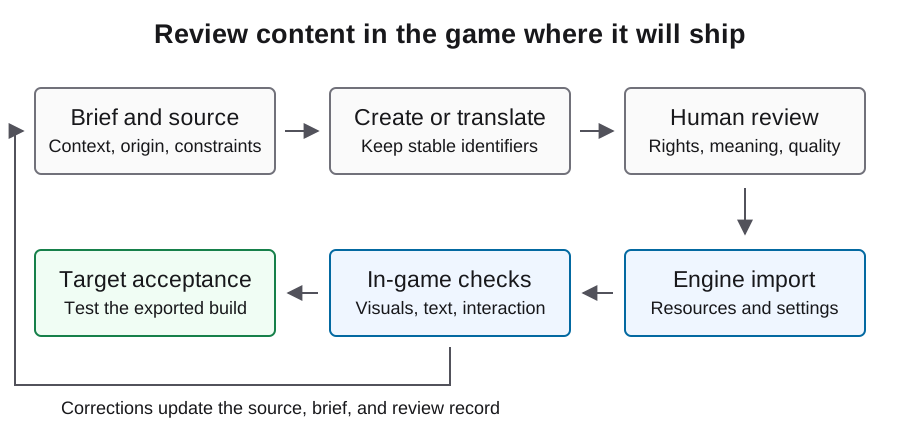
แปลเส้นทางของผู้เล่นให้ครบ ไม่ใช่รายการ string ที่แยกขาด เริ่มด้วย stable identifiers รักษาความหมาย gameplay และรีวิวผลในเกมที่ export แล้ว
ดึง string ที่ผู้เล่นจะพบจริง
เริ่มจาก journey ที่ครบหนึ่งชุด: title, settings, tutorial, gameplay feedback, win หรือ loss และ restart รวม error messages และ save prompts ไม่ใช่เฉพาะ dialogue ให้ทุก message มี stable key เพื่อใช้ revision โดยไม่ต้องเดาว่านักแปลหมายถึงวลีภาษาอังกฤษที่เหมือนกันรายการใด
เก็บ context ข้าง text: screen, speaker, action, tone และ space constraint คำว่า charge อาจหมายถึงราคา การโจมตี หรือพลังงานที่เก็บไว้ context field สั้นๆ ป้องกันความกำกวมกระจายทั้ง batch แยก identifiers จาก prose และอย่าเปลี่ยนชื่อ key เพียงเพราะ wording ภาษาอังกฤษเปลี่ยน
เตรียม source table ของ Godot ให้สะอาด
Godot มีเอกสาร translation input แบบ CSV ที่ใช้ unique keys และ language columns คอลัมน์ที่ขึ้นต้นด้วย underscore ใส่ comments ได้ ตัวอย่างนี้เป็น English source fixture ต้นฉบับ ให้เพิ่ม target-locale columns หลัง translation review ใช้ editor หรือ parser ที่เข้าใจ CSV เพื่อคง quotes, commas และ line breaks
ทำ terminology list สำหรับ controls, items และ recurring mechanics บอกนักแปลว่าคำใดเป็นชื่อและคำใดปรับได้ freeze source revision ก่อน batch แล้วติดตามการเปลี่ยนตาม key วิธีนี้ทำให้รีวิวเฉพาะ message ที่เปลี่ยน แทนการจ่ายเพื่อสร้างทุกบรรทัดที่เคยรับรองใหม่
keys,en,_context
MENU_START,Start game,Title screen action
MENU_RESTART,Restart round,Shown after win or loss
SCORE_TOTAL,Score: {score},HUD; preserve the named placeholder
SAVE_FAILED,Progress could not be saved.,Error after a failed save
ปกป้อง placeholders และข้อเท็จจริง gameplay
แยก text ที่เปลี่ยนได้จากค่าที่เกมใส่ตอน runtime Godot รองรับ translated strings ที่มี named formatting arguments ทำให้นักแปลเรียงประโยคใหม่ได้โดยคงตัวแปร ตัวอย่างสมมติว่า translation resource ตั้งค่าแล้วและ score_label เป็น Label reference ที่มีอยู่
ตรวจ placeholder set, required keys, ตัวเลขใน instructions และ markup ที่โปรเจกต์ใช้ ให้ human reviewer ตรวจความหมายอย่างอิสระ translation ที่ถูกต้องทางโครงสร้างยังอาจกลับคำสั่ง control หรือเปลี่ยน objective แยก structural checks และ language approval เป็นผลลัพธ์คนละแบบเพื่อส่ง failure ให้ reviewer ที่ถูกต้อง
score_label.text = tr("SCORE_TOTAL").format({"score": score})แปลตามบริบทและรีวิว message ที่ยาก
รวม screen หรือ conversation ที่เกี่ยวข้องใน batch เดียวเพื่อให้โมเดลรักษา terminology และ voice ให้ source context, approved glossary, protected tokens และ intended audience กับทุก batch ขอ structured output ที่ใช้ original identifiers เป็น key แล้วปฏิเสธรายการที่หายหรือเกินก่อน merge
ส่ง mechanics ที่กำกวม humor, character voice และข้อความที่ละเอียดอ่อนทางวัฒนธรรมให้ language reviewer ที่มีความสามารถ ปุ่มสั้นๆ มักต้องใช้ judgment มากกว่า descriptive text ยาวเพราะพื้นที่น้อย เก็บ reviewer corrections เป็น terminology หรือ context updates เมื่อเหมาะสม เพื่อไม่ให้ batch ถัดไปเข้าใจผิดซ้ำ
Import และ register translations
หลัง import ให้ตรวจ translation resources ที่ตั้งใจไว้ใน Godot Project Settings, Localization, Translations อย่าคิดว่าลงทะเบียนสำเร็จเพียงเพราะมี CSV ใช้เอกสารตาม engine version และตรวจ resource list จริง
เปลี่ยนภาษาในโปรเจกต์ที่กำลังรันและไปยัง screen ที่ใช้ key ใหม่ หากแสดง key ตรงๆ ให้ตรวจ spelling ของ key, resource registration และ locale ที่เลือก หาก text หายให้ตรวจ font และ glyph coverage ที่ต้องใช้ เก็บ font permissions และ fallback choices กับ asset records เพราะ translation ที่ถูกต้องไร้ประโยชน์หาก build render ไม่ได้
ทดสอบ layout ก่อนแปลทั้งหมด
ใช้ pseudolocalization tooling ของ Godot เพื่อเปิดเผย layout assumptions ตั้งแต่ต้น จากนั้นทดสอบ target-language strings ที่รีวิวจริงใน screen เดิม label ยาว หลายบรรทัด ลำดับขวาไปซ้าย punctuation และตัวเลขผสมอาจเผยปัญหาที่ source-language screenshot ไม่แสดง
รีวิว controls ที่ขนาดหน้าต่างเล็กที่สุดที่รองรับและ input method ที่ตั้งใจ ตรวจว่า label อ่านได้ ไม่บัง controls ข้างเคียง และ player ยังเข้าถึง action สำคัญได้ ทดสอบ dialogue progression และ subtitle timing ระหว่างเล่น ไม่ใช่แค่ใน spreadsheet เก็บ screenshot จาก build จริงสำหรับปัญหาที่ต้องใช้ judgment ทางภาพ
รักษา store copy และ language support ให้สอดคล้อง
แปล store descriptions จาก feature inventory ที่อนุมัติแล้ว ติดตาม interface text, subtitles และ audio support แยกกัน และทำให้ store representation ตรงกับสิ่งที่ build มีจริง อย่าให้ description ที่แปลสวยสัญญา mode, platform หรือ accessibility feature ที่ยังไม่ได้ส่ง
Steam มี localization workflow และ language settings ของตัวเอง กระทบยอดกับ release package ของเกมก่อน submission รวม AI-assisted player-facing translations ใน contribution inventory ของผลิตภัณฑ์สำหรับ Content Survey review ปัจจุบัน การเผยแพร่ store เป็น action แยกจากการเตรียม localization file จึงต้องระบุความรับผิดชอบด้าน review และ publication ให้ชัด
รับรอง journey ที่แปลแล้ว แล้วดูแล delta
สำหรับแต่ละ target locale ให้รัน player journey ที่เลือกจนจบรอบ และ relaunch โดยคง language preference ตาม design บันทึก missing keys, formatting defects, visual issues และ semantic corrections เทียบกับ source revision และ build รับรอง locale เมื่อ reviewer ที่เกี่ยวข้องแก้ findings แล้วเท่านั้น
ในการอัปเดตภายหลัง invalidate translations ที่ความหมาย source เปลี่ยน และเก็บ approved entries ที่ไม่เปลี่ยน คู่มือนี้ให้ขั้นตอนตามเอกสารและ fixtures ตัวอย่าง ไม่ได้รายงานผล localization ที่ execute แล้ว ใช้ journey ขนาดเล็กเป็น validation scope แรกก่อนขยายไปทั้ง script หรือภาษาเพิ่มเติม
คำถามที่พบบ่อย
ควรส่ง game script ทั้งหมดใน request เดียวหรือไม่?
เริ่มจาก scene หรือ screen ที่เป็นกลุ่มเดียวกันและ glossary ร่วม ตรวจ returned keys และรีวิว player journey ที่ครบก่อนขยาย batch
ให้โมเดลเปลี่ยนชื่อ translation keys ได้หรือไม่?
คง key ให้เสถียรและแยกจาก editable text เปลี่ยนชื่อเฉพาะเป็น code และ content migration ที่ตั้งใจ ไม่ใช่ผลข้างเคียงของ translation
ทำไมเกมแสดง key แทน translation?
ตรวจ locale ที่เลือก key ที่ตรง และ translation resources ที่ register แล้ว การมี CSV อยู่ในโปรเจกต์ไม่พอสำหรับวินิจฉัย
pseudolocalization ยืนยันคุณภาพ translation หรือไม่?
ช่วยเผย layout และ localization problems ความหมายของ target language จริงยังต้องผ่าน language review และ in-game testing
store language claims ควรตาม translation spreadsheet หรือไม่?
ควรตาม build ที่ทดสอบ แยก interface, subtitles และ audio แล้วกระทบยอดกับ store settings