AI game development
Updated 2026-09-05
Build a small playable loop, choose tools that expose real engine feedback, and carry the result through assets, localization, and a tested export.
Start with a complete small game loop
A useful first target is a single activity with an observable beginning and ending: start a round, move or choose, encounter a challenge, reach a win or loss, and restart. Specify what the player sees at each transition before asking an agent to write files. A polished title screen cannot establish that the loop works.
Choose one target platform and a small set of input devices. Treat additional levels, networking, and procedural content as later scope. This keeps a failed prototype diagnosable: you can distinguish a broken collision rule from an unfinished feature instead of repeatedly expanding the prompt.
Choose the workflow, then the engine
For an original small 2D project, start by evaluating Godot's documented CLI for an inspect-edit-run loop. Unity is a useful starting point when an existing project or team already depends on its editor workflow. Your ability to maintain the result should guide the choice as much as the first prototype.
Compare the work required to reproduce a failure on your machine. The best starting point is the one whose project structure, build prerequisites, and errors you can explain. An agent does not remove responsibility for engine upgrades or third-party packages.
| Route | Useful starting condition | First decision gate |
|---|---|---|
| Godot project | Small original 2D loop | Can the declared scene run and restart? |
| Unity project | Existing Unity knowledge or dependencies | Can the selected editor compile and run the slice? |
| Engine plus MCP | Need structured editor feedback | Can the client identify the intended project? |
Keep model access separate from engine tools
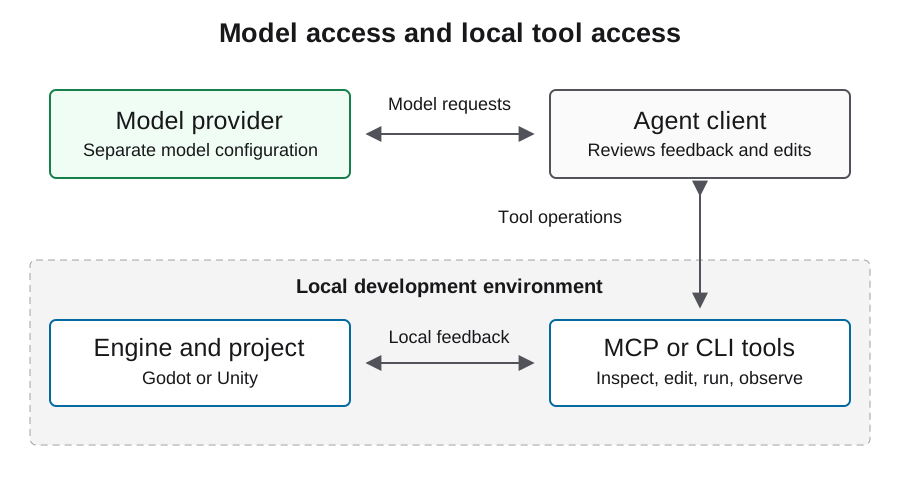
The agent has two different connections: a model service that produces reasoning and edits, and local tools that inspect or operate the project. Godot MCP and Unity MCP belong to the tool side. Installing either does not choose a model provider or prove a gateway integration.
Choose the model connection in your agent client and the engine connection in its tool settings. Verify each independently with a small operation. When a local project path is wrong, fix that path; changing the model endpoint will not make the intended scene appear.
Make the first brief testable
Name the required scenes, player actions, state transitions, and persistence behavior. Ask for the smallest implementation that satisfies those requirements and for an explicit list of unresolved decisions. Use the illustrative brief below as a starting point and replace its scope with the game you actually want.
Record the initial brief unchanged. When you add a requirement, label it as a scope change. When you explain a failure or edit a file yourself, label that as an intervention. This preserves the difference between one initial prompt and the many model and tool iterations that can follow.
Deliver one original 2D room with start, play, win/loss, and restart states.
Use project-owned placeholder art. Preserve the chosen engine version.
Record each edit, tool result, failed check, and human intervention.
Stop before downloads, purchases, uploads, or publishing.
Report unfinished requirements with their reproduction steps.
Work in reviewable changes
Ask for one behavior at a time after the initial scaffold: movement, then collision, then the end-of-round transition. Review the changed files and run the same acceptance path after each change. Preserve a known working project state before adding external packages or modifying import settings.
An agent should receive the relevant error, scene context, and observed behavior, not just a request to try harder. When the same symptom survives repeated edits, stop and isolate the boundary. A missing imported resource and a wrong node reference need different fixes even when both produce an empty scene.
Treat assets and localization as production inputs
Keep an asset manifest with source, permission, author or tool identity, modifications, and intended use. Review sprites at gameplay scale, including transparency, frame alignment, contrast, and collision fit. A plausible image is not automatically a usable sprite sheet.
Keep player-facing strings addressable by stable identifiers. Supply translation context and protect formatting arguments. Images, audio, fonts, and translated text each need review before distribution. Record image-generation expenditure independently from text-model coding work; neither an asset license nor an engine license establishes rights to every file in a project.
Prove each delivery state independently
A playable demo requires a person to complete its intended loop. An export requires a generated artifact. A tested export additionally requires launching that artifact on its target platform. Steam submission and release are later platform states. Use those labels precisely when sharing progress.
Preserve build identity, test inputs, screenshots from actual play, and the failures that remain. A browser capture should show changing gameplay after input, not merely a loading screen. A Windows executable exported on another OS still needs Windows verification. See the Steam guide for its separate account and scheduling requirements.
What the Playco example shows about the workflow
OpenAI's September 3, 2026 customer story describes Playco using Astra in Playbot, an IDE connected to game engines. The team iterated on a grey-box foundation before producing themed prototypes. This is a vendor-published customer account, not an APIsRouter benchmark.
The practical takeaway is the workflow shape: establish the playable mechanics, then vary presentation while preserving a shared baseline. Keep creative preferences separate from defect fixes so you can see what each iteration accomplished. Read the original account for its reported outcomes rather than treating them as a forecast for your own game.
Inspect a local Godot prototype
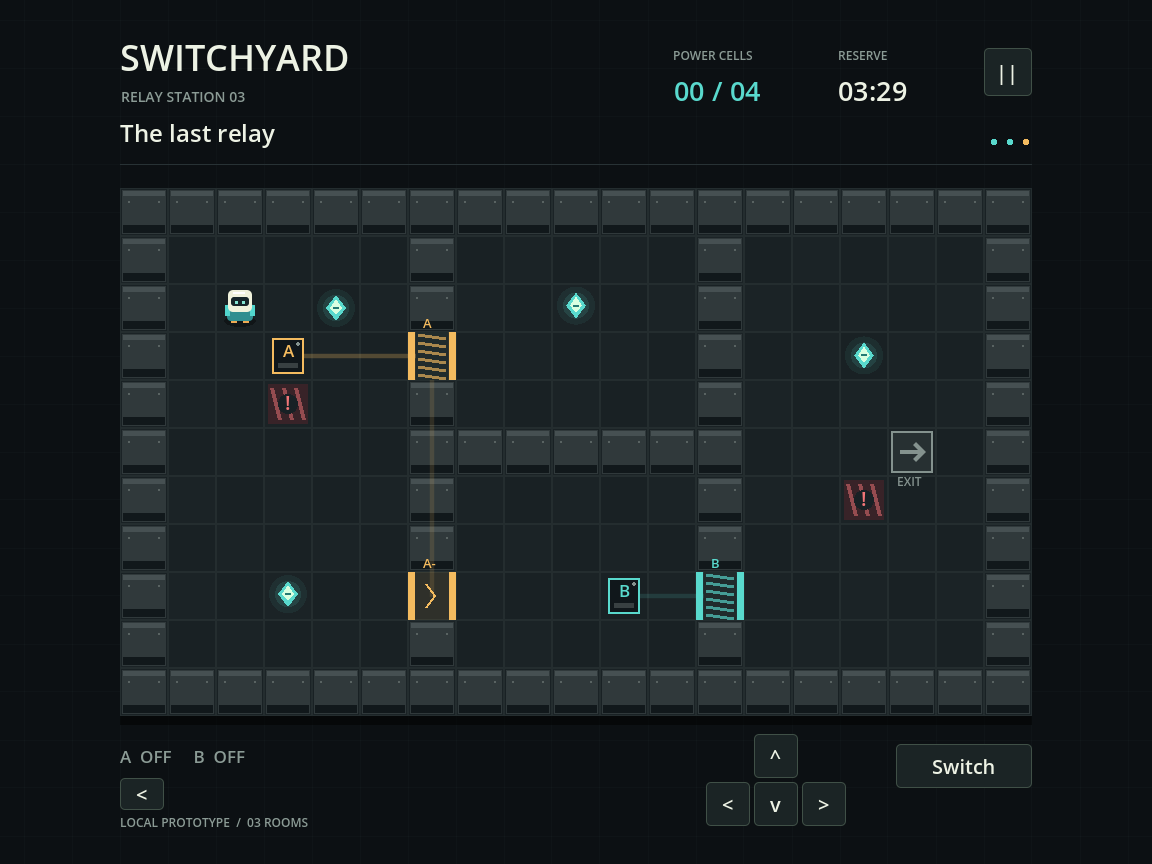
Switchyard is a small three-room circuit puzzle produced in a local Codex development run. The source project includes character movement, switches, doors, collectible cells, room completion, loss and restart, settings, and persisted progress. Automated engine checks exercised the gameplay loop and a separate process reopened the save. The screenshot below is an actual Godot viewport capture, not concept art.
The recorded run used Godot 4.5.1. Its model identity and API billing were not observable, so it is not presented as an Astra performance or cost benchmark. The downloadable source and PCK demonstrate the local project; the PCK requires Godot. A standalone Windows build, browser export, human playtest and Steam release remain separate work. This example shows the concrete artifacts to ask an agent for before making a delivery claim.
Choose the next guide by your bottleneck
Start with engine selection if your environment is undecided, the MCP setup pages if tool discovery fails, or the debugging guide if the project opens but behaves incorrectly. Use the cost guide when repeated repairs dominate spending; shrinking scope may matter more than changing the model.
These guides provide source-backed workflows and illustrative examples, not a measured engine ranking. The linked Astra experiment explains the evidence needed for its specific case. For your own project, choose the next step that resolves a concrete blocker and preserve its result before expanding the game.
FAQ
Can one prompt make a complete game?
One initial brief can start a workflow with many model calls, tool actions, and human corrections. Judge completeness against the original acceptance criteria and disclose those iterations.
Do I need MCP to use an agent?
Not necessarily. A client with file and shell tools can support a CLI workflow. MCP offers another tool interface whose project targeting and permissions still need verification.
Where should I begin if the game opens but does not work?
Use the debugging guide to separate startup, input, state, and rendering problems. Give the agent a reproducible player action and the first relevant engine error.
Will players consume my development API budget?
Ordinary exported game logic does not call a model simply because AI helped write it. Runtime model features are a separate service design and budget.
What should I keep from a failed prototype?
Keep the original brief, environment identity, last reproducible project state, errors, interventions, and usage evidence. Failed work is part of the production record.