AI गेम डेवलपमेंट
Updated 2026-09-05
छोटा playable loop बनाएँ, ऐसे tools चुनें जो वास्तविक engine feedback दिखाएँ और result को assets, localization तथा tested export तक ले जाएँ।
Complete छोटे game loop से शुरुआत करें
पहला उपयोगी target ऐसी single activity है जिसका beginning और ending दिखाई दे: round शुरू करें, move या choose करें, challenge का सामना करें, win या loss तक पहुँचें और restart करें। Agent से files लिखवाने से पहले हर transition पर player क्या देखेगा, यह तय करें। Polished title screen loop के काम करने का प्रमाण नहीं दे सकती।
एक target platform और input devices का छोटा set चुनें। Additional levels, networking और procedural content को बाद के scope में रखें। इससे failed prototype diagnose किया जा सकेगा: बार-बार prompt बढ़ाने के बजाय broken collision rule और unfinished feature अलग पहचाने जा सकेंगे।
पहले workflow, फिर engine चुनें
Original छोटे 2D project के लिए inspect-edit-run loop हेतु Godot के documented CLI का evaluation करें। Existing project या team पहले से editor workflow पर निर्भर हो तो Unity उपयोगी starting point है। Choice केवल first prototype से नहीं, result maintain करने की आपकी ability से भी तय होनी चाहिए।
अपने machine पर failure reproduce करने के लिए आवश्यक work compare करें। सबसे अच्छा starting point वह है जिसकी project structure, build prerequisites और errors आप समझा सकें। Agent engine upgrades या third-party packages की जिम्मेदारी खत्म नहीं करता।
| Route | Useful starting condition | First decision gate |
|---|---|---|
| Godot project | Small original 2D loop | क्या declared scene run और restart हो सकता है? |
| Unity project | Existing Unity knowledge या dependencies | क्या selected editor slice compile और run कर सकता है? |
| Engine plus MCP | Structured editor feedback की आवश्यकता | क्या client intended project पहचान सकता है? |
Model access को engine tools से अलग रखें
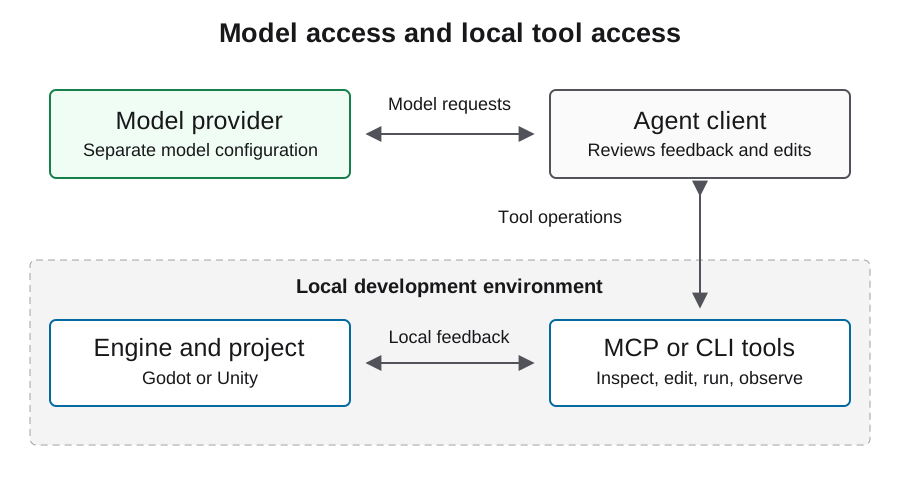
Agent के पास दो अलग connections होते हैं: reasoning और edits करने वाली model service तथा project inspect या operate करने वाले local tools। Godot MCP और Unity MCP tool side में हैं। इनमें से किसी को install करने से model provider चयनित नहीं होता और gateway integration सिद्ध नहीं होती।
Model connection agent client में और engine connection उसकी tool settings में चुनें। दोनों को छोटी operation से independently verify करें। Local project path गलत हो तो उसे ठीक करें; model endpoint बदलने से intended scene दिखाई नहीं देगी।
पहले brief को testable बनाएँ
Required scenes, player actions, state transitions और persistence behavior का नाम लिखें। Agent से ऐसा smallest implementation माँगें जो requirements पूरी करे और unresolved decisions की explicit list भी दे। नीचे दिया illustrative brief starting point है; उसका scope अपने actual game के अनुसार बदलें।
Initial brief को unchanged record करें। Requirement जोड़ें तो उसे scope change label दें। Failure समझाएँ या file स्वयं edit करें तो intervention label दें। इससे one initial prompt और उसके बाद होने वाले अनेक model तथा tool iterations के बीच का अंतर सुरक्षित रहता है।
Deliver one original 2D room with start, play, win/loss, and restart states.
Use project-owned placeholder art. Preserve the chosen engine version.
Record each edit, tool result, failed check, and human intervention.
Stop before downloads, purchases, uploads, or publishing.
Report unfinished requirements with their reproduction steps.
Review योग्य changes में काम करें
Initial scaffold के बाद एक समय में एक behavior माँगें: movement, फिर collision, फिर end-of-round transition। Changed files review करें और हर change के बाद वही acceptance path चलाएँ। External packages जोड़ने या import settings बदलने से पहले known working project state सुरक्षित रखें।
Agent को केवल harder try करने को न कहें; उसे relevant error, scene context और observed behavior दें। वही symptom repeated edits के बाद भी रहे तो रुकें और boundary isolate करें। Missing imported resource और wrong node reference को अलग fixes चाहिए, भले दोनों empty scene दें।
Assets और localization को production inputs मानें
Source, permission, author या tool identity, modifications और intended use वाली asset manifest रखें। Gameplay scale पर sprites review करें, जिसमें transparency, frame alignment, contrast और collision fit शामिल हों। Plausible image अपने आप usable sprite sheet नहीं होती।
Player-facing strings को stable identifiers से address योग्य रखें। Translation context दें और formatting arguments सुरक्षित रखें। Distribution से पहले images, audio, fonts और translated text हर एक की review करें। Image-generation खर्च को text-model coding work से अलग record करें; asset license या engine license project की हर file के rights सिद्ध नहीं करता।
हर delivery state को स्वतंत्र रूप से prove करें
Playable demo के लिए व्यक्ति को intended loop पूरा करना होगा। Export के लिए generated artifact चाहिए। Tested export के लिए उस artifact को target platform पर launch करना भी आवश्यक है। Steam submission और release बाद की platform states हैं। Progress share करते समय इन labels का सटीक उपयोग करें।
Build identity, test inputs, actual play के screenshots और remaining failures सुरक्षित रखें। Browser capture input के बाद बदलता gameplay दिखाए, केवल loading screen नहीं। किसी दूसरे OS पर exported Windows executable को Windows verification फिर भी चाहिए। Steam guide में उसके अलग account और scheduling requirements देखें।
Playco example workflow के बारे में क्या दिखाता है
OpenAI की September 3, 2026 customer story Playco को game engines से जुड़े IDE Playbot में Astra का उपयोग करते हुए describe करती है। Team ने themed prototypes बनाने से पहले grey-box foundation पर iterations कीं। यह vendor-published customer account है, APIsRouter benchmark नहीं।
Practical takeaway workflow का shape है: पहले playable mechanics स्थापित करें, फिर shared baseline बचाते हुए presentation बदलें। Creative preferences को defect fixes से अलग रखें, ताकि हर iteration का परिणाम दिखाई दे। Reported outcomes के लिए original account पढ़ें; उन्हें अपने game का forecast न मानें।
Local Godot prototype inspect करें
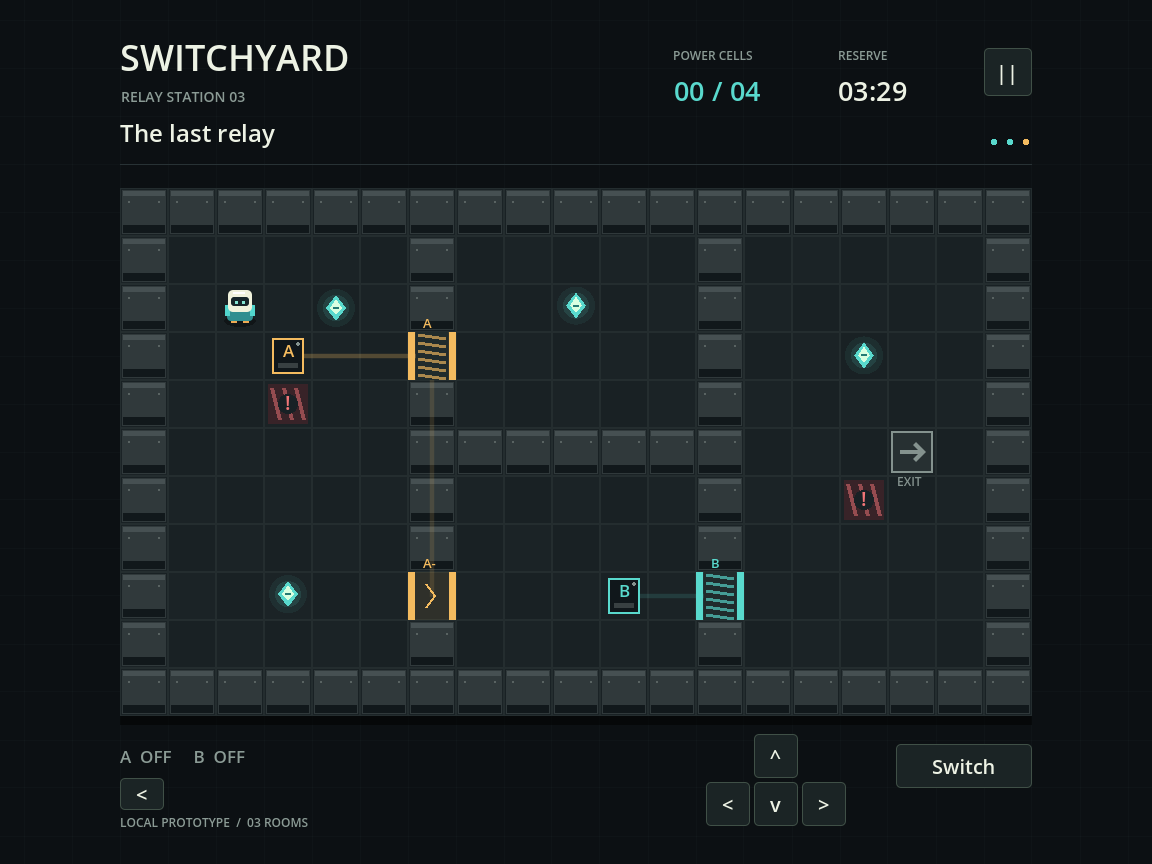
Switchyard local Codex development run में बना छोटा three-room circuit puzzle है। Source project में character movement, switches, doors, collectible cells, room completion, loss और restart, settings तथा persisted progress शामिल हैं। Automated engine checks ने gameplay loop exercise किया और अलग process ने save reopen किया। नीचे का screenshot actual Godot viewport capture है, concept art नहीं।
Recorded run में Godot 4.5.1 उपयोग हुआ। Model identity और API billing observable नहीं थे, इसलिए इसे Astra performance या cost benchmark की तरह प्रस्तुत नहीं किया गया है। Downloadable source और PCK local project दिखाते हैं; PCK के लिए Godot चाहिए। Standalone Windows build, browser export, human playtest और Steam release अलग work हैं। यह example delivery claim करने से पहले agent से माँगे जाने वाले concrete artifacts दिखाता है।
अपने bottleneck के अनुसार अगली guide चुनें
Environment undecided हो तो engine selection से शुरू करें, tool discovery fail हो तो MCP setup pages देखें और project open होकर गलत behavior करे तो debugging guide उपयोग करें। Repeated repairs spending पर हावी हों तो cost guide देखें; scope घटाना model बदलने से अधिक महत्वपूर्ण हो सकता है।
ये guides source-backed workflows और illustrative examples देती हैं, measured engine ranking नहीं। Linked Astra experiment उसके specific case के लिए आवश्यक evidence समझाता है। अपने project में वह अगला step चुनें जो concrete blocker हटाए और game बढ़ाने से पहले उसका result सुरक्षित रखें।
अक्सर पूछे जाने वाले प्रश्न
क्या एक prompt complete game बना सकता है?
One initial brief कई model calls, tool actions और human corrections वाला workflow शुरू कर सकता है। Completeness को original acceptance criteria के विरुद्ध judge करें और उन iterations को disclose करें।
क्या agent उपयोग करने के लिए MCP आवश्यक है?
जरूरी नहीं। File और shell tools वाला client CLI workflow support कर सकता है। MCP एक अन्य tool interface देता है, जिसकी project targeting और permissions फिर verify करनी होंगी।
Game open हो लेकिन काम न करे तो कहाँ से शुरू करूँ?
Debugging guide से startup, input, state और rendering problems अलग करें। Agent को reproducible player action और पहला relevant engine error दें।
क्या players मेरा development API budget खर्च करेंगे?
Ordinary exported game logic केवल इसलिए model call नहीं करती कि उसे AI ने लिखने में मदद की। Runtime model features अलग service design और budget हैं।
Failed prototype से क्या बचाकर रखूँ?
Original brief, environment identity, last reproducible project state, errors, interventions और usage evidence रखें। Failed work production record का हिस्सा है।