AI-assisted games के लिए Godot बनाम Unity
Updated 2026-09-05
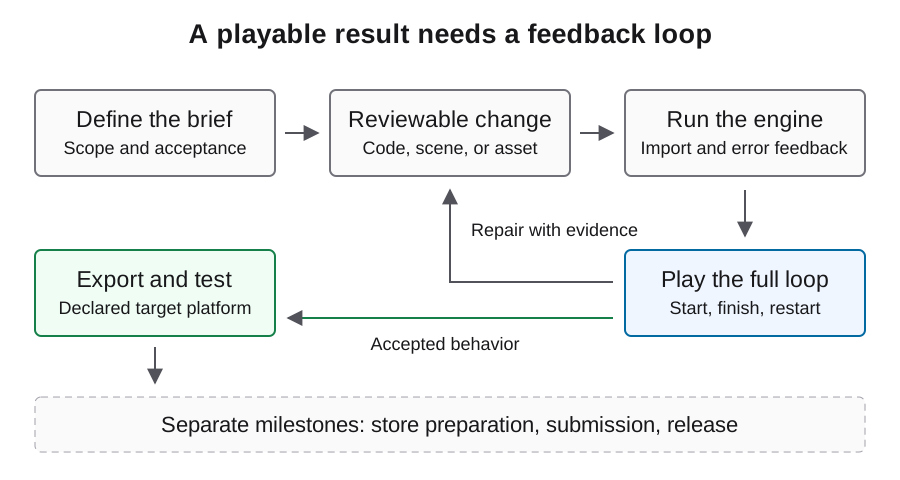
Original छोटे 2D project के लिए Godot और existing code, assets या team skills के कारण natural home बनने पर Unity का मूल्यांकन करें। Complete production loop की तुलना करें।
Recommendation आपके starting point पर निर्भर है
Original छोटे 2D project के लिए पहले Godot और narrow desktop target का मूल्यांकन करें। उसका CLI edit-and-observe workflow चलाने का स्पष्ट तरीका देता है। जब यह workflow आपकी skills और requirements से मेल खाए, तब इसे चुनें और बड़े prototype में निवेश करने से पहले target export validate करें।
यदि आप पहले से Unity project maintain करते हैं, तो पहले उसी project के भीतर agent assistance का मूल्यांकन करें। केवल model आजमाने के लिए scenes, assets और team habits migrate करना दूसरा experiment जोड़ता है। यह जाँचते समय engine को stable रखें कि agent छोटा उपयोगी change बना और verify कर सकता है या नहीं।
Marketing labels नहीं, automation boundaries की तुलना करें
दोनों routes को engine environment और उचित permissions वाले agent की आवश्यकता है। Code लिख सकने वाला model केवल एक component है। तुलना करें कि operator project की पहचान कैसे करता है, errors देखता है, changes review करता है और target build प्राप्त करता है।
Table feature score के बजाय decision questions दर्ज करती है। CLI तब उपयोगी है जब उसका output failure को सही जगह तक सीमित करे; editor automation तब उपयोगी है जब relevant state scenes या inspector settings में रहती है। इनमें से कोई भी game की स्वयं review करने की आवश्यकता समाप्त नहीं करता। चुने हुए version को verify करने के लिए linked official documentation देखें।
| Decision | Godot route | Unity route |
|---|---|---|
| Project access | Explicit project directory | Selected editor project और instance |
| Automation entry | Documented CLI; optional Godot MCP | Editor CLI; optional Unity MCP |
| Build prerequisites | Preset और export templates | Project build setup और target modules |
| Acceptance evidence | Playable loop और target export check | Playable loop और target player check |
| Best baseline | Known scope वाला original छोटा project | उपलब्ध होने पर existing project conventions |
Agent को मिलने वाले feedback का मूल्यांकन करें
एक representative failure लिखें, जैसे restart button का response न देना, और पहचानें कि diagnosis के लिए कौन-सी जानकारी चाहिए। Agent को scene references, input event, state variables और runtime error की आवश्यकता हो सकती है। जाँचें कि चुने हुए tools यह context भरोसेमंद ढंग से दे सकते हैं या नहीं।
बड़े tool inventory को बेहतर debugging का evidence न मानें। सही project state लौटाने वाला narrow tool, अस्पष्ट editor instance पर किए गए कई actions से अधिक उपयोगी हो सकता है। Failed reads, stale observations और manual context gathering को experiment effort का हिस्सा record करें।
Fair same-task trial तैयार करें
एक ही original game brief, acceptance criteria, target device, asset baseline, time policy और model access conditions रखें। Engine-specific implementation freedom बनाए रखें, लेकिन किसी version को required behavior छोड़ने न दें। पहले तय करें कि setup time और prior engine knowledge कैसे report किए जाएंगे।
नीचे प्रस्तावित trial record में unknown values जानबूझकर रखे गए हैं। इन्हें केवल executed run से भरें। Workflow को human repair चाहिए तो उस सहायता को visible रखें। यदि एक engine को चुपचाप finished controller मिले और दूसरा उसे scratch से बनाए, तो comparison engine fit नहीं बल्कि अलग starting assets मापती है।
{
  "brief_hash": null,
  "engine_version": null,
  "agent_model_identity": null,
  "target_platform": null,
  "acceptance_passed": null,
  "human_interventions": null,
  "actual_api_cost": null,
  "artifact_hash": null
}
Export risk को जल्दी test करें
Prototype बढ़ाने से पहले स्थापित करें कि selected environment intended target artifact बना सकता है। अंत में मिला export prerequisite schedule को invalid कर सकता है, भले editor demo playable हो। इसे model-quality score के बजाय अलग readiness check मानें।
फिर artifact को real target पर launch करें। Editor success, artifact creation और target acceptance को अलग columns में रखें। Web delivery में browser loading, input और runtime errors शामिल करें। Desktop delivery में development environment के बाहर startup और persistence verify करें। समान output filename का अर्थ समान supported runtime behavior नहीं होता।
Assets और team maintenance को हिसाब में रखें
Engines की तुलना से पहले existing assets के rights, import behavior और editing requirements inspect करें। Established animations, materials और review tools वाले project की migration cost empty prototype से अलग होती है। Engine कोई भी हो, generated art को technical cleanup और provenance की जरूरत रहती है।
Initial experiment के बाद result कौन maintain करेगा, यह सोचें। Review योग्य scripts, predictable scene organization और reproducible build पहली generated screenshot से अधिक महत्वपूर्ण हो सकते हैं। Handoff package से एक defect reproduce करने को maintainer से कहें; इसमें लगा effort workflow quality का evidence है जिसे feature matrix नहीं दे सकती।
Setup को free मानकर task cost न मापें
API billing, engine setup, local build time और human review अलग रखें। Project budget के लिए इन्हें जोड़ें तो labor assumptions और currencies स्पष्ट लिखें। Failed requests और abandoned repairs सुरक्षित रखें। महँगा दिखने वाला call बाद का काम घटा सकता है, लेकिन उस hypothesis को केवल complete acceptance path ही test कर सकता है।
Prompt length से task budget extrapolate न करें और subscription activity की तुलना fabricated per-run API bill से न करें। Model rates actual provider और dated billing record से आते हैं। Cost guide hardcoded prices या assumed engine winner के बिना measurement structure देती है।
Reversible engine decision लें
वह route चुनें जिसका सबसे छोटा trial आपके current environment और team के साथ reproduce किया जा सके। वे evidence पहले परिभाषित करें जिनसे आप निर्णय बदलेंगे: missing target support, inaccessible project state, repeated opaque failures या unacceptable maintenance work। Thresholds को project से जोड़ें, AI game makers के general claims से नहीं।
यह comparison source-backed selection framework है, measured same-task ranking नहीं। Relevant workflow और MCP page review करें, फिर migration या बड़े asset investment से पहले contained trial चलाएँ। Results को अपने brief और environment से बाँधें, ताकि अगला engine decision आपकी वास्तविक production needs के evidence पर आधारित हो।
अक्सर पूछे जाने वाले प्रश्न
क्या model choice से engine तय होना चाहिए?
Project requirements और team knowledge से शुरुआत करें। फिर test करें कि चुना गया model और tools उस environment में representative change पूरा कर सकते हैं या नहीं।
क्या AI के लिए Unity project को Godot में migrate करना चाहिए?
केवल इस evidence पर नहीं। पहले existing project में bounded agent change का मूल्यांकन करें; migration अलग risk और effort जोड़ता है।
क्या MCP दोनों engines को equivalent बना देता है?
नहीं। MCP connection को standardize करता है, tools, engine semantics, project structure या observations की quality को नहीं।
क्या केवल exported file की तुलना कर सकता हूँ?
Target-platform play, acceptance coverage, environment prerequisites और intervention records भी चाहिए। File creation केवल एक milestone है।
पहला उपयोगी Godot trial क्या होगा?
एक original 2D room में complete round और restart रखें, फिर declared desktop target पर export करें। Scope और acceptance को किसी Unity trial के comparable रखें।