AI দিয়ে game development
Updated 2026-09-05
একটি ছোট playable loop তৈরি করুন, real engine feedback দেয় এমন tool বেছে নিন এবং asset, localization ও tested export পর্যন্ত result নিয়ে যান।
একটি complete ছোট game loop দিয়ে শুরু করুন
প্রথম target হিসেবে এমন একটি single activity নিন যার শুরু ও শেষ দেখা যায়: round শুরু, move বা choose, challenge-এর মুখোমুখি হওয়া, win বা loss-এ পৌঁছানো এবং restart। Agent-কে file লিখতে বলার আগে প্রতিটি transition-এ player কী দেখবে specify করুন। Polished title screen loop কাজ করছে এমন প্রমাণ নয়।
একটি target platform ও অল্প কিছু input device বেছে নিন। Additional level, networking ও procedural content-কে পরের scope হিসেবে ধরুন। এতে failed prototype diagnose করা সহজ হয়: বারবার prompt বাড়ানোর বদলে broken collision rule ও unfinished feature আলাদা করতে পারবেন।
Workflow, তারপর engine বেছে নিন
Original ছোট 2D project হলে documented Godot CLI দিয়ে inspect-edit-run loop evaluate করে শুরু করুন। Existing project বা team যদি editor workflow-এর ওপর নির্ভর করে, Unity ভালো starting point হতে পারে। প্রথম prototype-এর মতোই result maintain করার ক্ষমতাকেও choice-এর guide হতে দিন।
আপনার machine-এ failure reproduce করতে কত কাজ লাগে তুলনা করুন। যে project structure, build prerequisite ও error আপনি ব্যাখ্যা করতে পারেন, সেটিই সেরা starting point। Agent engine upgrade বা third-party package-এর দায়িত্ব সরিয়ে দেয় না।
| Route | Useful starting condition | First decision gate |
|---|---|---|
| Godot project | Small original 2D loop | Declared scene কি run ও restart করতে পারে? |
| Unity project | Existing Unity knowledge বা dependency | Selected editor কি slice compile ও run করতে পারে? |
| Engine plus MCP | Structured editor feedback দরকার | Client কি intended project identify করতে পারে? |
Model access ও engine tool আলাদা রাখুন
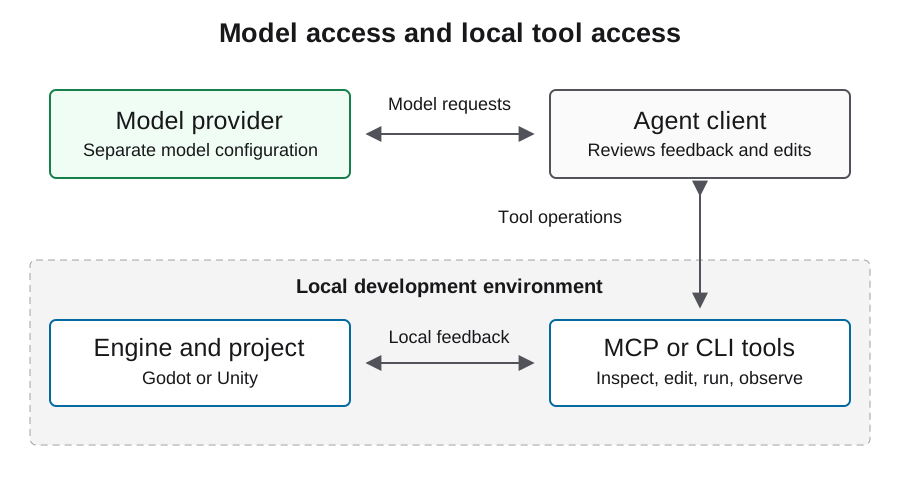
Agent-এর দুই ধরনের connection থাকে: reasoning ও edit তৈরি করা model service, এবং project inspect বা operate করা local tool। Godot MCP ও Unity MCP tool side-এ থাকে। যেকোনো একটি install করলেই model provider বেছে নেওয়া হয় না বা gateway integration প্রমাণিত হয় না।
Agent client-এ model connection এবং tool setting-এ engine connection বেছে নিন। ছোট operation দিয়ে প্রত্যেকটি independently verify করুন। Local project path ভুল হলে path ঠিক করুন; model endpoint বদলালে intended scene দেখা যাবে না।
প্রথম brief-কে testable করুন
Required scene, player action, state transition ও persistence behavior-এর নাম দিন। এই requirement পূরণ করে এমন smallest implementation এবং unresolved decision-এর explicit list চাইুন। নিচের illustrative brief starting point হিসেবে ব্যবহার করুন, তারপর আপনি সত্যিই যে game চান তার scope বসান।
Initial brief অপরিবর্তিত record করুন। Requirement যোগ করলে scope change হিসেবে label দিন। Failure explain বা নিজে file edit করলে intervention হিসেবে label দিন। এতে এক initial prompt এবং পরে হওয়া বহু model ও tool iteration-এর পার্থক্য বজায় থাকে।
Deliver one original 2D room with start, play, win/loss, and restart states.
Use project-owned placeholder art. Preserve the chosen engine version.
Record each edit, tool result, failed check, and human intervention.
Stop before downloads, purchases, uploads, or publishing.
Report unfinished requirements with their reproduction steps.
Reviewable change-এ কাজ করুন
Initial scaffold-এর পরে একবারে একটি behavior চাইুন: movement, তারপর collision, তারপর end-of-round transition। প্রতিটি change-এর পরে changed file review করুন এবং একই acceptance path run করুন। External package যোগ বা import setting বদলানোর আগে known working project state রাখুন।
Agent-কে শুধু harder try বলতে নয়, relevant error, scene context ও observed behavior দিন। একই symptom repeated edit-এর পরও থাকলে থামুন এবং boundary isolate করুন। Missing imported resource ও wrong node reference-এর fix আলাদা, যদিও দুটোতেই empty scene দেখা যেতে পারে।
Asset ও localization-কে production input ধরুন
Source, permission, author বা tool identity, modification ও intended use-সহ asset manifest রাখুন। Transparency, frame alignment, contrast ও collision fit-সহ gameplay scale-এ sprite review করুন। Plausible image automatically usable sprite sheet নয়।
Stable identifier দিয়ে player-facing string addressable রাখুন। Translation context দিন এবং formatting argument protect করুন। Distribution-এর আগে image, audio, font ও translated text প্রত্যেকটির review দরকার। Image-generation expenditure text-model coding work থেকে আলাদাভাবে record করুন; asset license বা engine license কোনো project-এর প্রতিটি file-এর rights প্রতিষ্ঠা করে না।
প্রতিটি delivery state independently প্রমাণ করুন
Playable demo-এর জন্য একজন person-কে intended loop complete করতে হবে। Export-এর জন্য generated artifact দরকার। Tested export-এর জন্য target platform-এ সেই artifact launch করতে হবে। Steam submission ও release পরের platform state। Progress share করার সময় label নির্ভুল রাখুন।
Build identity, test input, actual play-এর screenshot এবং বাকি failure সংরক্ষণ করুন। Browser capture-এ input-এর পরে বদলানো gameplay দেখা উচিত, শুধু loading screen নয়। অন্য OS-এ export করা Windows executable-এও Windows verification দরকার। আলাদা account ও scheduling requirement-এর জন্য Steam guide দেখুন।
Playco example workflow সম্পর্কে কী দেখায়
OpenAI-এর September 3, 2026 customer story-তে Playco-কে Playbot-এ Astra ব্যবহার করতে বর্ণনা করা হয়েছে, যেখানে একটি IDE game engine-এর সঙ্গে connected। Team themed prototype তৈরির আগে grey-box foundation-এ iteration করেছে। এটি vendor-published customer account, APIsRouter benchmark নয়।
Practical takeaway হলো workflow-এর shape: আগে playable mechanic স্থির করুন, তারপর shared baseline রেখে presentation বদলান। Creative preference defect fix থেকে আলাদা রাখুন, যাতে প্রতিটি iteration কী করেছে বোঝা যায়। Reported outcome forecast ধরে না নিয়ে original account পড়ুন।
একটি local Godot prototype inspect করুন
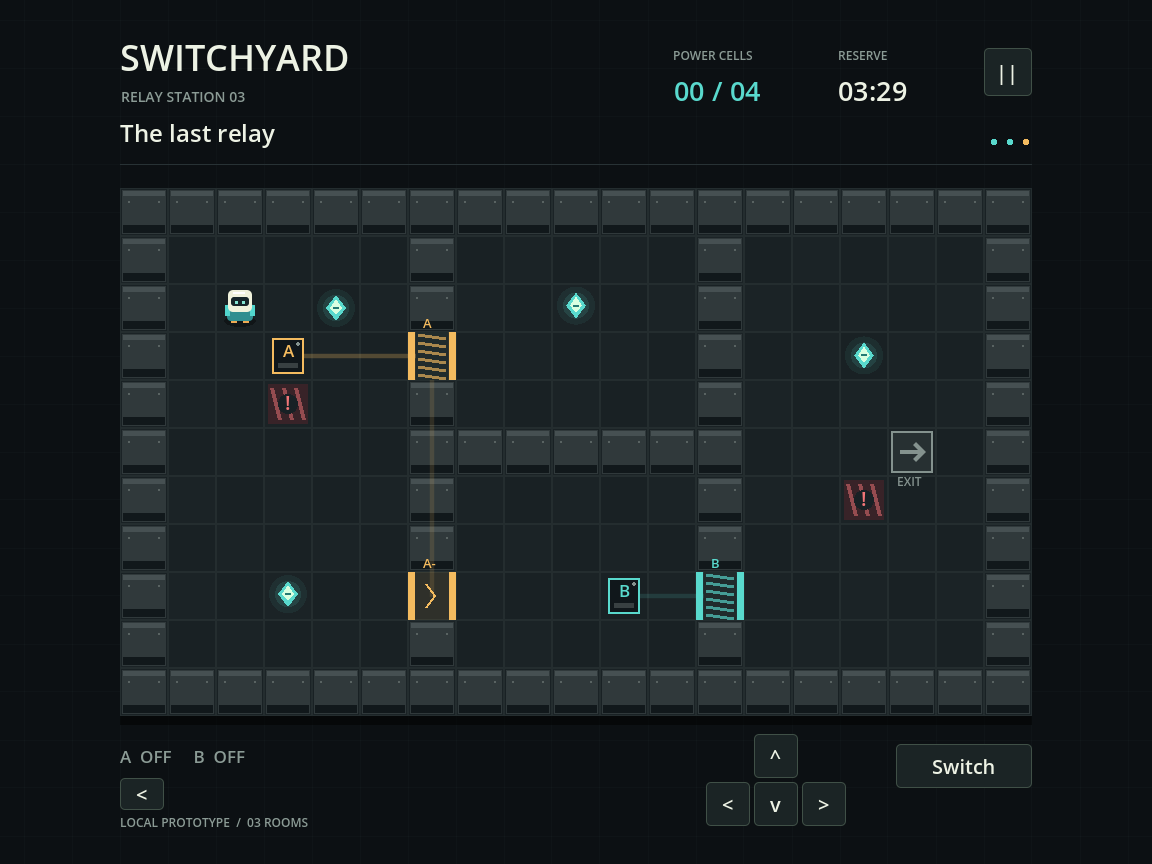
Switchyard হলো local Codex development run-এ তৈরি একটি ছোট three-room circuit puzzle। Source project-এ character movement, switch, door, collectible cell, room completion, loss ও restart, setting এবং persisted progress আছে। Automated engine check gameplay loop exercise করেছে এবং আলাদা process save reopen করেছে। নিচের screenshot actual Godot viewport capture, concept art নয়।
Recorded run-এ Godot 4.5.1 ব্যবহার হয়েছে। Model identity ও API billing observable ছিল না, তাই এটি Astra performance বা cost benchmark হিসেবে দেওয়া হচ্ছে না। Downloadable source ও PCK local project দেখায়; PCK-এর জন্য Godot দরকার। Standalone Windows build, browser export, human playtest ও Steam release আলাদা কাজ। Delivery claim করার আগে agent-এর কাছে যে concrete artifact চাইতে হবে এই example তা দেখায়।
আপনার bottleneck অনুযায়ী পরের guide বেছে নিন
Environment undecided হলে engine-selection guide, tool discovery ব্যর্থ হলে MCP setup page, আর project খুললেও ভুল আচরণ করলে debugging guide দিয়ে শুরু করুন। Repeated repair spending dominate করলে cost guide ব্যবহার করুন; model বদলানোর চেয়ে scope ছোট করা বেশি গুরুত্বপূর্ণ হতে পারে।
এই guide-গুলো source-backed workflow ও illustrative example দেয়, measured engine ranking নয়। Linked Astra experiment তার specific case-এর evidence requirement ব্যাখ্যা করে। নিজের project-এ concrete blocker মেটায় এমন next step নিন এবং game বাড়ানোর আগে তার result সংরক্ষণ করুন।
সাধারণ প্রশ্ন
একটি prompt কি complete game তৈরি করতে পারে?
একটি initial brief বহু model call, tool action ও human correction-সহ workflow শুরু করতে পারে। Original acceptance criteria অনুযায়ী completeness বিচার করুন এবং iteration disclose করুন।
Agent ব্যবহার করতে কি MCP দরকার?
অবশ্যই নয়। File ও shell tool-সহ client CLI workflow support করতে পারে। MCP আরেকটি tool interface দেয়, যার project targeting ও permission এখনও verify করতে হবে।
Game খুলছে কিন্তু কাজ করছে না হলে কোথা থেকে শুরু করব?
Startup, input, state ও rendering problem আলাদা করতে debugging guide ব্যবহার করুন। Agent-কে reproducible player action ও প্রথম relevant engine error দিন।
Player কি আমার development API budget consume করবে?
AI সাহায্যে লেখা হয়েছে বলেই ordinary exported game logic model call করে না। Runtime model feature আলাদা service design ও budget।
Failed prototype থেকে কী রাখা উচিত?
Original brief, environment identity, শেষ reproducible project state, error, intervention ও usage evidence রাখুন। Failed work production record-এর অংশ।