AI-generated game debug করুন
Updated 2026-09-05
প্রথম যে boundary fail করে তা খুঁজুন, agent-কে reproducible symptom দিন এবং একই player action retest করুন। আপনি যে engine ও build সত্যিই run করেন তা দিয়ে শুরু করুন।
Fix চাওয়ার আগে failure classify করুন
সবচেয়ে আগে কোন step fail করছে identify করুন: project discovery, import, parsing বা compilation, scene startup, player input, gameplay state, export অথবা target launch। পরের symptom প্রথম failure-এর consequence হতে পারে। Engine version, project revision, target ও exact reproduction একসঙ্গে রাখুন।
যেমন, যে scene কখনও start হয় না তার restart button কাজ করে কি না জানা যায় না। Browser game package fetch করতে না পারলে controller test করা যায় না। Code বদলানোর আগে error-কে সঠিক boundary-তে route করুন; এতে original prerequisite broken থাকা অবস্থায় repair loop unrelated patch জমায় না।
| Symptom | আগে inspect করুন | Retest outcome |
|---|---|---|
| Project open হয় না | Path, version, dependency | Expected project load হয় |
| Blank scene | Startup error, scene, camera, visibility | Expected content দেখা যায় |
| Input-এর effect নেই | Focus, action mapping, state, handler | Action game state বদলায় |
| Export fail | Preset বা target prerequisite | Artifact তৈরি হয় |
| শুধু target-এ build fail | Packaged resource ও platform log | Target একই loop complete করে |
প্রথম meaningful engine error capture করুন
Godot-এ debugger panel ও relevant runtime output ব্যবহার করুন। Unity-তে compilation ও runtime error আলাদা inspect করুন এবং play result interpret করার আগে editor ready হওয়া পর্যন্ত অপেক্ষা করুন। Failing script ও যে operation তা trigger করেছে শনাক্ত করা stack বা location preserve করুন।
Focused excerpt-এর সঙ্গে relevant scene বা object context agent-কে দিন। First error আড়াল করে এমন giant undifferentiated log এড়ান, কিন্তু পরে inspection-এর জন্য full record locally রাখুন। Credential ও personal data redact করুন। Useful report বলবে player কী করেছে, কী হওয়া উচিত ছিল এবং engine আসলে কী report করেছে।
Requirement বদলানো ছাড়া reproduction ছোট করুন
Recoverable project state থেকে শুরু করে defect এখনও দেখা যায় এমন smallest scene বা action isolate করুন। Problem-এর সঙ্গে জড়িত real controller, collision rule বা save boundary রাখুন। Failing system পুরো সরিয়ে দিলে clean run হতে পারে, কিন্তু যে behavior fix করা দরকার তা হারায়।
নিচের brief original diagnostic template। Cause assume করতে model-কে না বলে observed detail দিয়ে পূরণ করুন। একটি proposed explanation ও narrowly scoped change চাইুন। Test complete হলে full player journey-তে ফিরুন, যাতে local repair broken scene transition আড়াল না করে।
Project revision: <record actual revision>
Engine and target: <record actual environment>
Steps: launch -> start round -> perform the failing action
Expected state: <specific result>
Observed state: <specific result>
First engine error: <relevant error and location>
Inspect the referenced scene and script before editing.
Propose one cause, make a scoped fix, then repeat these steps.
Preserve the required behavior and report any remaining failure.
Layer ধরে blank screen investigate করুন
প্রথমে engine start হয়েছে ও intended scene load হয়েছে কি না ঠিক করুন। তারপর camera selection, viewport dimension, object visibility, position এবং scene ঢেকে রাখা overlay inspect করুন। Engine state ও real capture একসঙ্গে ব্যবহার করুন: image একা scene paused, off-camera বা empty কি না নাও দেখাতে পারে।
কিছু না দেখা গেলেও input apply করে state change হয় কি না দেখুন। Position বদলালেও image না বদলালে rendering বা scene reference-এ focus করুন। কোনোটিই বদলালে না startup ও input investigate করুন, artwork adjust নয়। প্রতিটি hypothesis observation-এর সঙ্গে বাঁধুন, যাতে agent অপ্রয়োজনীয়ভাবে দুই system rewrite না করে।
Gameplay transition-এর মধ্য দিয়ে input trace করুন
Focus ও mapping থেকে handler, তারপর যে state বদলানোর কথা সেখানে action follow করুন। Movement math-কে দোষ দেওয়ার আগে pause state ও UI interception check করুন। Restart failure missing handler, stale scene reference অথবা reset না হওয়া state হতে পারে।
Repair-এর পরে একাধিক relevant state থেকে action test করুন: first launch, win-এর পরে এবং প্রযোজ্য হলে loss-এর পরে। Repeated round-এর পর দেখা দেয় এমন duplicated handler বা stale object check করুন। ছোট complete miniflow এই lifecycle defect isolate করতে button একা বারবার test করার চেয়ে কার্যকর।
Browser loading ও game logic আলাদা করুন
Godot web export-এর ক্ষেত্রে gameplay code edit করার আগে browser network ও console panel inspect করুন। Exported HTML, JavaScript, WebAssembly ও game package intended location থেকে load হচ্ছে কি না confirm করুন। Chosen thread configuration-এর requirement-সহ official web export documentation-এর সঙ্গে hosting setting তুলনা করুন।
Exported companion filename consistent রাখুন এবং old ও new file মিশ্রণ নয়, artifact test করুন। Wrong project দেখা গেলে test browser-এ service-worker caching inspect করুন। তারপর input exercise করে moving content verify করুন। Nonblank canvas initial rendering check, game loop কাজ করার প্রমাণ নয়।
Target-এ export-specific failure check করুন
Editor কাজ করলেও distributed build fail করলে startup scene selection, included resource, configuration ও target log তুলনা করুন। Exact artifact hash রাখুন, যাতে পরের re-export reproduction record invalid না করে। Existing save বা editor cache-এ ভরসা করার আগে clean starting state দিয়ে test করুন।
Missing packaged file solve করতে core mechanic বদলাবেন না। Packaging boundary ঠিক করে target build-এ একই acceptance path replay করুন। Desktop artifact-এর জন্য actual operating system, browser artifact-এর জন্য intended browser ও hosting setup ব্যবহার করুন। শুধু cross-export করা target behavior establish করে না।
Before-and-after result দিয়ে repair বন্ধ করুন
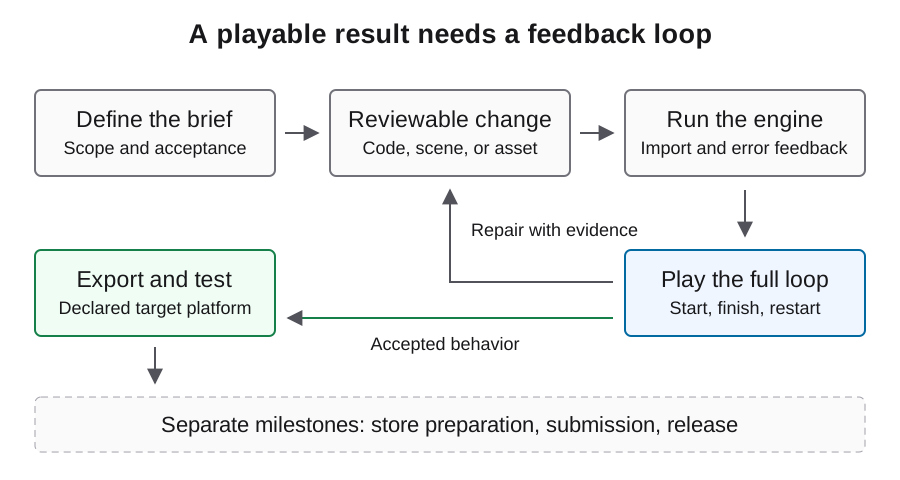
Failing reproduction, scoped diff ও এখন expected state তৈরি করা repeated action রাখুন। Defect যে boundary-তে ছিল সেখানে regression check যোগ করুন, তারপর surrounding game loop replay করুন। Manual correction ও unsuccessful repair-এ consumed request record করুন।
এখানকার example diagnostic procedure, published failure-and-fix case নয়। নিজের project-এর concrete report তৈরি করতে ব্যবহার করুন। Repeated proposal-এর পরও symptom থাকলে automatic loop থামিয়ে missing observation সংগ্রহ করুন; নতুন evidence ছাড়া broad rewrite-এ যাবেন না।
সাধারণ প্রশ্ন
Agent game fixed বলছে, কিন্তু screen blank। এরপর কী?
Symptom reproduce করে startup error, active scene, camera ও input response inspect করুন। Completion message runtime observation নয়।
পুরো project regenerate করব?
আগে earliest failing boundary isolate করে working state preserve করুন। বহু system বদলানো replacement-এর চেয়ে focused reproduction সাধারণত review করা সহজ।
Browser পুরনো game দেখায় কেন?
Test browser-এ artifact identity, served file ও service-worker cache check করুন। Current export আসলেই load হচ্ছে কি না verify করুন।
Passing script check কি playability প্রমাণ করে?
যে check execute হয়েছে সেটুকু cover করে। Scene wiring, input, rendering, state transition ও persistence-এর runtime evidence দরকার।
Useful bug report-এ কী থাকবে?
Project ও engine identity, target, step, expected ও observed state, first relevant error এবং reproduce করার জন্য smallest scene বা file।