WooCommerce AI content with controlled imports
Updated 2026-09-05
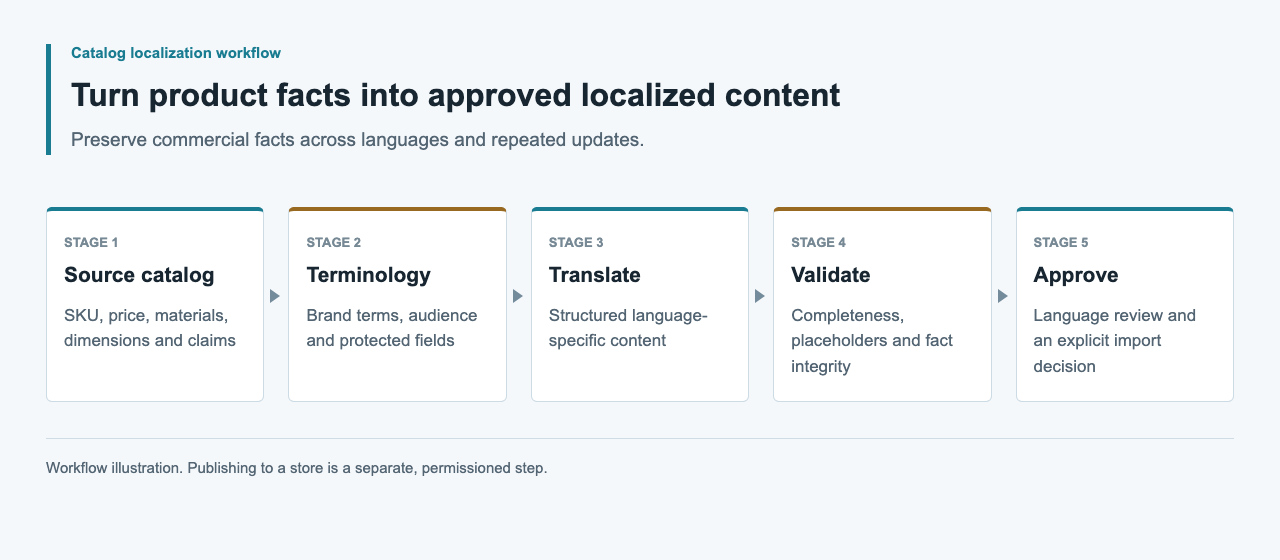
Use approved product facts to draft text, review the result, then map only intended fields into WooCommerce. Keep generation and store updates as separate steps.
Start with a content-only scope
Choose a specific output, such as a revised description or care paragraph. Keep product identity, pricing, inventory and taxonomy changes outside that task. This reduces the review surface and makes it possible to compare the approved text with exactly what the store later receives.
Prepare a backup and a test store before attempting changes, and obtain authorization before any live product write. Export a familiar product family first, assign a reviewer and identify the exact fields you want to update. Keep that field list with the batch so the eventual import has a clear scope.
Separate the drafting and import tools
Meow Apps documents AI Engine's custom OpenAI-compatible provider. That makes it a candidate for a WordPress drafting environment, subject to a version-specific endpoint test. WooCommerce's documented CSV importer is a separate product-data interface. Do not imply that configuring the first automatically validates the second.
An external content worker can also prepare drafts without direct store credentials. Choose based on where reviewers work and who will maintain the mapping. Record the WordPress, WooCommerce and relevant plugin versions before testing so a later update does not inherit an unsupported compatibility claim.
| Component | Responsibility | Required check |
|---|---|---|
| AI drafting environment | Produce candidate text | Actual endpoint and response handling |
| Editorial review | Approve facts and language | Source and candidate revision match |
| Import mapper | Select intended product fields | Destination schema and identifiers |
| WooCommerce test store | Store and display the changes | Import report and read-back |
Export a source snapshot
Use a fresh store export as the starting point for field names and product identity. Retain an untouched copy as the before-state. Make a separate review file with source references and editorial notes, rather than appending private comments to text that may be imported publicly.
Check identifier uniqueness and variant relationships before generating content. A description for one size must not migrate to another because spreadsheet rows were sorted differently. Preserve price and unit values in their original structured representation. Limit the model's output to approved text fields and assemble operational fields from the trusted snapshot.
Prepare a minimal destination patch
WooCommerce documents UTF-8 CSV input, column mapping and existing-product matching by ID or SKU. For a description-only update, make the mapping intentionally narrow. Exclude fields you do not intend to change and inspect the mapping before import.
Adapt the synthetic example below using identifiers exported from the test store. Serialize through a CSV library and verify quote handling. Test the selected update mode with a small controlled sample, using a fresh store export as the mapping reference for any supplier fields.
SKU,Description
SYNTHETIC-LINEN-A,"Approved description text, reviewed against its source."
Treat multilingual storage as a separate contract
A generic product CSV is not evidence that your store can store independent descriptions for every locale. Confirm the multilingual plugin or other localization layer, its version and its official field mapping. Do not invent columns such as description_de and assume they create translated products.
Keep locale-specific candidates keyed by product identifier and source revision in the review package. Only transform them into the destination format after that contract is established. Review language selection and fallback in the test storefront. Two imported language rows overwriting the same description would be a failed localization workflow even if the import itself completed.
Check markup, claims and CSV handling
Generated text should not introduce HTML that the field does not permit, change manual links or remove placeholders. WordPress's escaping guidance is relevant when implementing custom display code; the normal store rendering path still needs a real preview. Keep content validation separate from output escaping.
Inspect assertions about materials, compatibility and care against the source. Reject unsupported certifications or benefits rather than polishing them. For spreadsheet review files, also consider formula interpretation and the chosen editor's behavior. Quoted CSV syntax alone is not an editorial or security approval. Preserve the raw source and use a destination-specific export policy.
Inspect the import report and stored fields
WooCommerce's importer documentation describes skipped and failed rows as outcomes to investigate. Save the report and reconcile the intended product set. Do not keep rerunning the full file until the counts look plausible; identify the failed identifiers and their specific causes.
Read back the updated descriptions and compare them with approved candidates. Confirm protected product fields are unchanged. Inspect the product page and variant selection in the test theme, including long text and links. A stored value matching the payload establishes a different fact from the page rendering correctly, so keep both observations.
Evidence and rollout checks
Retain the source export, review decisions, approved patch, import report, read-back comparison and actual test-store screenshots when a test is performed. Label the environment clearly. A screenshot of a generated paragraph is not proof of a successful product import.
Before any authorized live update, recheck the current source and the exact field list, then define how previous values will be restored if verification fails. Record model usage and editor effort separately. This guide's CSV is illustrative; a model run, sandbox import and multilingual store result have not been performed for this article.
FAQ
Does AI Engine automatically validate WooCommerce imports?
This has not been established. Its documented model-provider configuration and WooCommerce product imports are separate paths that need their own tests.
Can I update descriptions without changing prices?
Design a minimal text-only patch and inspect the importer mapping. Confirm prices, units and other protected fields remain unchanged in the test store after import.
Can I add a column for every language?
Only when the actual multilingual layer documents that schema. A generic language-suffixed column is not a verified localization interface.
What should I do with skipped products?
Keep the import report and reconcile identifiers, selected import mode and mapping. Fix the affected records in staging instead of repeatedly importing the entire batch.
What should I keep for a rollback?
Save the previous values for the targeted fields, the approved patch and the import report. Compare current store values before restoring them so later editorial changes are not overwritten.