Controlled imports کے ساتھ WooCommerce AI content
Updated 2026-09-05
Approved product facts سے text draft کریں، result review کریں، پھر صرف intended fields WooCommerce میں map کریں۔ Generation اور store updates الگ steps رہیں۔
Content-only scope سے شروع کریں
ایک specific output چنیں، مثلاً revised description یا care paragraph۔ Product identity، pricing، inventory اور taxonomy changes اس task سے باہر رکھیں۔ اس سے review surface کم ہوتی ہے اور approved text کو store کے later payload سے عین compare کیا جا سکتا ہے۔
Changes سے پہلے backup اور test store تیار کریں، اور live product write سے پہلے authorization لیں۔ پہلے familiar product family export کریں، reviewer assign کریں اور exact fields identify کریں۔ Field list batch کے ساتھ رکھیں تاکہ eventual import کا scope واضح رہے۔
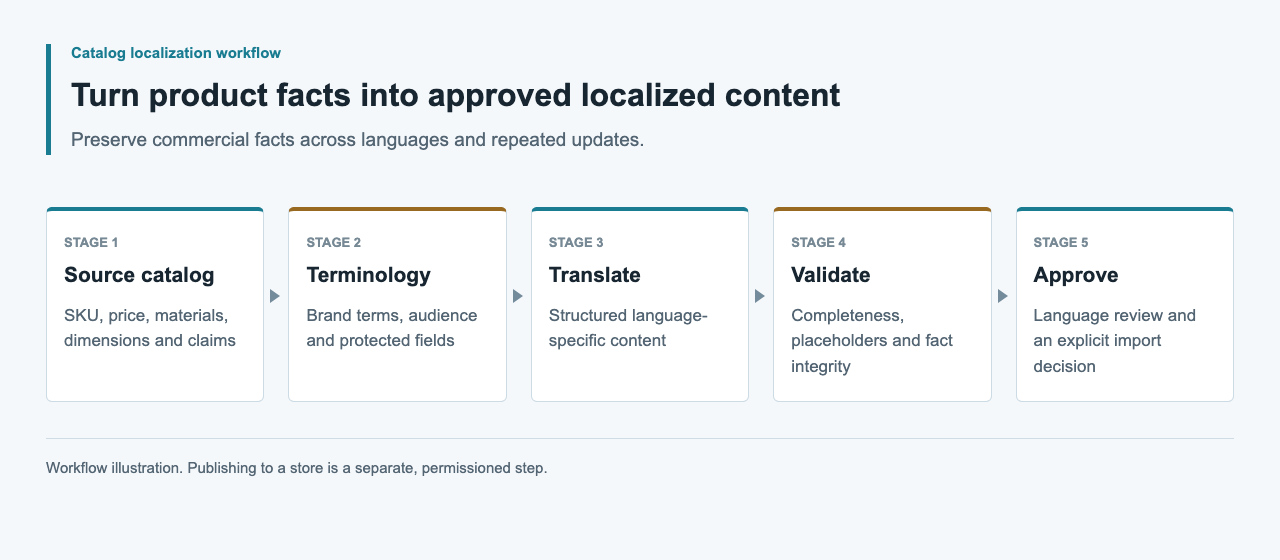
Drafting اور import tools الگ رکھیں
Meow Apps AI Engine کا custom OpenAI-compatible provider document کرتا ہے۔ Version-specific endpoint test کے subject پر یہ WordPress drafting environment کے لیے candidate ہے۔ WooCommerce کا documented CSV importer الگ product-data interface ہے۔ پہلے کو configure کرنے سے دوسرے کی validation خودکار ثابت نہ سمجھیں۔
External content worker direct store credentials کے بغیر بھی drafts تیار کر سکتا ہے۔ Reviewer کہاں کام کرے گا اور mapping کون maintain کرے گا، اس کے مطابق انتخاب کریں۔ Testing سے پہلے WordPress، WooCommerce اور relevant plugin versions record کریں تاکہ future update unsupported compatibility claim inherit نہ کرے۔
| Component | Responsibility | Required check |
|---|---|---|
| AI drafting environment | Candidate text بنانا | Actual endpoint اور response handling |
| Editorial review | Facts اور language approve کرنا | Source اور candidate revision match |
| Import mapper | Intended product fields منتخب کرنا | Destination schema اور identifiers |
| WooCommerce test store | Changes store اور display کرنا | Import report اور read-back |
Source snapshot export کریں
Field names اور product identity کے لیے fresh store export سے شروع کریں۔ Untouched copy before-state کے طور پر رکھیں۔ Source references اور editorial notes والی الگ review file بنائیں؛ private comments اس text میں نہ append کریں جو public import ہو سکتی ہے۔
Content generate کرنے سے پہلے identifier uniqueness اور variant relationships check کریں۔ Spreadsheet rows sort ہونے کی وجہ سے ایک size کی description دوسری پر migrate نہ ہو۔ Price اور unit values original structured representation میں رکھیں۔ Model output approved text fields تک محدود کریں اور operational fields trusted snapshot سے assemble کریں۔
Minimal destination patch تیار کریں
WooCommerce UTF-8 CSV input، column mapping اور ID یا SKU سے existing-product matching document کرتا ہے۔ Description-only update میں mapping جان بوجھ کر narrow رکھیں۔ جن fields کو بدلنا نہیں، انہیں exclude کریں اور import سے پہلے mapping inspect کریں۔
نیچے synthetic example کو test store سے export کیے identifiers کے ساتھ adapt کریں۔ CSV library سے serialize کریں اور quote handling verify کریں۔ Small controlled sample پر selected update mode test کریں، supplier fields کے لیے mapping reference fresh store export رکھیں۔
SKU,Description
SYNTHETIC-LINEN-A,"Approved description text, reviewed against its source."
Multilingual storage کو الگ contract سمجھیں
Generic product CSV اس بات کا evidence نہیں کہ store ہر locale کی independent descriptions رکھ سکتی ہے۔ Multilingual plugin یا localization layer، اس کا version اور official field mapping confirm کریں۔ description_de جیسے columns invent کر کے translated products بننے کا فرض نہ کریں۔
Locale candidates کو review package میں product identifier اور source revision سے key کریں۔ Contract قائم ہونے کے بعد ہی انہیں destination format میں transform کریں۔ Test storefront میں language selection اور fallback review کریں۔ دو language rows ایک description overwrite کر دیں تو import complete ہونے کے باوجود localization workflow fail ہے۔
Markup، claims اور CSV handling چیک کریں
Generated text ایسے HTML شامل نہ کرے جو field permit نہیں کرتی، manual links نہ بدلے اور placeholders نہ ہٹائے۔ Custom display code میں WordPress escaping guidance relevant ہے؛ normal store rendering path کو بھی real preview چاہیے۔ Content validation کو output escaping سے الگ رکھیں۔
Materials، compatibility اور care کے assertions source کے خلاف inspect کریں۔ Unsupported certifications یا benefits reject کریں، polish نہ کریں۔ Spreadsheet review files میں formula interpretation اور chosen editor behavior بھی دیکھیں۔ Quoted CSV syntax editorial یا security approval نہیں۔ Raw source محفوظ اور destination-specific export policy استعمال کریں۔
Import report اور stored fields inspect کریں
WooCommerce importer documentation skipped اور failed rows کو investigate کرنے والے outcomes کے طور پر بیان کرتی ہے۔ Report save کریں اور intended product set reconcile کریں۔ Counts plausible لگنے تک full file rerun نہ کریں؛ failed identifiers اور ان کی specific causes identify کریں۔
Updated descriptions read back کریں اور approved candidates سے compare کریں۔ Protected product fields unchanged ہونے کی تصدیق کریں۔ Test theme میں product page اور variant selection inspect کریں، long text اور links سمیت۔ Stored payload match ہونا page rendering درست ہونے سے الگ fact ہے، دونوں observations رکھیں۔
Evidence اور rollout checks
Test ہونے پر source export، review decisions، approved patch، import report، read-back comparison اور actual test-store screenshots محفوظ کریں۔ Environment واضح label کریں۔ Generated paragraph کا screenshot successful product import کا proof نہیں۔
Authorized live update سے پہلے current source اور exact field list دوبارہ check کریں، پھر verification fail ہونے پر previous values restore کرنے کا طریقہ define کریں۔ Model usage اور editor effort الگ record کریں۔ یہ guide CSV کو illustrative رکھتی ہے؛ اس article کے لیے model run، sandbox import یا multilingual store result انجام نہیں دیا گیا۔
عمومی سوالات
کیا AI Engine WooCommerce imports automatically validate کرتا ہے؟
یہ establish نہیں ہوا۔ اس کی documented model-provider configuration اور WooCommerce product imports الگ paths ہیں اور اپنی testing مانگتے ہیں۔
کیا prices بدلے بغیر descriptions update کر سکتا ہوں؟
Minimal text-only patch design کریں اور importer mapping inspect کریں۔ Test store میں import کے بعد prices، units اور دوسرے protected fields unchanged confirm کریں۔
کیا ہر language کے لیے column add کر سکتا ہوں؟
صرف تب جب actual multilingual layer اس schema کو document کرے۔ Generic language-suffixed column verified localization interface نہیں۔
Skipped products کے ساتھ کیا کروں؟
Import report رکھیں اور identifiers، selected import mode اور mapping reconcile کریں۔ Staging میں affected records fix کریں، پوری batch بار بار import نہ کریں۔
Rollback کے لیے کیا محفوظ رکھوں؟
Targeted fields کی previous values، approved patch اور import report save کریں۔ Restore سے پہلے current store values compare کریں تاکہ بعد کی editorial changes overwrite نہ ہوں۔