Controlled import-সহ WooCommerce AI content
Updated 2026-09-05
Approved product fact দিয়ে text draft করুন, result review করুন, তারপর কেবল intended field WooCommerce-এ map করুন। Generation ও store update আলাদা step রাখুন।
Content-only scope দিয়ে শুরু করুন
নির্দিষ্ট output বেছে নিন, যেমন revised description বা care paragraph। Product identity, pricing, inventory ও taxonomy change ওই task-এর বাইরে রাখুন। এতে review surface কমে এবং store পরে ঠিক কী পাবে approved text-এর সঙ্গে তুলনা করা যায়।
Change করার আগে backup ও test store প্রস্তুত করুন এবং live product write-এর আগে authorization নিন। আগে familiar product family export করুন, reviewer assign করুন এবং কোন exact field update হবে identify করুন। Batch-এর সঙ্গে field list রাখুন, যাতে eventual import-এর clear scope থাকে।
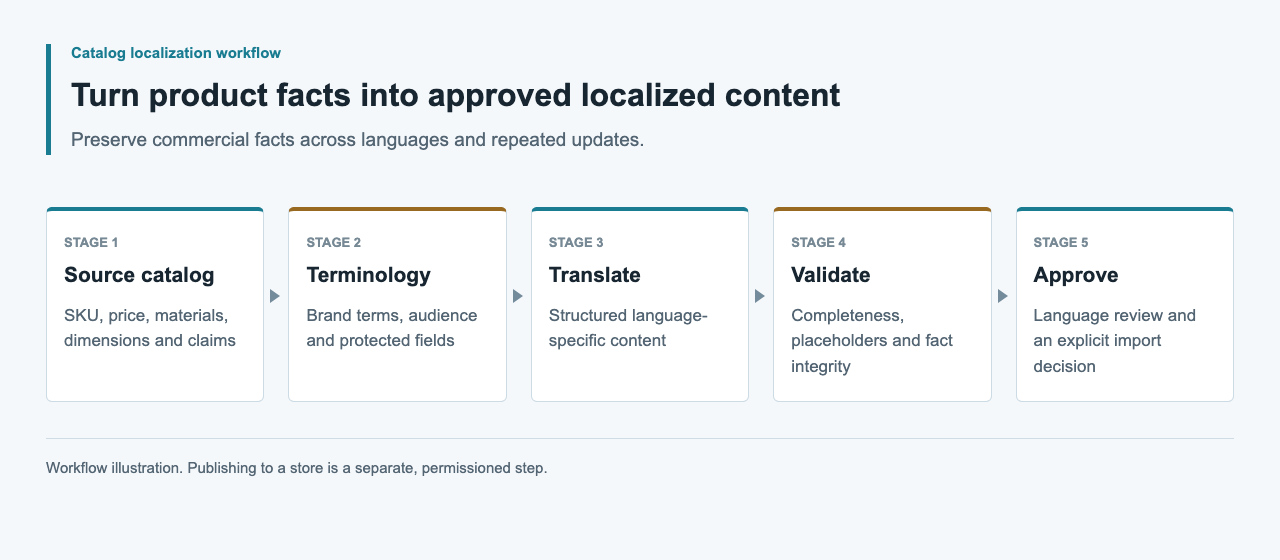
Drafting tool ও import tool আলাদা করুন
Meow Apps AI Engine-এর custom OpenAI-compatible provider document করে। Version-specific endpoint test-এর অধীনে এটি WordPress drafting environment-এর candidate। WooCommerce-এর documented CSV importer আলাদা product-data interface। প্রথমটি configure করলেই দ্বিতীয়টি automatically validate হয় এমন imply করবেন না।
External content worker direct store credential ছাড়াও draft প্রস্তুত করতে পারে। Reviewer কোথায় কাজ করেন ও mapping কে maintain করবেন তার ওপর choice নিন। Test-এর আগে WordPress, WooCommerce ও relevant plugin version record করুন, যাতে later update unsupported compatibility claim উত্তরাধিকার না পায়।
| Component | Responsibility | Required check |
|---|---|---|
| AI drafting environment | Candidate text তৈরি | Actual endpoint ও response handling |
| Editorial review | Fact ও language approve | Source ও candidate revision match |
| Import mapper | Intended product field select | Destination schema ও identifier |
| WooCommerce test store | Change store ও display | Import report ও read-back |
একটি source snapshot export করুন
Field name ও product identity-এর starting point হিসেবে fresh store export ব্যবহার করুন। Untouched copy before-state হিসেবে রাখুন। Publicly import হতে পারে এমন text-এ private comment append না করে source reference ও editorial note-সহ আলাদা review file তৈরি করুন।
Content generate করার আগে identifier uniqueness ও variant relationship check করুন। Spreadsheet row আলাদা sort হওয়ায় এক size-এর description অন্য size-এ migrate হবে না। Price ও unit original structured representation-এ রাখুন। Model output approved text field-এ সীমিত করুন এবং trusted snapshot থেকে operational field assemble করুন।
Minimal destination patch প্রস্তুত করুন
WooCommerce UTF-8 CSV input, column mapping এবং ID বা SKU দিয়ে existing-product matching document করে। Description-only update-এর জন্য mapping ইচ্ছাকৃতভাবে narrow করুন। যে field বদলাবেন না তা exclude করুন এবং import-এর আগে mapping inspect করুন।
Test store থেকে export করা identifier ব্যবহার করে নিচের synthetic example adapt করুন। CSV library দিয়ে serialize করে quote handling verify করুন। ছোট controlled sample-এ selected update mode test করুন এবং supplier field-এর mapping reference হিসেবে fresh store export ব্যবহার করুন।
SKU,Description
SYNTHETIC-LINEN-A,"Approved description text, reviewed against its source."
Multilingual storage-কে আলাদা contract ধরুন
Generic product CSV আপনার store প্রতিটি locale-এর independent description store করতে পারে এমন evidence নয়। Multilingual plugin বা localization layer, তার version ও official field mapping confirm করুন। description_de-এর মতো column invent করে translated product তৈরি হয় ধরে নেবেন না।
Review package-এ locale-specific candidate product identifier ও source revision দিয়ে key করুন। Contract establish হওয়ার পরেই destination format-এ transform করুন। Test storefront-এ language selection ও fallback review করুন। দুই imported language row একই description overwrite করলে import complete হলেও localization workflow fail।
Markup, claim ও CSV handling check করুন
Generated text field permit করে না এমন HTML introduce করবে না, manual link বদলাবে না বা placeholder সরাবে না। Custom display code implement করার সময় WordPress escaping guidance relevant; normal store rendering path-এ real preview এখনও দরকার। Content validation output escaping থেকে আলাদা রাখুন।
Material, compatibility ও care-এর assertion source-এর বিরুদ্ধে inspect করুন। Unsupported certification বা benefit polish না করে reject করুন। Spreadsheet review file-এ formula interpretation ও chosen editor behavior-ও বিবেচনা করুন। Quoted CSV syntax নিজে editorial বা security approval নয়। Raw source রাখুন এবং destination-specific export policy ব্যবহার করুন।
Import report ও stored field inspect করুন
WooCommerce importer documentation skipped ও failed row-কে investigate করার outcome বলে। Report save করে intended product set reconcile করুন। Count plausible না হওয়া পর্যন্ত full file rerun করবেন না; failed identifier ও specific cause identify করুন।
Updated description read back করে approved candidate-এর সঙ্গে compare করুন। Protected product field unchanged confirm করুন। Test theme-এ product page ও variant selection inspect করুন, long text ও link-সহ। Payload-এর stored value match করা এবং page ঠিক render করা আলাদা fact, তাই দুটো observation রাখুন।
Evidence ও rollout check
Test করলে source export, review decision, approved patch, import report, read-back comparison ও actual test-store screenshot রাখুন। Environment স্পষ্ট label করুন। Generated paragraph-এর screenshot successful product import-এর proof নয়।
Authorized live update-এর আগে current source ও exact field list আবার check করুন, verification fail হলে previous value কীভাবে restore করবেন define করুন। Model usage ও editor effort আলাদা record করুন। এই guide-এর CSV illustrative; এই article-এর জন্য model run, sandbox import বা multilingual store result করা হয়নি।
সাধারণ প্রশ্ন
AI Engine কি WooCommerce import automatically validate করে?
এটি establish করা হয়নি। Documented model-provider configuration ও WooCommerce product import separate path, নিজস্ব test দরকার।
Price বদলানো ছাড়া description update করতে পারি?
Minimal text-only patch design করে importer mapping inspect করুন। Import-এর পরে test store-এ price, unit ও অন্য protected field unchanged confirm করুন।
প্রতিটি language-এর জন্য column যোগ করতে পারি?
শুধু actual multilingual layer সেই schema document করলে। Generic language-suffixed column verified localization interface নয়।
Skipped product নিয়ে কী করব?
Import report রেখে identifier, selected import mode ও mapping reconcile করুন। পুরো batch বারবার import না করে staging-এ affected record fix করুন।
Rollback-এর জন্য কী রাখব?
Targeted field-এর previous value, approved patch ও import report save করুন। Restore করার আগে current store value compare করুন, যাতে later editorial change overwrite না হয়।