WooCommerce AI content की समीक्षा
Updated 2026-09-05
Product copy को सीमित scope में तैयार करें, protected fields बचाएँ और import से पहले staging में वास्तविक परिणाम जाँचें।
एक स्पष्ट output से शुरुआत करें
Specific output चुनें, जैसे revised description या care paragraph। Product identity, pricing, inventory और taxonomy changes को उस task से बाहर रखें। इससे review surface छोटा रहता है और approved text की तुलना store को मिलने वाले exact content से की जा सकती है।
किसी बदलाव से पहले backup और test store तैयार करें तथा live product write के लिए authorization लें। पहले परिचित product family export करें, reviewer तय करें और update करने वाले exact fields पहचानें। इस field list को batch के साथ रखें, ताकि बाद का import स्पष्ट scope वाला हो।
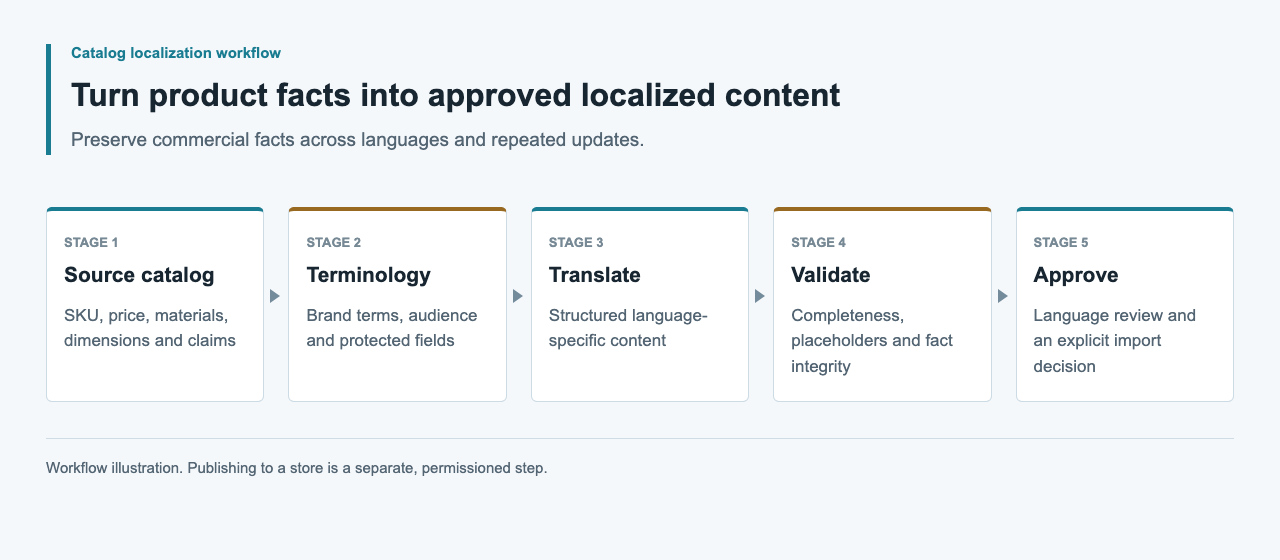
AI Engine और WooCommerce paths को अलग समझें
Meow Apps AI Engine के custom OpenAI-compatible provider को document करता है। इससे वह WordPress drafting environment के लिए candidate बनता है, लेकिन version-specific endpoint test अभी भी चाहिए। WooCommerce का documented CSV importer अलग product-data interface है। पहले को configure करने से दूसरा अपने आप validated नहीं हो जाता।
Reviewers कहाँ काम करेंगे और mapping कौन maintain करेगा, इसके आधार पर चुनाव करें। External content worker direct store credentials के बिना drafts तैयार कर सकता है। Test से पहले WordPress, WooCommerce और relevant plugin versions record करें, ताकि बाद का update unsupported compatibility claim inherit न करे।
| पथ | उपयोग | सीमा |
|---|---|---|
| AI Engine से drafting | model की सहायता से copy | Provider और model test |
| WooCommerce CSV import | product-data का import | Mapping और read-back |
| external worker process | review queue | Store credentials अलग |
| बहुभाषी layer | locale-specific content | Plugin schema verify करें |
Source export और protected fields बचाएँ
Fresh store export से field names और product identity की शुरुआत करें। Untouched copy को before-state की तरह रखें। Private comments को public import होने वाले text में जोड़ने के बजाय source references और editorial notes वाली अलग review file बनाएँ।
Content generate करने से पहले identifier uniqueness और variant relationships जाँचें। Spreadsheet rows sort होने के कारण एक size का description दूसरे size में migrate नहीं होना चाहिए। Price और unit values को उनकी original structured representation में रखें। Model output को approved text fields तक सीमित करें और operational fields trusted snapshot से assemble करें।
CSV mapping को संकीर्ण और reproducible रखें
WooCommerce UTF-8 CSV input, column mapping और ID या SKU से existing-product matching document करता है। Description-only update के लिए mapping जानबूझकर narrow रखें। जिन fields को बदलना नहीं है उन्हें exclude करें और import से पहले mapping inspect करें।
नीचे के synthetic example को test store से export किए identifiers के साथ adapt करें। CSV library से serialize करके quote handling verify करें। चुने गए update mode को छोटे controlled sample में test करें और supplier fields की mapping के लिए fresh store export को reference रखें।
SKU,Description
SYNTHETIC-LINEN-A,"Approved description text, reviewed against its source."
Multilingual storage को अनुमान से न भरें
Generic product CSV इस बात का evidence नहीं है कि store हर locale के लिए अलग description रख सकता है। Multilingual plugin या localization layer, उसका version और official field mapping confirm करें। description_de जैसी columns invent करके यह न मानें कि translated products बन जाएँगी।
Review package में locale-specific candidates को product identifier और source revision से key करें। Contract स्थापित होने के बाद ही उन्हें destination format में बदलें। Test storefront में language selection और fallback review करें। Import complete होने पर भी यदि दो language rows एक ही description overwrite करें तो localization workflow fail है।
Content safety और rendering अलग जाँचें
Generated text ऐसे HTML को introduce न करे जिसे field अनुमति नहीं देती, manual links न बदले और placeholders न हटाए। Custom display code में WordPress की escaping guidance relevant है, लेकिन normal store rendering path को real preview की जरूरत रहती है। Content validation और output escaping को अलग रखें।
Materials, compatibility और care के assertions को source से मिलाएँ। Unsupported certifications या benefits को polish करने के बजाय reject करें। Spreadsheet review files में formula interpretation और चुने गए editor का behavior भी देखें। Quoted CSV syntax editorial या security approval नहीं है। Raw source रखें और destination-specific export policy इस्तेमाल करें।
Import report और read-back को reconcile करें
WooCommerce importer documentation skipped और failed rows को investigate करने योग्य outcomes बताती है। Report save करें और intended product set से reconcile करें। Counts plausible दिखने तक पूरी file बार-बार न चलाएँ; failed identifiers और उनके specific causes खोजें।
Updated descriptions read back करके approved candidates से compare करें। Confirm करें कि protected product fields unchanged हैं। Test theme में product page और variant selection inspect करें, जिसमें long text और links भी हों। Stored payload match होना और page सही render होना अलग facts हैं; दोनों observations रखें।
Test-store evidence के साथ handoff करें
Test होने पर source export, review decisions, approved patch, import report, read-back comparison और actual test-store screenshots बचाएँ। Environment स्पष्ट label करें। Generated paragraph का screenshot सफल product import का proof नहीं है।
Authorized live update से पहले current source और exact field list फिर जाँचें तथा verification fail होने पर previous values restore करने का तरीका तय करें। Model usage और editor effort अलग record करें। यह guide का CSV illustrative है; इस article के लिए model run, sandbox import और multilingual store result perform नहीं किए गए हैं।
अक्सर पूछे जाने वाले प्रश्न
क्या AI Engine WooCommerce imports को automatically validate करता है?
यह स्थापित नहीं है। इसका documented model-provider configuration और WooCommerce product import अलग paths हैं, जिनके अपने tests चाहिए।
क्या prices बदले बिना descriptions update कर सकता हूँ?
Minimal text-only patch design करें और importer mapping inspect करें। Test store में import के बाद prices, units और अन्य protected fields unchanged रहें यह confirm करें।
क्या हर language के लिए एक column जोड़ सकता हूँ?
केवल तब जब actual multilingual layer उस schema को document करती हो। Generic language-suffixed column verified localization interface नहीं है।
Skipped products के साथ क्या करूँ?
Import report रखें और identifiers, selected import mode तथा mapping reconcile करें। पूरी batch फिर import करने के बजाय affected records staging में ठीक करें।
Rollback के लिए क्या सुरक्षित रखें?
Targeted fields की previous values, approved patch और import report रखें। Restore से पहले current store values compare करें, ताकि बाद के editorial changes overwrite न हों।