WooCommerce AI content พร้อม controlled imports
Updated 2026-09-05
ใช้ approved product facts ร่าง text รีวิวผล แล้ว map เฉพาะ fields ที่ตั้งใจเข้า WooCommerce แยก generation และ store updates เป็นขั้นตอนคนละแบบ
เริ่มจากขอบเขต content-only
เลือก output เฉพาะ เช่น description ที่แก้หรือ care paragraph เก็บ product identity, pricing, inventory และ taxonomy changes นอก task นั้น ช่วยลด review surface และทำให้เทียบ approved text กับสิ่งที่ store ได้จริงในภายหลัง
เตรียม backup และ test store ก่อนเปลี่ยน และขอ authorization ก่อน live product write export product family ที่คุ้นเคยก่อน มอบหมาย reviewer และระบุ fields ที่ต้อง update ให้ชัด เก็บ field list กับ batch เพื่อให้ import มี scope ที่ชัด
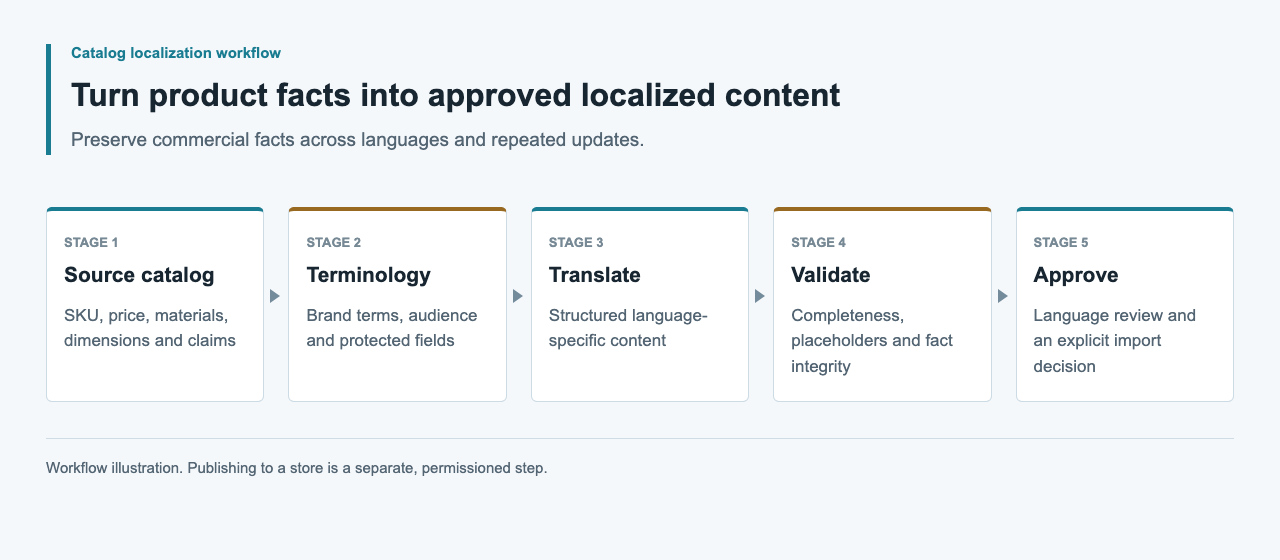
แยก drafting tools และ import tools
Meow Apps มีเอกสาร AI Engine custom OpenAI-compatible provider จึงเป็น candidate สำหรับ WordPress drafting environment โดยต้องทดสอบ endpoint ตาม version WooCommerce documented CSV importer เป็น product-data interface แยก อย่าสื่อว่าการตั้งค่าแรก validate อย่างที่สองโดยอัตโนมัติ
external content worker ก็เตรียม drafts ได้โดยไม่ถือ store credentials เลือกตามที่ reviewer ทำงานและผู้ดูแล mapping บันทึก WordPress, WooCommerce และ plugin versions ก่อนทดสอบ เพื่อไม่ให้ update ภายหลังรับ claim compatibility ที่ไม่รองรับ
| Component | ความรับผิดชอบ | Check ที่ต้องมี |
|---|---|---|
| AI drafting environment ของ WordPress | สร้าง candidate text | Endpoint จริงและ response handling |
| Editorial review | Approve facts และภาษา | Source และ candidate revision ตรงกัน |
| Import mapper | เลือก product fields ที่ตั้งใจ | Destination schema และ identifiers |
| WooCommerce test store สำหรับ staging | เก็บและแสดง changes ใน store | Import report และ read-back |
Export source snapshot
ใช้ fresh store export เป็นจุดเริ่มของ field names และ product identity เก็บ untouched copy เป็น before-state ทำ review file แยกที่มี source references และ editorial notes แทนการต่อ private comments ใน text ที่อาจ import สาธารณะ
ตรวจ identifier uniqueness และ variant relationships ก่อนสร้าง content description ของ size หนึ่งต้องไม่ย้ายไปอีก size เพราะ spreadsheet rows ถูก sort เก็บ price และ unit values ในรูป structured เดิม จำกัด model output ให้ approved text fields และประกอบ operational fields จาก trusted snapshot
เตรียม destination patch ขั้นต่ำ
WooCommerce มีเอกสาร UTF-8 CSV input, column mapping และการ match existing product ด้วย ID หรือ SKU สำหรับ update description อย่างเดียว ให้ mapping แคบโดยตั้งใจ exclude fields ที่ไม่ต้องเปลี่ยนและตรวจ mapping ก่อน import
ปรับ synthetic example ด้านล่างด้วย identifiers จาก test store serialize ผ่าน CSV library และตรวจ quote handling ทดสอบ update mode ที่เลือกด้วย sample เล็กๆ ที่ควบคุม โดยใช้ fresh store export เป็น mapping reference ของ supplier fields
SKU,Description
SYNTHETIC-LINEN-A,"Approved description text, reviewed against its source."
ถือ multilingual storage เป็น contract แยก
generic product CSV ไม่ใช่หลักฐานว่า store เก็บ descriptions อิสระให้ทุก locale ได้ ยืนยัน multilingual plugin หรือ localization layer, version และ official field mapping อย่าสร้าง columns เช่น description_de แล้วคิดว่าจะสร้าง translated products
เก็บ locale-specific candidates ด้วย product identifier และ source revision ใน review package แปลงเป็น destination format หลังมี contract เท่านั้น รีวิว language selection และ fallback ใน test storefront หาก language rows สองรายการเขียนทับ description เดียวกัน workflow ล้มเหลวแม้ import จะจบ
ตรวจ markup, claims และ CSV handling
generated text ไม่ควรใส่ HTML ที่ field ไม่อนุญาต เปลี่ยน manual links หรือลบ placeholders WordPress escaping guidance สำคัญเมื่อเขียน custom display code แต่ store rendering ปกติก็ต้องมี preview จริง แยก content validation จาก output escaping
ตรวจ claims เรื่อง material, compatibility และ care กับ source ปฏิเสธ certification หรือ benefit ที่ไม่มีหลักฐานแทนการขัดเกลา สำหรับ review files แบบ spreadsheet ให้คิดถึง formula interpretation และพฤติกรรมของ editor ที่เลือก quoted CSV syntax อย่างเดียวไม่ใช่ editorial หรือ security approval เก็บ raw source และใช้ destination-specific export policy
ตรวจ import report และ stored fields
เอกสาร importer ของ WooCommerce อธิบาย skipped และ failed rows เป็นผลที่ต้องตรวจ เก็บ report และกระทบยอด product set ที่ตั้งใจ อย่ารัน file ทั้งหมดซ้ำจนจำนวนดูสมเหตุผล ให้ระบุ identifiers ที่ fail และสาเหตุเฉพาะ
อ่าน descriptions ที่ update กลับมาเทียบ approved candidates ยืนยัน protected product fields ไม่เปลี่ยน ตรวจ product page และ variant selection ใน test theme รวม long text และ links stored value ที่ตรง payload เป็นคนละข้อเท็จจริงกับ page ที่ render ถูกต้อง เก็บ observation ทั้งคู่
Evidence และ rollout checks
เก็บ source export, review decisions, approved patch, import report, read-back comparison และ screenshot จาก test store จริงเมื่อมีการทดสอบ ระบุ environment ชัด screenshot ของ paragraph ที่สร้างไม่ใช่หลักฐาน product import สำเร็จ
ก่อน authorized live update ตรวจ source ปัจจุบันและ field list ที่แน่นอนอีกครั้ง แล้วกำหนดวิธีกู้ previous values หาก verification fail บันทึก model usage และ editor effort แยก CSV ในคู่มือนี้เป็นตัวอย่าง ไม่มี model run, sandbox import หรือผล multilingual store ที่ทำสำหรับบทความนี้
คำถามที่พบบ่อย
AI Engine validate WooCommerce imports อัตโนมัติหรือไม่?
ยังยืนยันไม่ได้ การตั้งค่า model provider ตามเอกสารและ product imports ของ WooCommerce เป็นคนละเส้นทางและต้องทดสอบของตัวเอง
Update descriptions โดยไม่เปลี่ยนราคาได้หรือไม่?
ออกแบบ text-only patch ขั้นต่ำและตรวจ importer mapping ยืนยันว่า prices, units และ protected fields อื่นยังไม่เปลี่ยนใน test store หลัง import
เพิ่ม column สำหรับทุกภาษาได้หรือไม่?
ทำได้เมื่อ multilingual layer จริงมีเอกสาร schema นั้น generic language-suffixed column ไม่ใช่ localization interface ที่ verify แล้ว
ควรทำอย่างไรกับสินค้าที่ถูก skip?
เก็บ import report และกระทบยอด identifiers, import mode และ mapping แก้ affected records ใน staging แทนการ import batch ทั้งหมดซ้ำ
ควรเก็บอะไรสำหรับ rollback?
เก็บ previous values ของ target fields, approved patch และ import report เปรียบเทียบ current store values ก่อน restore เพื่อไม่ overwrite editorial changes ภายหลัง