Unity MCP setup
Updated 2026-09-05
अपने client को local Unity MCP server से connect करें, intended editor instance की पुष्टि करें और permissions बढ़ाने से पहले saved scene का छोटा बदलाव test करें।
Editor bridge को समझें
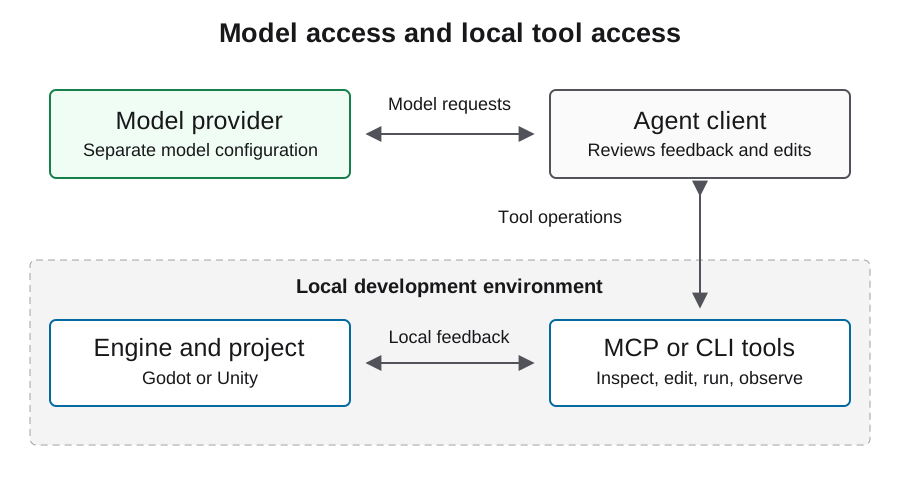
CoplayDev/unity-mcp MCP client को server और editor-side package से connect करता है। Model service अलग dependency है। Project scenes, scripts, assets और tests के साथ काम करने वाले tools document करता है, लेकिन listed capability यह evidence नहीं कि वह आपके project में काम करेगी।
Record करें कि connection का हर हिस्सा किस process के स्वामित्व में है। Client server तक पहुँच सके लेकिन editor पर काम न कर पाए तो diagnosis में यह महत्वपूर्ण है। Account credentials, editor licensing, package compatibility और model availability को अलग setup checks रखें। Model बदलने से editor-instance mismatch ठीक नहीं होगा।
Installation path और pinning policy review करें
Project installation guide Unity Package Manager से package जोड़ने और setup interface से server तथा client configure करने की प्रक्रिया बताती है। कुछ install करने से पहले चुने हुए revision के लिए उसकी बताई Unity, Python और uv prerequisites review करें।
Reproducibility के लिए setup के बाद resolved package revision, editor version, server version और dependency records सुरक्षित रखें। Moving branch URL discovery path है, immutable experiment identity नहीं। Existing game पर downloads और package changes लागू करने से पहले review करें और previous working project state रखें, ताकि connection experiment reversible रहे।
https://github.com/CoplayDev/unity-mcp.git?path=/MCPForUnity#mainLocal HTTP endpoint को client से मिलाएँ
Maintained installation guide नीचे दिया local HTTP example document करती है। यह मानता है कि server उस address पर पहले से चल रहा है। इसका उपयोग करने से पहले editor setup interface में actual configured transport और address confirm करें। MCP URL LLM API base URL नहीं है।
अपने client का documented configuration format उपयोग करें। कुछ clients अलग root keys या transport declarations लेते हैं, इसलिए यह generic mcpServers example हर agent में paste करने योग्य universal file नहीं है। Server को local रखें, जब तक अलग से reviewed remote setup आवश्यक न हो, और unrelated editor connection में model credentials न जोड़ें।
{
  "mcpServers": {
    "unityMCP": {
      "url": "http://localhost:8080/mcp"
    }
  }
}
सिद्ध करें कि काम किस editor instance को मिल रहा है
Intended project खोलें और package interface से connection state inspect करें। फिर client की discovered read operations से project और scene context लें। Edit approve करने से पहले उस information को local project से मिलाएँ। कई open projects हों तो यह gate खास तौर पर महत्वपूर्ण है।
Installed version से actual resources और tool schemas record करें। किसी दूसरे release में याद रहे नाम से tool call invent न करें। उपयोगी पहला result expected scene और उसके existing objects की पहचान बिना कोई बदलाव किए करता है। Returned state stale या ambiguous हो तो target पता करने के लिए visible mutation करने के बजाय रुकें और routing ठीक करें।
पहले miniflow में reversible edit रखें
Owned disposable scene चुनें, उसकी initial state record करें और visible consequence वाला एक simple change माँगें। Saved scene और file diff inspect करें, editor ready होने दें और scene exercise करें। Observed behavior तथा console errors सुरक्षित रखें।
फिर scene reopen करके confirm करें कि intended change persist हुआ है। इससे in-memory editor effect और saved project change अलग होते हैं। Flow इतना छोटा रखें कि failure को routing, mutation, compilation, execution या persistence की एक boundary पर diagnose किया जा सके। Review के बाद disposable scene restore करें और अगली task के लिए recorded working configuration उपयोग करें।
| Observation | यह क्या स्थापित करता है | क्या बाकी रहता है |
|---|---|---|
| Client tools discover करता है | Server reachable है | Correct editor targeting |
| Expected scene लौटता है | Read intended context को target करता है | Write और runtime behavior |
| Saved diff request से match करता है | Resource mutation persist हुई | Playable result |
| Scene requested behavior दिखाता है | Narrow runtime outcome | Full game और export acceptance |
Game से पहले transport troubleshoot करें
Client connect न कर सके तो configured URL और local server running है या नहीं, verify करें। Server start हो लेकिन editor absent हो तो package connection और editor logs inspect करें। Intended editor connected हो लेकिन कोई tool missing हो तो installed version के exposed tool groups देखें।
उस boundary के काम करने के बाद ही compilation या gameplay diagnose करें। Client startup, server routing, editor readiness और failed scene action के log excerpts अलग रखें। इससे report बता सकेगी कि execution कहाँ रुका, हर failure को model पर डालने या बिना evidence components बार-बार reinstall करने की आवश्यकता नहीं होगी।
Project को broad automation से सुरक्षित रखें
Editor connection scenes, scripts और assets बदल सकता है। Initial experiment को known directory तक सीमित रखें और resources delete करने, dependencies बदलने या unrelated scenes छूने वाले operations के लिए review आवश्यक रखें। First change से पहले recoverable working state सुरक्षित करें।
Client configuration issue ठीक करने के लिए local development service को public expose न करें। Third-party asset content और tool results को untrusted inputs मानें तथा credentials shared logs से बाहर रखें। Successful connection builds upload करने या store records बदलने की permission नहीं है। Publishing अलग workflow और अलग authorization boundary है।
Reproducible connection record handoff करें
Editor, project, package और server revisions, client version, transport, observed tool surface और completed miniflow record करें। Exact scene diff और runtime result साथ रखें। लिखें कि compilation, PlayMode behavior, tests और target export देखे गए हैं या अभी pending हैं।
यह configuration maintained project documentation follow करती है; इसे अपने installed package और client से verify करें। Game production के लिए Unity workflow guide पर जाएँ और complete loop test करें। Handoff में known limitations रखें, ताकि दूसरा developer connection issue और project problem अलग कर सके और वही working setup reproduce कर सके।
अक्सर पूछे जाने वाले प्रश्न
क्या localhost:8080/mcp model endpoint है?
नहीं। यह documented local MCP server example है। Model requests agent client की अलग provider configuration उपयोग करती हैं।
क्या connected indicator integration सिद्ध करता है?
यह initial observation है। Reversible write और runtime check से पहले project identity और controlled read verify करें।
क्या मैं वही JSON हर client में उपयोग कर सकता हूँ?
नहीं। Clients का schema और transport support अलग होता है। चुने हुए client की documented configuration follow करें।
क्या पहला test complete game build करना चाहिए?
एक reversible scene change से शुरुआत करें। बड़े task से पहले यह routing, persistence और runtime behavior का स्पष्ट evidence देता है।
Setup के बाद क्या record करना चाहिए?
Client, transport, editor और server versions, resolved package revision, project identity तथा read और reversible scene test के results record करें।