Astra API setup with official OpenAI authentication
Updated 2026-09-05
Use the documented gpt-6-astra model ID, an OpenAI Platform key and the official endpoint. Keep account access, request handling and agent verification explicit.
Start with the provider and billing account
Use gpt-6-astra through OpenAI's API with your own OpenAI Platform key. For an application, start with the Responses example below. For local coding work, use the Codex CLI login and model-selection commands. Both paths use your Platform account and incur API charges at the applicable OpenAI rates.
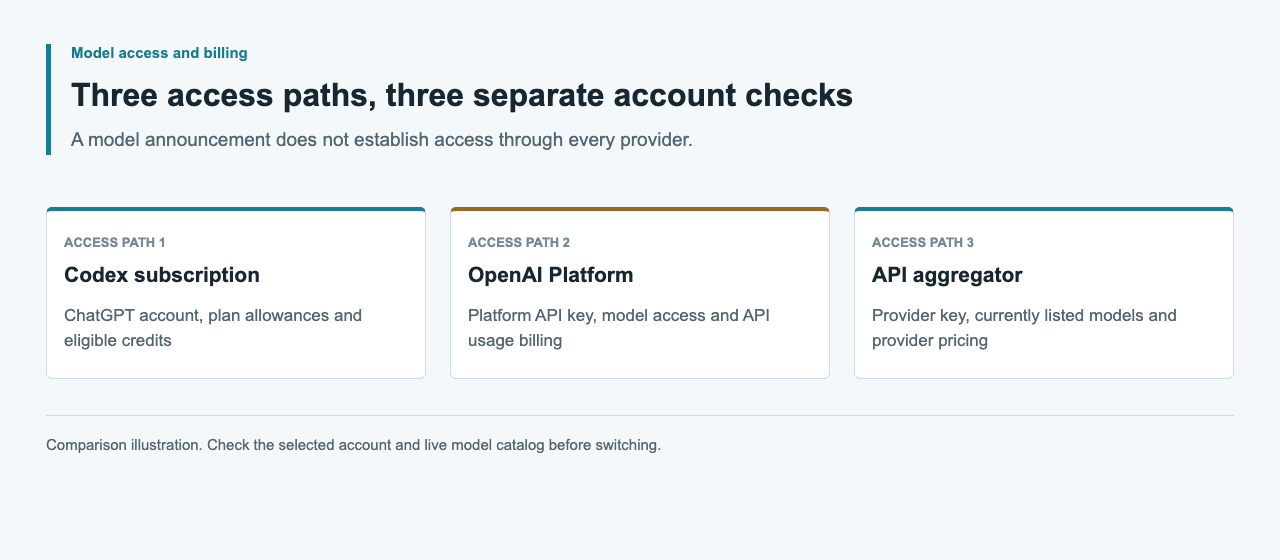
Before running a request, confirm who owns the Platform project, whether its key can access the model, and which billing controls apply. A model appearing in ChatGPT or Codex does not grant access to every API project. Keep subscription login and API-key login separate in your run notes. That distinction is essential when diagnosing a limit or reconciling charges later.
Prepare the key and client in a trusted environment
Create an API key in the OpenAI dashboard and supply it as OPENAI_API_KEY through your private environment or secret manager. The official SDK reads that variable. Never embed the key in browser JavaScript, a public repository, a screenshot or a shared terminal transcript. Avoid shell tracing while handling credentials.
For the JavaScript example below, install the official openai package in your project with npm install openai. Record the installed version in your lockfile. The explicit baseURL selects OpenAI rather than an inherited custom endpoint. Review existing agent configuration too: a provider override and a credential from another service do not become compatible merely because both accept an Authorization header.
| Setting | Official direct configuration | Check before running |
|---|---|---|
| Credential | OPENAI_API_KEY | Your OpenAI Platform project |
| Base URL | https://api.openai.com/v1 | No unintended provider override |
| Model | gpt-6-astra | Access for the selected key |
| Request API | Responses | Client supports the response shape |
Send a Responses request and read the answer
Create astra-example.mjs with the following code, then run node astra-example.mjs. The prompt asks for a short checklist so you can inspect the returned answer before connecting a larger workflow. Automatic SDK retries are disabled for this first request, making connection or account errors easier to diagnose.
When status is completed, response.output_text contains the SDK's combined text output. Print it to standard output so another program can consume it or redirect it to a file. Send response metadata to standard error to keep it separate from the answer. For incomplete responses, retain incomplete_details and usage and return a nonzero exit code.
import OpenAI from 'openai'

const client = new OpenAI({
  apiKey: process.env.OPENAI_API_KEY,
  baseURL: 'https://api.openai.com/v1',
  maxRetries: 0,
})
const response = await client.responses.create({
  model: 'gpt-6-astra',
  input: 'List three checks for a small code change.',
})
console.error(JSON.stringify({
  id: response.id,
  model: response.model,
  status: response.status,
  usage: response.usage,
  incomplete_details: response.incomplete_details,
}))
if (response.status === 'completed') {
  console.log(response.output_text)
} else {
  process.exitCode = 1
}
Select API-key authentication for local Codex
OpenAI documents API-key login for local Codex work. In the CLI, inspect codex login status before changing credentials. The documented stdin command below avoids pasting a secret into a command argument. After login, check the active authentication method again, then select the exact model with the CLI model flag.
The final command opens an interactive session with Astra selected. Start in your project directory so the agent can read the right files and repository instructions. Review existing provider overrides and confirm the active account. API-key mode supports local work; Codex cloud requires ChatGPT authentication. For a cloud task you want to continue locally, bring the working files and a short summary of remaining work into your local project first.
codex login status
printenv OPENAI_API_KEY | codex login --with-api-key
codex login status
codex --model gpt-6-astra
Match capabilities to the client path
Astra supports Responses and Chat Completions, but tool calling requires Responses. Use Responses for an agent that executes functions or custom tools. A client written to read chat choices cannot parse Responses output by changing only the URL, and a text-only smoke does not exercise a tool loop.
Add one capability at a time using a small example from your application. For tools, validate arguments, run the function in your application and return the result through Responses with the matching call_id. For structured output, validate the schema and handle incomplete responses. For streaming, process completion and cancellation events as well as text. Keep the simple text request available as a diagnostic path while adding these features.
Diagnose access, rate and completion failures separately
Use the HTTP status and structured error fields before retrying. OpenAI's error guide distinguishes invalid authentication, exhausted credits, enforced spend limits and request-rate pressure. In particular, a 429 response is not enough to choose a remedy: inspect error.code and the relevant account settings.
For temporary rate pressure, honor Retry-After when present and use bounded retries. Billing or spend-limit failures need an account decision, not repeated requests. A Responses result marked incomplete is a different condition again and can already have consumed tokens. Retain redacted error information and usage; do not turn a timeout or a missing receipt into a successful or free attempt.
| Observable signal | Meaning to investigate | Next action |
|---|---|---|
| HTTP 401 | Authentication or account configuration | Check the key and project |
| HTTP 429; credit_balance_exhausted | Prepaid credits exhausted | Review Platform billing |
| HTTP 429; project_spend_limit_exceeded | Enforced project spend limit | Review the approved budget |
| HTTP 429; slow_down | Request rate increased too quickly | Pace requests; honor Retry-After |
| status: incomplete | Generation did not finish | Inspect incomplete_details and usage |
Provider availability and evidence: September 5, 2026
OpenAI has announced GPT-6 Astra with a staged rollout, and its model reference documents the official API. The examples here follow those sources; no paid request or Codex authentication switch was run for this guide. The public APIsRouter catalog check on September 5, 2026 returned HTTP 200, success: true and 34 models, with no Astra or GPT-6 entry.
Use OpenAI credentials only with the official endpoint shown above. Check the live APIsRouter catalog for its own offerings. A later Astra listing would still need its exact model ID, price and required client features checked before using it in your application.
Connect the response to a useful local workflow
Choose one local task with a concrete result, such as explaining a function and proposing a test. Give the agent the relevant file path, expected behavior and test command. After a code change, inspect the diff and run the focused tests. Keep the original input and returned answer together so revisions are easy to compare.
In an application, pass completed text to your review screen or document pipeline. If the next step expects machine-readable data, use structured output and validate required fields before storing it. Keep request identity and usage alongside the task, and set a bounded retry policy. Expand the workflow after its basic input, response handling and completion checks work together.
FAQ
What model ID should I use for Astra?
Use gpt-6-astra, exactly as listed in the official OpenAI model reference. Your selected OpenAI API key must also have access to that model.
Which key does the example require?
Use your own OpenAI Platform key in OPENAI_API_KEY with https://api.openai.com/v1.
Can I use Astra in local Codex with an API key?
Yes, when your key has model access. Sign in with the CLI API-key command, check login status and select gpt-6-astra with --model.
Can I use Chat Completions for Astra tool calls?
No. Astra supports Chat Completions, but its tool calling requires Responses. Use a Responses-aware client and preserve the call_id when returning function results.
Is Astra available through APIsRouter?
Astra was absent from the September 5, 2026 catalog check. These examples use official OpenAI access; check the live catalog for APIsRouter offerings.