Official OpenAI authentication-সহ Astra API setup
Updated 2026-09-05
Documented gpt-6-astra model ID, OpenAI Platform key ও official endpoint ব্যবহার করুন। Account access, request handling ও agent verification explicit রাখুন।
Provider ও billing account দিয়ে শুরু করুন
নিজের OpenAI Platform key দিয়ে OpenAI API-তে gpt-6-astra ব্যবহার করুন। Application-এর জন্য নিচের Responses example দিয়ে শুরু করুন। Local coding work-এর জন্য Codex CLI login ও model-selection command ব্যবহার করুন। দুই path-ই Platform account ব্যবহার করে এবং প্রযোজ্য OpenAI rate-এ API charge হয়।
Request চালানোর আগে Platform project-এর owner, তার key model access করতে পারে কি না এবং কোন billing control প্রযোজ্য confirm করুন। ChatGPT বা Codex-এ model দেখা গেলেই প্রতিটি API project-এ access মেলে না। Run note-এ subscription login ও API-key login আলাদা রাখুন। Limit diagnose বা পরে charge reconcile করার সময় এই distinction জরুরি।
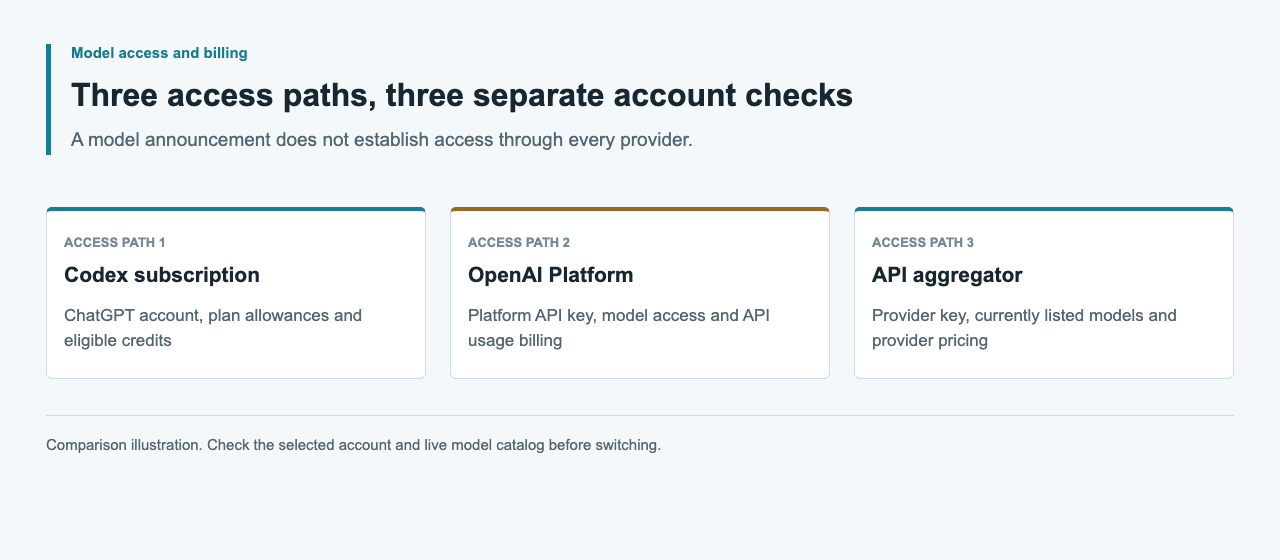
Trusted environment-এ key ও client প্রস্তুত করুন
OpenAI dashboard-এ API key তৈরি করুন এবং private environment বা secret manager-এর মাধ্যমে OPENAI_API_KEY হিসেবে supply করুন। Official SDK এই variable পড়ে। Browser JavaScript, public repository, screenshot বা shared terminal transcript-এ key কখনও embed করবেন না। Credential handle করার সময় shell tracing এড়ান।
নিচের JavaScript example-এর জন্য project-এ npm install openai দিয়ে official openai package install করুন। Installed version lockfile-এ record করুন। Explicit baseURL inherited custom endpoint নয়, OpenAI select করে। Existing agent configuration-ও review করুন: দুটো Authorization header গ্রহণ করলেই provider override ও অন্য service-এর credential compatible হয়ে যায় না।
| Setting | Official direct configuration | চালানোর আগে check |
|---|---|---|
| Credential | OPENAI_API_KEY | Your OpenAI Platform project |
| Base URL | https://api.openai.com/v1 | কোনো unintended provider override নেই |
| Model | gpt-6-astra | Selected key-এর access |
| Request API | Responses | Client response shape support করে |
Responses request পাঠিয়ে answer পড়ুন
নিচের code দিয়ে astra-example.mjs তৈরি করুন, তারপর node astra-example.mjs চালান। বড় workflow connect করার আগে returned answer inspect করতে prompt একটি short checklist চায়। এই প্রথম request-এ automatic SDK retry disabled, তাই connection বা account error diagnose করা সহজ।
status completed হলে response.output_text SDK-এর combined text output ধারণ করে। Standard output-এ print করুন, যাতে অন্য program consume করতে পারে বা file-এ redirect করা যায়। Answer থেকে আলাদা রাখতে response metadata standard error-এ পাঠান। Incomplete response হলে incomplete_details ও usage রেখে nonzero exit code ফেরত দিন।
import OpenAI from 'openai'

const client = new OpenAI({
  apiKey: process.env.OPENAI_API_KEY,
  baseURL: 'https://api.openai.com/v1',
  maxRetries: 0,
})
const response = await client.responses.create({
  model: 'gpt-6-astra',
  input: 'List three checks for a small code change.',
})
console.error(JSON.stringify({
  id: response.id,
  model: response.model,
  status: response.status,
  usage: response.usage,
  incomplete_details: response.incomplete_details,
}))
if (response.status === 'completed') {
  console.log(response.output_text)
} else {
  process.exitCode = 1
}
Local Codex-এর জন্য API-key authentication select করুন
OpenAI local Codex work-এর জন্য API-key login document করে। CLI-তে credential বদলানোর আগে codex login status inspect করুন। নিচের documented stdin command secret-কে command argument-এ paste করা এড়ায়। Login-এর পরে active authentication method আবার check করুন, তারপর CLI model flag দিয়ে exact model select করুন।
শেষ command-টি Astra selected-সহ interactive session খোলে। Project directory থেকে শুরু করুন, যাতে agent সঠিক file ও repository instruction পড়তে পারে। Existing provider override review করে active account confirm করুন। API-key mode local work support করে; Codex cloud-এর জন্য ChatGPT authentication লাগে। Cloud task locally চালিয়ে যেতে চাইলে আগে working file ও remaining work-এর short summary local project-এ আনুন।
codex login status
printenv OPENAI_API_KEY | codex login --with-api-key
codex login status
codex --model gpt-6-astra
Client path-এর সঙ্গে capability মিলিয়ে নিন
Astra Responses ও Chat Completions support করে, কিন্তু tool calling-এর জন্য Responses দরকার। Function বা custom tool execute করা agent-এর জন্য Responses ব্যবহার করুন। Chat choice পড়ার জন্য লেখা client শুধু URL বদলে Responses output parse করতে পারে না, আর text-only smoke tool loop exercise করে না।
Application-এর ছোট example দিয়ে একবারে একটি capability যোগ করুন। Tool-এর ক্ষেত্রে argument validate করুন, application-এ function চালান এবং matching call_id-সহ Responses-এর মাধ্যমে result ফেরত দিন। Structured output-এ schema validate করুন এবং incomplete response handle করুন। Streaming-এ text-এর পাশাপাশি completion ও cancellation event process করুন। Feature যোগ করার সময় simple text request diagnostic path হিসেবে available রাখুন।
Access, rate ও completion failure আলাদা diagnose করুন
Retry করার আগে HTTP status ও structured error field ব্যবহার করুন। OpenAI error guide invalid authentication, exhausted credit, enforced spend limit ও request-rate pressure আলাদা করে। বিশেষ করে 429 response একা remedy বেছে নেওয়ার জন্য যথেষ্ট নয়: error.code ও relevant account setting inspect করুন।
Temporary rate pressure হলে Retry-After থাকলে মানুন এবং bounded retry ব্যবহার করুন। Billing বা spend-limit failure account decision চায়, repeated request নয়। Incomplete mark করা Responses result আলাদা condition এবং ইতিমধ্যেই token consume করে থাকতে পারে। Redacted error information ও usage রাখুন; timeout বা missing receipt-কে successful বা free attempt বানাবেন না।
| Observable signal | যে meaning investigate করবেন | পরের action |
|---|---|---|
| HTTP 401 | Authentication বা account configuration | Key ও project check করুন |
| HTTP 429; credit_balance_exhausted | Prepaid credit শেষ | Platform billing review করুন |
| HTTP 429; project_spend_limit_exceeded | Project spend limit enforced | Approved budget review করুন |
| HTTP 429; slow_down | Request rate খুব দ্রুত বেড়েছে | Request pace কমান; Retry-After মানুন |
| status: incomplete | Generation শেষ হয়নি | incomplete_details ও usage inspect করুন |
Provider availability ও evidence: September 5, 2026
OpenAI GPT-6 Astra announce করেছে staged rollout-সহ এবং model reference official API document করে। এখানকার example সেই source অনুসরণ করে; এই guide-এর জন্য paid request বা Codex authentication switch run করা হয়নি। September 5, 2026-এ public APIsRouter catalog check HTTP 200, success: true ও 34 model ফেরত দিয়েছে, Astra বা GPT-6 entry ছাড়া।
উপরে দেখানো official endpoint-এ কেবল OpenAI credential ব্যবহার করুন। নিজের offering-এর জন্য live APIsRouter catalog check করুন। পরে Astra listing এলেও application-এ ব্যবহার করার আগে exact model ID, price ও required client feature check করতে হবে।
Response-কে একটি useful local workflow-এ যুক্ত করুন
Concrete result-সহ একটি local task বেছে নিন, যেমন function explain করা ও test propose করা। Relevant file path, expected behavior ও test command agent-কে দিন। Code change-এর পরে diff inspect করে focused test run করুন। Original input ও returned answer একসঙ্গে রাখুন, যাতে revision সহজে compare করা যায়।
Application-এ completed text review screen বা document pipeline-এ পাঠান। পরের step machine-readable data আশা করলে structured output ব্যবহার করুন এবং store করার আগে required field validate করুন। Task-এর পাশে request identity ও usage রাখুন এবং bounded retry policy set করুন। Basic input, response handling ও completion check একসঙ্গে কাজ করার পর workflow expand করুন।
সাধারণ প্রশ্ন
Astra-এর জন্য কোন model ID ব্যবহার করব?
Official OpenAI model reference-এ যেমন listed, ঠিক তেমন gpt-6-astra ব্যবহার করুন। Selected OpenAI API key-এরও সেই model-এ access থাকতে হবে।
Example-এ কোন key দরকার?
https://api.openai.com/v1 endpoint-এ নিজের OpenAI Platform key OPENAI_API_KEY-এ ব্যবহার করুন।
API key দিয়ে local Codex-এ Astra ব্যবহার করতে পারি?
Key-এর model access থাকলে পারেন। CLI API-key command দিয়ে sign in করুন, login status check করুন এবং --model দিয়ে gpt-6-astra select করুন।
Astra tool call-এর জন্য Chat Completions ব্যবহার করতে পারি?
না। Astra Chat Completions support করলেও tool calling-এর জন্য Responses দরকার। Responses-aware client ব্যবহার করুন এবং function result ফেরত দেওয়ার সময় call_id রাখুন।
APIsRouter-এর মাধ্যমে Astra available?
September 5, 2026 catalog check-এ Astra ছিল না। এই example official OpenAI access ব্যবহার করে; APIsRouter offering-এর জন্য live catalog check করুন।