Codex Astra usage limits اور paid continuation
Updated 2026-09-05
پہلے identify کریں کہ task روکنے والا account اور allowance کون سا ہے۔ پھر اپنی billing، access اور feature boundaries والے documented continuation path کا انتخاب کریں۔
Limit message account signal ہے، model verdict نہیں
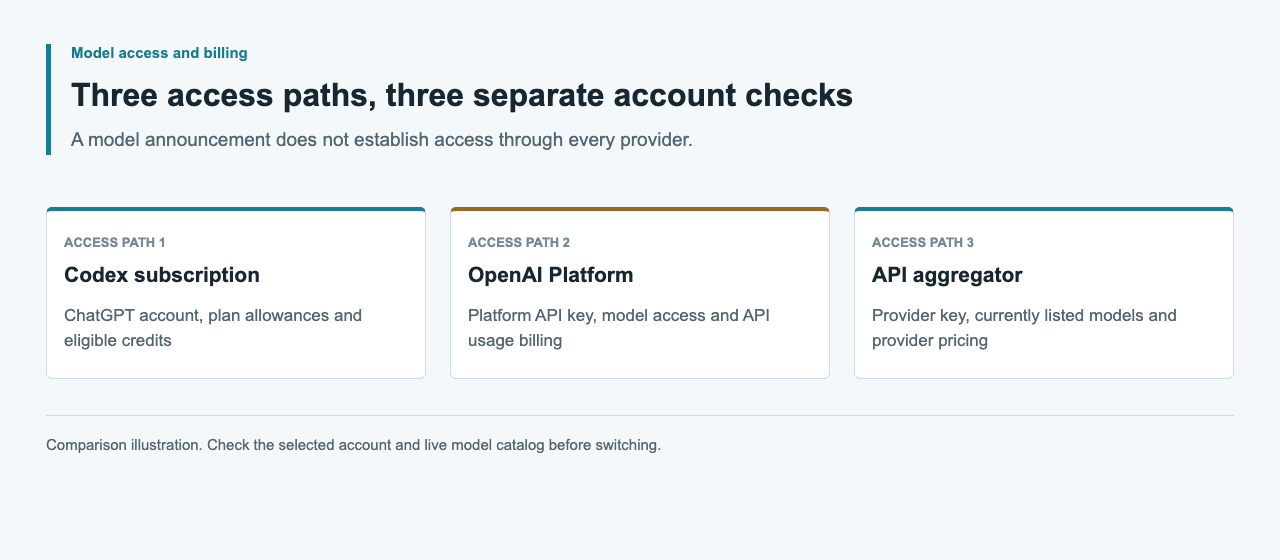
Codex allowance تک پہنچنے کا مطلب یہ نہیں کہ Astra غائب ہو گئی ہے یا کسی دوسرے API account میں بھی اتنی ہی capacity باقی ہے۔ پہلے دیکھیں کہ موجودہ session ChatGPT login یا API key استعمال کر رہی ہے۔ OpenAI local work کے لیے ان دونوں کو الگ authentication اور billing paths کے طور پر document کرتا ہے۔
Official pricing guide کہتی ہے کہ ChatGPT Work اور Codex usage share کرتے ہیں۔ وہ included allowances کو additional credits اور API-key usage سے بھی الگ کرتی ہے۔ ایک ہی task کو run ہونے کی جگہ اور authentication کے مطابق مختلف controls مل سکتے ہیں۔ پہلے متاثرہ allowance identify کریں، پھر wait، eligible credits یا API-key billing کے ساتھ local continuation میں سے انتخاب کریں۔
Dashboard اور active CLI session پڑھیں
Current limits اور reset times کے لیے official Codex usage dashboard استعمال کریں۔ Interactive Codex CLI session میں /status remaining limits دکھاتا ہے۔ الگ سے codex login status active authentication method بتاتا ہے۔ Numbers سمجھنے سے پہلے منتخب account یا workspace record کریں، خاص طور پر جب ایک سے زیادہ organizations استعمال ہوں۔
Pricing page میں دی گئی message ranges estimates ہیں، Astra turns کی fixed promise نہیں۔ Local messages اور cloud chats plan allowance share کرتے ہیں اور weekly limits بھی لاگو ہو سکتی ہیں۔ Dashboard observation صرف اسی account اور وقت سے متعلق ہے۔ کسی دوسرے plan کا screenshot یا published estimate اپنی task کے لیے countdown نہ بنائیں۔
codex login status/statusملتے جلتے prompts مختلف allowances کیوں استعمال کرتے ہیں
OpenAI model choice، task complexity، context، reasoning، tools، retrieval اور caching کو usage factors بتاتا ہے۔ مختصر instruction بھی بڑی repository inspection یا لمبا tool loop شروع کر سکتی ہے، جبکہ لمبا مگر self-contained سوال کم work مانگ سکتا ہے۔ اس لیے prompt length اکیلی قابل اعتماد پیش گو نہیں ہے۔
اپنا pattern سمجھنے کے لیے usage observations کے ساتھ task outcomes بھی رکھیں: کون سا source material شامل تھا، کون سا model منتخب ہوا، اور کیا repeated revision چاہیے تھی۔ Similar accepted tasks کا موازنہ کریں، صرف message count کا نہیں۔ غیر متعلق context کم یا مناسب چھوٹا model آزما کر result اور usage کو اصل task سے compare کریں۔ Completion criteria ایک جیسے رکھیں تاکہ مختصر مگر نامکمل answer improvement نہ لگے۔
Documented continuation choices کا موازنہ کریں
Official pricing guide ایک سے زیادہ راستے دیتی ہے۔ Plus اور Pro users included limits پر پہنچنے کے بعد additional credits خرید سکتے ہیں۔ اہل Business، Enterprise اور Edu workspaces اپنی pricing arrangement کے تحت additional workspace credits استعمال کر سکتے ہیں۔ Users API key کے ساتھ API rates پر extra local work بھی چلا سکتے ہیں۔
انتخاب task کی required surface، features اور billing owner کے مطابق کریں۔ Displayed reset کا انتظار موجودہ account path برقرار رکھتا ہے۔ Capacity باقی ہو اور کام اس کے لیے موزوں ہو تو model بدلنا مدد دے سکتا ہے۔ API-key work الگ meter ہوتی ہے؛ یہ API limits bypass یا subscription کو unlimited بنانے کا طریقہ نہیں ہے۔
| Choice | Accounting path | پہلے چیک کریں |
|---|---|---|
| Reset کا انتظار | Current plan allowance | Dashboard reset time اور active window |
| موزوں چھوٹا model استعمال کریں | Current plan allowance | Remaining capacity اور task requirements |
| Additional personal credits | Eligible ChatGPT plan credits | اپنے account پر دکھائی گئی offer اور terms |
| Additional workspace credits | Eligible workspace pricing | Administrator policy اور agreement |
| Extra local API-key work | OpenAI Platform API usage | Model access، rates اور feature support |
سوچی سمجھی auth تبدیلی کے ساتھ local work جاری رکھیں
Login mode بدلنے سے پہلے task کی working files، accepted decisions اور باقی checks محفوظ کریں۔ OpenAI desktop app، CLI اور IDE extension میں local API-key authentication support کرتا ہے؛ Codex cloud کے لیے ChatGPT login چاہیے۔ Cloud سے local work کی طرف آنے والے task کے لیے local checkout، dependencies اور required integrations پہلے تیار کریں۔
CLI میں اپنا OPENAI_API_KEY نیچے والے command کے ذریعے stdin سے دیں، پھر login status confirm کریں۔ Work بھیجنے سے پہلے custom provider settings دیکھیں اور اپنی key کے لیے دستیاب model منتخب کریں۔ CLI اور extension credentials share کر سکتے ہیں، اس لیے دونوں ساتھ استعمال ہوں تو دونوں چیک کریں۔ اس mode میں model work آپ کے OpenAI Platform account پر API rates کے مطابق bill ہوگی۔
printenv OPENAI_API_KEY | codex login --with-api-key
codex login status
Subscription exhaustion اور API errors میں فرق کریں
API-key request credentials، model access، rate pressure، prepaid credit exhaustion یا enforced spend limits کی وجہ سے پھر بھی fail ہو سکتی ہے۔ یہ Platform controls ہیں، Codex subscription کا reset clock نہیں۔ Structured API errors اور متعلقہ project settings دیکھیں، ہر limit کے لیے ایک ہی remedy فرض نہ کریں۔
OpenAI error guide credit_balance_exhausted، project_spend_limit_exceeded اور organization_spend_limit_exceeded کو request-rate errors سے الگ کرتی ہے۔ Billing یا spend-limit error کو retry کرنے سے access واپس نہیں آتا۔ Rate pressure میں Retry-After ہو تو اس پر عمل کریں اور requests کو pace کریں۔ Logs redacted رکھیں اور error code محفوظ کریں؛ application کا human-facing phrase اصل فرق چھپا سکتا ہے۔
| Limit surface | Authoritative check | Decision |
|---|---|---|
| ChatGPT-authenticated Codex | Usage dashboard; CLI /status | Reset، eligible credits یا task adjustment |
| API request rate | API error اور rate-limit headers | رفتار کم کریں اور bounded retry کریں |
| API prepaid balance | credit_balance_exhausted; Platform billing | مزید requests سے پہلے funding دیکھیں |
| API spend limit | Structured spend-limit code؛ account settings | Budget decision حاصل کریں |
Provider availability اور evidence: 5 ستمبر 2026
اس guide کے continuation paths official Codex pricing اور authentication documentation سے لیے گئے ہیں۔ Article کے لیے کوئی live account transition نہیں کیا گیا۔ 5 ستمبر 2026 کی APIsRouter public pricing check نے HTTP 200، success: true اور 34 models واپس کیے، مگر Astra یا GPT-6 entry نہیں تھی۔
APIsRouter balance ChatGPT allowances کو replenish نہیں کرتا، اور یہ catalog observation Astra continuation route ثابت نہیں کرتی۔ Current offerings کے لیے live catalog استعمال کریں۔ دوسرے provider کے لیے model identity، supported protocol اور billing terms الگ چیک کریں؛ subscription credits اور Codex workspace features endpoint بدلنے کے ساتھ منتقل نہیں ہوتے۔
Budget اور واضح completion test کے ساتھ resume کریں
Account path منتخب ہونے کے بعد اگلا concrete milestone دوبارہ لکھیں: reviewed code change، validated document یا کوئی اور observable output۔ Duplicate task شروع کرنے سے پہلے دیکھیں کہ unfinished work ابھی چل تو نہیں رہی۔ پچھلے artifacts محفوظ رکھیں تاکہ نیا attempt خاموشی سے مہنگا work دوبارہ نہ کرے۔
نئے authentication mode، model اور usage evidence کو پچھلی subscription activity سے الگ record کریں۔ API work کے لیے approved task budget اور bounded retry policy رکھیں، پھر completion کے بعد recorded usage reconcile کریں۔ Official guide fair use کے تحت limit پہنچنے کے بعد active turn جاری رہنے کی اجازت دیتی ہے؛ یہ ہر task کے مکمل ہونے یا اگلے turn کی capacity کی guarantee نہیں۔
عمومی سوالات
کیا Codex limit کا مطلب Astra دستیاب نہیں رہی؟
کوئی universal fixed count نہیں۔ Official pricing page model، task complexity اور execution context سے متاثر estimates دیتی ہے۔ Current limits اور resets کے لیے usage dashboard اور CLI /status دیکھیں۔
میں Codex کا reset time کہاں دیکھوں؟
Official Codex usage dashboard دیکھیں؛ active CLI session میں /status بھی remaining limits اور reset information دکھا سکتی ہے۔
کیا additional credits API limits ختم کر دیتی ہیں؟
نہیں۔ Eligible ChatGPT یا workspace credits subscription-side continuation ہیں۔ API-key work اپنی model access، rates اور Platform controls کے تحت الگ bill ہوتی ہے۔
کیا API-key login ہر Codex feature محفوظ رکھتا ہے؟
نہیں۔ Local API-key work documented ہے، مگر ChatGPT workspace access یا cloud services پر depend کرنے والی features limited یا unavailable ہو سکتی ہیں۔ Codex cloud کو ChatGPT authentication درکار ہے۔
کیا API key کے ساتھ local Codex مفت ہے؟
نہیں۔ یہ ChatGPT allowances replenish نہیں کرتی۔ Astra بھی 5 ستمبر 2026 کی APIsRouter catalog check میں absent تھی؛ current offerings کے لیے live catalog دیکھیں۔