Shopify के लिए AI product translation
Updated 2026-09-05
Shopify की documented translation interfaces को समझें, source digests बचाएँ और store में write करने से पहले human review रखें।
पहले merchant tool या API path चुनें
जब editor translations को सीधे manage कर सकता हो, तब Shopify के merchant tools का उपयोग करें। जब repeatable external review queue चाहिए और कोई developer application maintain कर सकता हो, तब GraphQL Admin API चुनें। API path में अलग model client text का draft बनाता है, जबकि stored translations Shopify संभालता है।
Development store और एक product से शुरू करें। उसके translatable fields पढ़ें, candidate तैयार करें, review लें और उसके बाद ही intended changes submit करें। Model settings, store credentials और publication permissions अलग रखें, ताकि हर चरण independently inspect और correct किया जा सके।
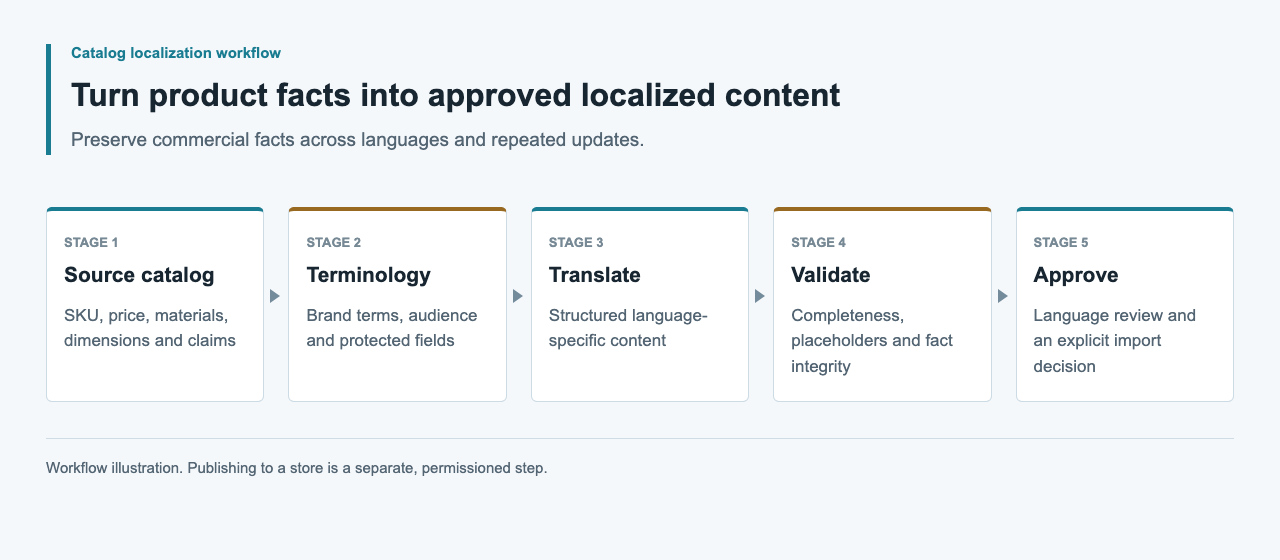
Merchant control और custom connector का trade-off समझें
Shopify की Translate & Adapt documentation manual editing और automatic translation दोनों बताती है और publication से पहले review की बात करती है। जब merchant बिना application बनाए सीधे editorial control चाहता हो, यह पर्याप्त हो सकता है। Custom integration तभी उचित है जब external review queue जैसी specific requirement connector को own करने का कारण दे।
Review queue और field mapping की maintenance कौन करेगा, इसके आधार पर चुनाव करें। Third-party app हो तो installation से पहले उसकी documented configuration, permissions और export behavior inspect करें। Merchant-facing editor और external model drafting वाली application अलग operational needs हल करती हैं।
| पथ | किसके लिए | पहला check |
|---|---|---|
| Translate & Adapt editor | merchant द्वारा managed editing | Review और publication controls |
| GraphQL Admin API पथ | दोहराई जा सकने वाली external queue | Scopes और resource support |
| custom application का path | model की सहायता से drafting | Connector maintenance और read-back |
Scopes और API version पहले verify करें
translatableResource reference को read_translations चाहिए और translationsRegister को write_translations चाहिए। Testing के समय development store, app installation, API version और granted scopes record करें। LLM gateway credential Shopify Admin API request को authenticate नहीं करता और Shopify token को model endpoint पर नहीं भेजना चाहिए।
जहाँ application design अनुमति दे, discovery के लिए read access से शुरू करें। बाद के authorized workflow के लिए केवल आवश्यक permissions जोड़ें। Reference जाँचने के बाद supported API version pin करें; unrecorded latest alias पर deploy न करें। Tokens server-side रखें और review exports तथा request logs से बाहर रखें।
हर translatable field का digest सुरक्षित रखें
Documented query resource identifier और key, value, digest तथा locale वाली translatable entries लौटाती है। इन field-specific digests को source snapshot के साथ रखें। इससे proposed translation उस content से जुड़ी रहती है जो वास्तव में पढ़ा गया था, spreadsheet से कॉपी किए गए product title से नहीं।
नीचे की query official schema से adapted read-only example है। Development environment में authorized product GID दें। Returned keys inspect करें और explicit field allowlist उपयोग करें; source locale को browser language से infer करने के बजाय returned value लें।
query TranslationSource($resourceId: ID!) {
  translatableResource(resourceId: $resourceId) {
    resourceId
    translatableContent {
      key
      value
      digest
      locale
    }
  }
}
Candidate record को source revision से बाँधें
Internal candidate record में resource ID, field key, source digest, target locale, glossary revision और draft value रखें। Model को केवल text और आवश्यक product context भेजें। SKU, price, currency, inventory और variant identity को generated patch से बाहर रखें।
Bilingual reviewer को candidate देने से पहले required text, placeholders और approved terminology validate करें। Product reviewer original source के विरुद्ध claims और warnings जाँचे। Browser extension से storefront translate होना यह record नहीं बनाता और Shopify ने translation store की है यह सिद्ध नहीं करता; वह केवल inspection aid है।
translationsRegister result और userErrors पढ़ें
translationsRegister mutation translatableContentDigest सहित translated fields स्वीकार करती है। उसके documented result में userErrors शामिल हैं। Connector को इस result को inspect करना चाहिए; केवल HTTP response को successful registration का प्रमाण न मानें।
Authorized write से पहले current source को reviewed snapshot से compare करें। बदल गया हो तो candidate hold करें और नया review लें। Intended field changes और recovery के लिए previous translations की explicit list रखें। Development store में पहले एक field से शुरू करें और patch बढ़ाने से पहले उसे read back करें।
Stored translation और storefront को अलग जाँचें
Shopify के documented workflow में stored translation और storefront availability अलग checkpoints हैं। Merchant के साथ locale configuration और theme checks plan करें। Translated value save हो जाना language publish करने या market settings बदलने की automatic permission नहीं है।
Development store में target product, locale selector, fallback content, links और variant labels inspect करें। Stored translation read back करके approved value से compare करें। Field absent हो तो दूसरी translation generate करने से पहले resource support या theme rendering जाँचें। Observations record करें और development store को live merchant success की तरह न प्रस्तुत करें।
Shopify evidence की सीमा स्पष्ट रखें
Official references Shopify translation interfaces स्थापित करती हैं। यहाँ APIsRouter-connected application test नहीं की गई है और reviewed sources Shopify या Translate & Adapt में arbitrary gateway baseURL setting स्थापित नहीं करते। जब तक development-store result न मिले, custom-application path को connector research ही मानें।
Complete test के लिए application version, scoped authentication record, source query, candidate, approval, registration result और read-back comparison रखें। Source-change conflict और rejected request भी शामिल करें। Model identity और usage को store operations से अलग record करें, ताकि compatibility claim की सीमा स्पष्ट रहे।
अक्सर पूछे जाने वाले प्रश्न
क्या Shopify में APIsRouter base URL paste कर सकता हूँ?
Reviewed official sources ने कोई general Shopify setting स्थापित नहीं की। Gateway-backed workflow के लिए separate model client और verified store integration चाहिए।
कौन-से Shopify scopes relevant हैं?
Referenced read query को read_translations और registration mutation को write_translations चाहिए। Installation से पहले pinned API version और complete application requirements जाँचें।
Source digest क्यों रखना चाहिए?
Shopify हर translatable source field के लिए digest देता है और translation input में उसे अपेक्षित करता है। इसे reviewed source के साथ रखें, ताकि connector बिना source context का candidate submit न करे।
क्या translation API product prices update करेगी?
Proposed flow केवल explicitly selected translatable text fields की अनुमति देता है। Prices, currency, inventory और SKU changes अलग authorized product operations हैं।
Source product बदलने पर क्या करें?
Current translatable fields फिर प्राप्त करें और reviewed snapshot से compare करें। Affected candidates hold करें और registration से पहले approval renew करें।
क्या browser में translated page import का proof है?
नहीं। Stored translation और intended storefront locale inspect करें। Browser-rendered translation editor की view बदल सकती है, merchant content save नहीं करती।