Shopify AI product translation workflow research
Updated 2026-09-05
Use Translate & Adapt for merchant-managed editing, or build a reviewed translation pipeline around Shopify's resource IDs and source digests. This guide maps both paths.
Choose the translation path you need
Use Shopify's merchant tools when an editor can manage translations directly. Use the GraphQL Admin API when you need a repeatable external review queue and a developer can maintain the application. In the API path, a separate model client drafts text while Shopify handles the stored translations.
Begin with a development store and one product. Read its translatable fields, prepare a candidate, obtain review and only then submit the intended changes. Keep model settings, store credentials and publication permissions separate so each step can be inspected and corrected independently.
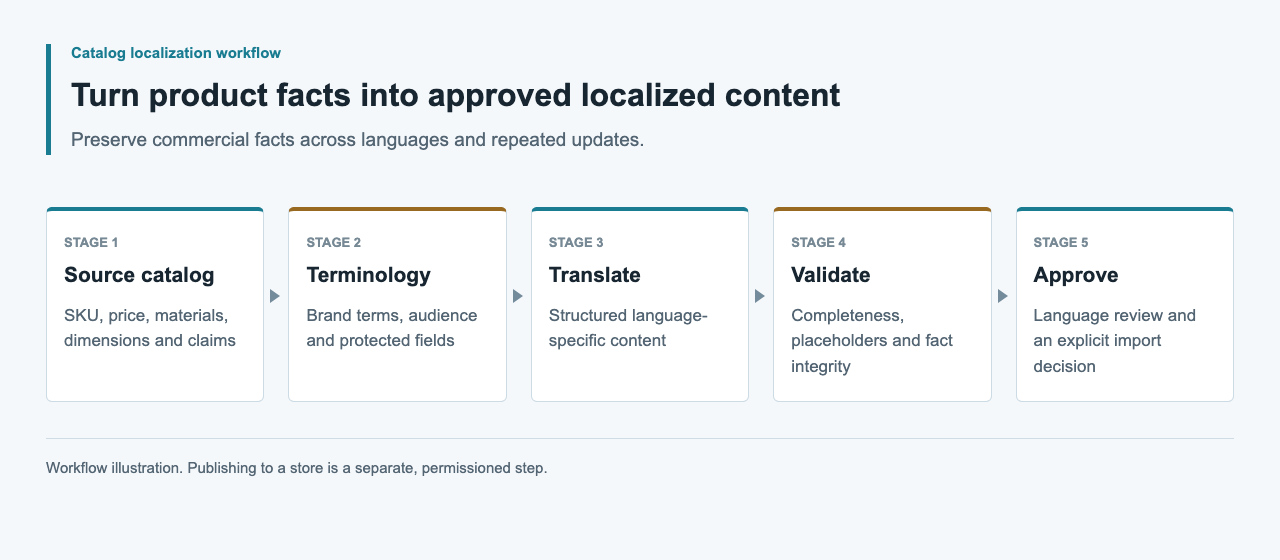
Choose a merchant workflow or an application
Shopify's Translate & Adapt documentation describes manual editing and automatic translation, with review before publication. That may be enough when the merchant wants direct editorial control without building an application. A custom integration makes sense only when a specific requirement, such as an external review queue, justifies owning the connector.
Choose according to who will maintain the review queue and field mapping. For a third-party app, inspect its documented configuration, permissions and export behavior before installation. A merchant-facing editor and an application with external model drafting solve different operational needs.
| Path | Who owns the workflow? | Best fit |
|---|---|---|
| Translate & Adapt | Merchant and Shopify tooling | Direct editorial management |
| Reviewed external draft plus editor | Merchant copies approved fields | Small externally reviewed batches |
| Custom translation application | Developer owns auth, mapping and review | Revision-aware repeatable delivery |
Plan authentication and version boundaries
The translatableResource reference requires read_translations; translationsRegister requires write_translations. Use a development store and record the app installation, API version and granted scopes when testing. An LLM gateway credential does not authenticate a Shopify Admin API request, and a Shopify token must not be sent to the model endpoint.
Start with read access for discovery where the application design permits it. Add only the permissions needed for the later authorized workflow. Pin a supported API version after checking its reference rather than deploying against an unrecorded latest alias. Keep tokens server-side and exclude them from review exports and request logs.
Read translatable fields with their digests
The documented query returns a resource identifier and translatable entries with key, value, digest and locale. Retain those field-specific digests with the source snapshot. They connect a proposed translation to the content that was actually read, rather than to a product title copied from a spreadsheet.
The query below is adapted from the official schema as a read-only example. Supply an authorized product GID in a development environment. Inspect returned keys and use an explicit field allowlist; use the returned source locale rather than inferring it from the browser language.
query TranslationSource($resourceId: ID!) {
  translatableResource(resourceId: $resourceId) {
    resourceId
    translatableContent {
      key
      value
      digest
      locale
    }
  }
}
Generate a translation candidate outside Shopify
Build an internal candidate record containing the resource ID, field key, source digest, target locale, glossary revision and draft value. Send only the text and necessary product context to the model. Keep SKU, price, currency, inventory and variant identity out of the generated patch.
Validate required text, placeholders and approved terminology before a bilingual reviewer sees the candidate. Have a product reviewer check claims and warnings against the original source. A browser extension translating the storefront does not create this record or establish that Shopify has stored a translation; it is only an inspection aid.
Register only approved, current translations
The translationsRegister mutation accepts translated fields with translatableContentDigest. Its documented result includes userErrors. A connector must inspect that result rather than treating an HTTP response alone as proof of successful registration.
Before an authorized write, compare the current source with the reviewed snapshot. If it changed, hold the candidate and obtain a new review. Keep an explicit list of intended field changes and previous translations for recovery. Start with one field in the development store and read it back before expanding the patch.
Verify the storefront separately
Stored translation and storefront availability are separate checkpoints in Shopify's documented workflow. Plan the locale configuration and theme checks with the merchant. Saving a translated value should not automatically authorize publishing a language or changing market settings.
In the development store, inspect the target product, locale selector, fallback content, links and variant labels. Read the stored translation back and compare it with the approved value. If a field is absent, investigate resource support or theme rendering before generating another translation. Preserve the observations without presenting a development store as a live merchant success.
Evidence and connector limits
The official references establish the Shopify translation interfaces. An APIsRouter-connected application has not been tested here, and the reviewed sources do not establish an arbitrary gateway baseURL setting in Shopify or Translate & Adapt. Treat the custom-application path as connector research until it has a development-store result.
For a complete test, retain the application version, scoped authentication record, source query, candidate, approval, registration result and read-back comparison. Include a source-change conflict and a rejected request. Record model identity and usage separately from store operations so the resulting compatibility claim has a clear scope.
FAQ
Can I paste an APIsRouter base URL into Shopify?
No such general Shopify setting was established by the official sources reviewed here. A gateway-backed workflow requires a separate model client and a verified store integration.
Which Shopify scopes are relevant?
The referenced read query requires read_translations and the registration mutation requires write_translations. Check the pinned API version and the complete application requirements before installation.
Why retain the source digest?
Shopify includes a digest for each translatable source field and expects it in the translation input. Keep it with the reviewed source so the connector does not submit a candidate without its source context.
Will the translation API update product prices?
This proposed flow permits only explicitly selected translatable text fields. Prices, currency, inventory and SKU changes belong to separate authorized product operations.
What should happen when the source product changes?
Retrieve the current translatable fields and compare them with the reviewed snapshot. Hold affected candidates and renew approval before registration.
Is a translated page in my browser proof of an import?
No. Inspect the stored translation and the intended storefront locale. Browser-rendered translation can change what an editor sees without saving merchant content.